> ## Documentation Index
> Fetch the complete documentation index at: https://ai-development-environment.mintlify.site/llms.txt
> Use this file to discover all available pages before exploring further.
# Import and export
> Move app and repository configuration with an interactive review of contents, conflicts, dependencies, and clone destinations.
 Apps and repositories use one import/export flow. A portable JSON package carries selected configuration and references to Git repositories. Import reviews that package against the destination control plane before it saves settings or queues clones. A package can be up to 100 MiB.
## Open the transfer review
| Starting point | Actions |
| - | - |
| **Apps** at `/apps` | **Import** an app package, including when no repositories exist yet. |
| An app at `/apps/[appId]` | **Import** or **Export** from its header. |
| **Repository details** at `/codebases/repositories/{id}` | **Import** settings into this repository or **Export** its saved configuration. Save pending edits first. |
| Native iOS app | **Import App** from Apps, **Import App** / **Export App** from app details, or **Import Repository Settings** / **Export Repository Settings** from **Edit Repository**. |
## Choose what to export
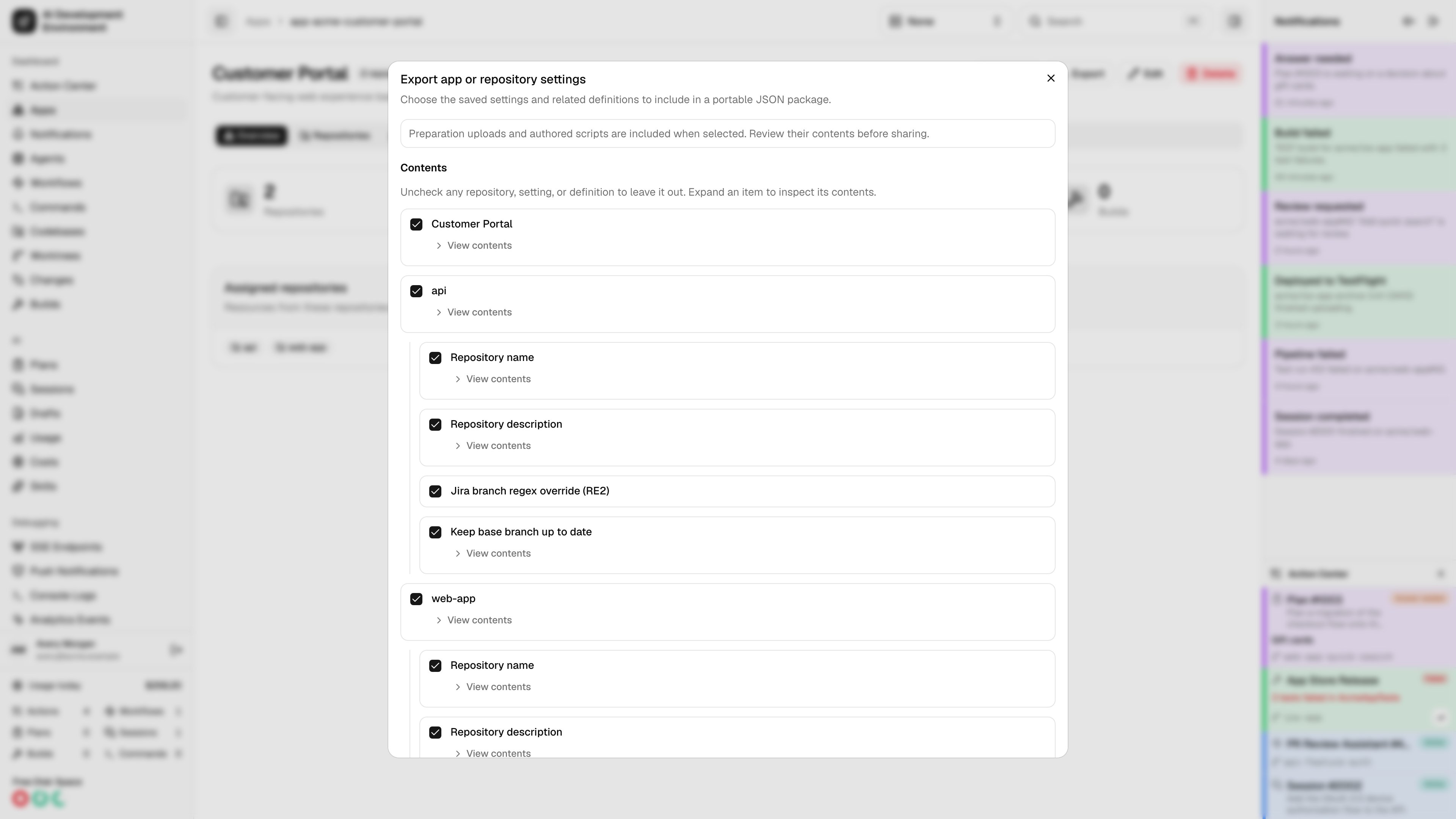
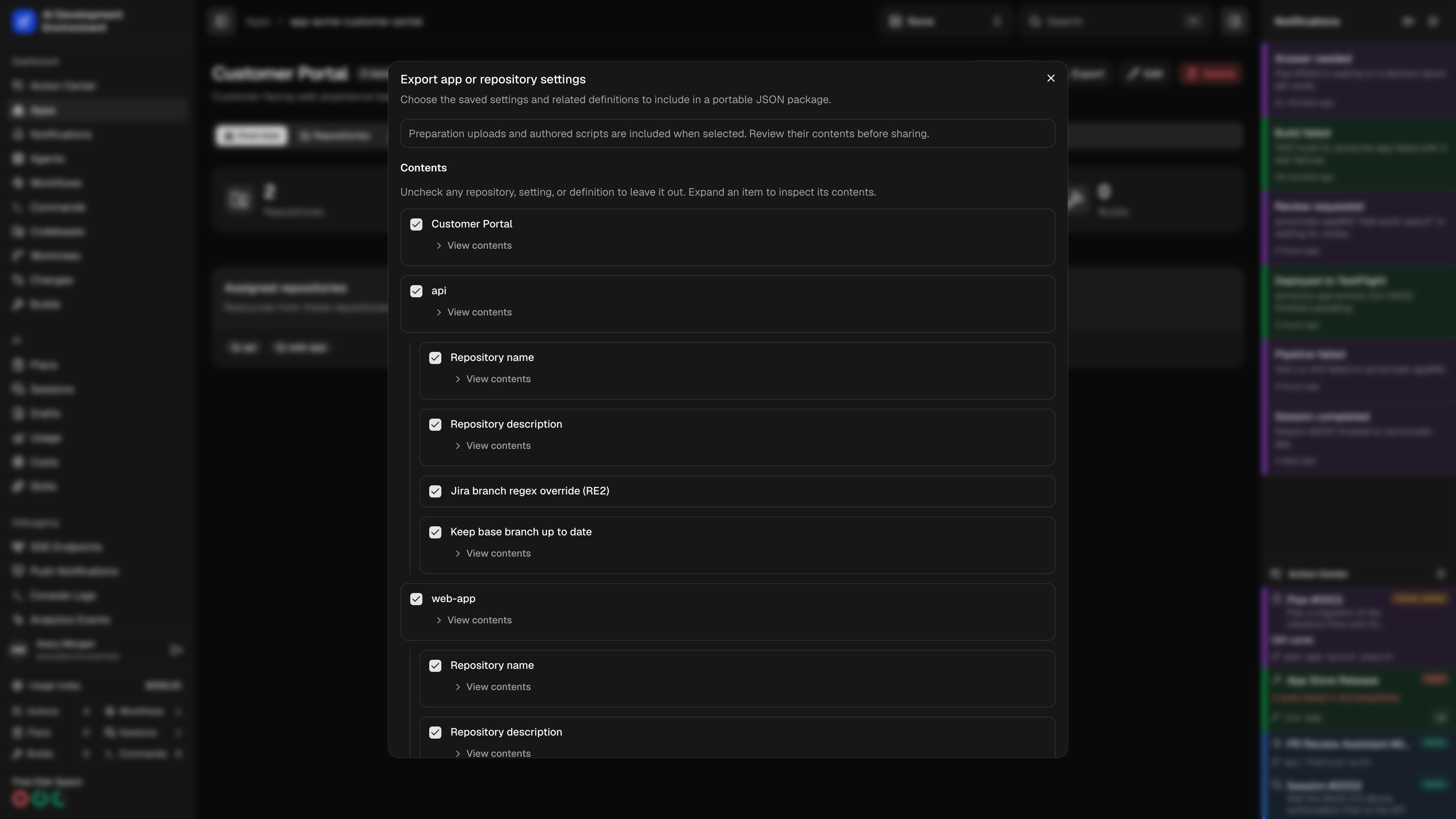
Click **Export**, then review **Contents**. Expand **View contents** to inspect an item. Uncheck an item to exclude it and its children, or exclude an individual repository setting. Click **Download JSON** when the selection is ready.
The package can include:
| Content | Selection and portability |
| - | - |
| App | Name, description, and repository assignments. |
| Repository details | Name, description, Jira branch regex, and **Keep base branch up to date**, selected individually. |
| Preparations | Individual write, delete, and assume-unchanged rules; selected write rules include uploaded bytes. |
| iOS App configuration | Saved source paths, schemes, build configurations, actions, advanced settings, and export settings. Agent observations and past build artifacts are not transferred. |
| Build scripts | Selected reusable scripts and their repository assignments. |
| Skill groups | Repository assignments, mapped to groups on the destination control plane. |
| Auto Retry | Repository rules and their targets; imported rules are paused. |
| Commands | Unarchived definitions whose target repositories include an exported repository. |
| Workflows | Unarchived workflows assigned to an exported repository, their selected published snapshots, and optional dependencies. |
An app export can include a command or workflow shared with another repository. Additional required resources appear as **Dependency** items. Include them deliberately, map the reference to a local resource during import, or exclude the item that needs them.
Preparation uploads and authored commands, build scripts, and workflow text can contain sensitive values. Review their contents before sharing a package. Export does not make arbitrary file contents or script text safe to publish. Credential values, signing identities, run histories, and agent home directories are not transferable settings.
## Import and resolve conflicts
Apps and repositories use one import/export flow. A portable JSON package carries selected configuration and references to Git repositories. Import reviews that package against the destination control plane before it saves settings or queues clones. A package can be up to 100 MiB.
## Open the transfer review
| Starting point | Actions |
| - | - |
| **Apps** at `/apps` | **Import** an app package, including when no repositories exist yet. |
| An app at `/apps/[appId]` | **Import** or **Export** from its header. |
| **Repository details** at `/codebases/repositories/{id}` | **Import** settings into this repository or **Export** its saved configuration. Save pending edits first. |
| Native iOS app | **Import App** from Apps, **Import App** / **Export App** from app details, or **Import Repository Settings** / **Export Repository Settings** from **Edit Repository**. |
## Choose what to export
Click **Export**, then review **Contents**. Expand **View contents** to inspect an item. Uncheck an item to exclude it and its children, or exclude an individual repository setting. Click **Download JSON** when the selection is ready.
The package can include:
| Content | Selection and portability |
| - | - |
| App | Name, description, and repository assignments. |
| Repository details | Name, description, Jira branch regex, and **Keep base branch up to date**, selected individually. |
| Preparations | Individual write, delete, and assume-unchanged rules; selected write rules include uploaded bytes. |
| iOS App configuration | Saved source paths, schemes, build configurations, actions, advanced settings, and export settings. Agent observations and past build artifacts are not transferred. |
| Build scripts | Selected reusable scripts and their repository assignments. |
| Skill groups | Repository assignments, mapped to groups on the destination control plane. |
| Auto Retry | Repository rules and their targets; imported rules are paused. |
| Commands | Unarchived definitions whose target repositories include an exported repository. |
| Workflows | Unarchived workflows assigned to an exported repository, their selected published snapshots, and optional dependencies. |
An app export can include a command or workflow shared with another repository. Additional required resources appear as **Dependency** items. Include them deliberately, map the reference to a local resource during import, or exclude the item that needs them.
Preparation uploads and authored commands, build scripts, and workflow text can contain sensitive values. Review their contents before sharing a package. Export does not make arbitrary file contents or script text safe to publish. Credential values, signing identities, run histories, and agent home directories are not transferable settings.
## Import and resolve conflicts
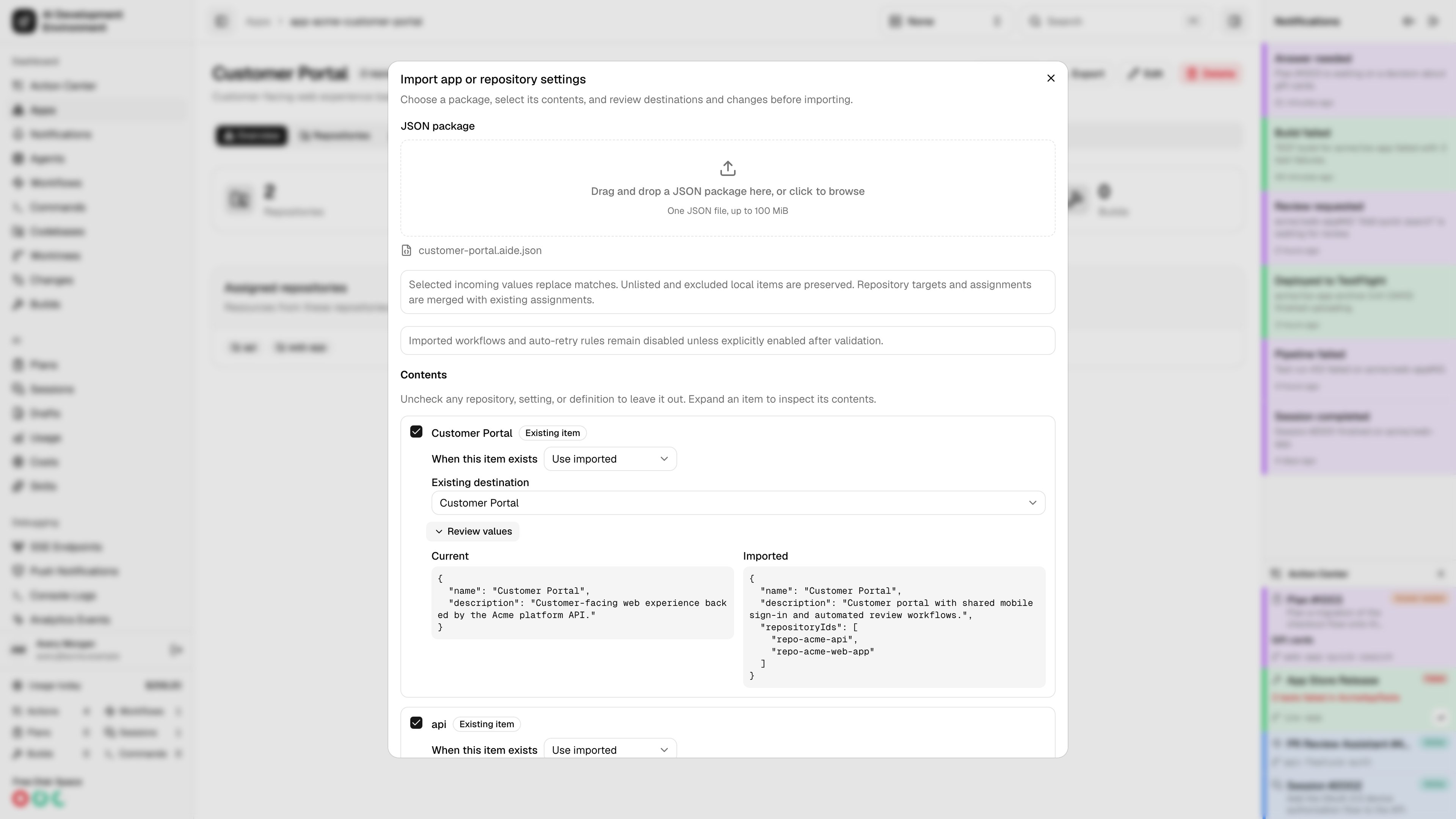
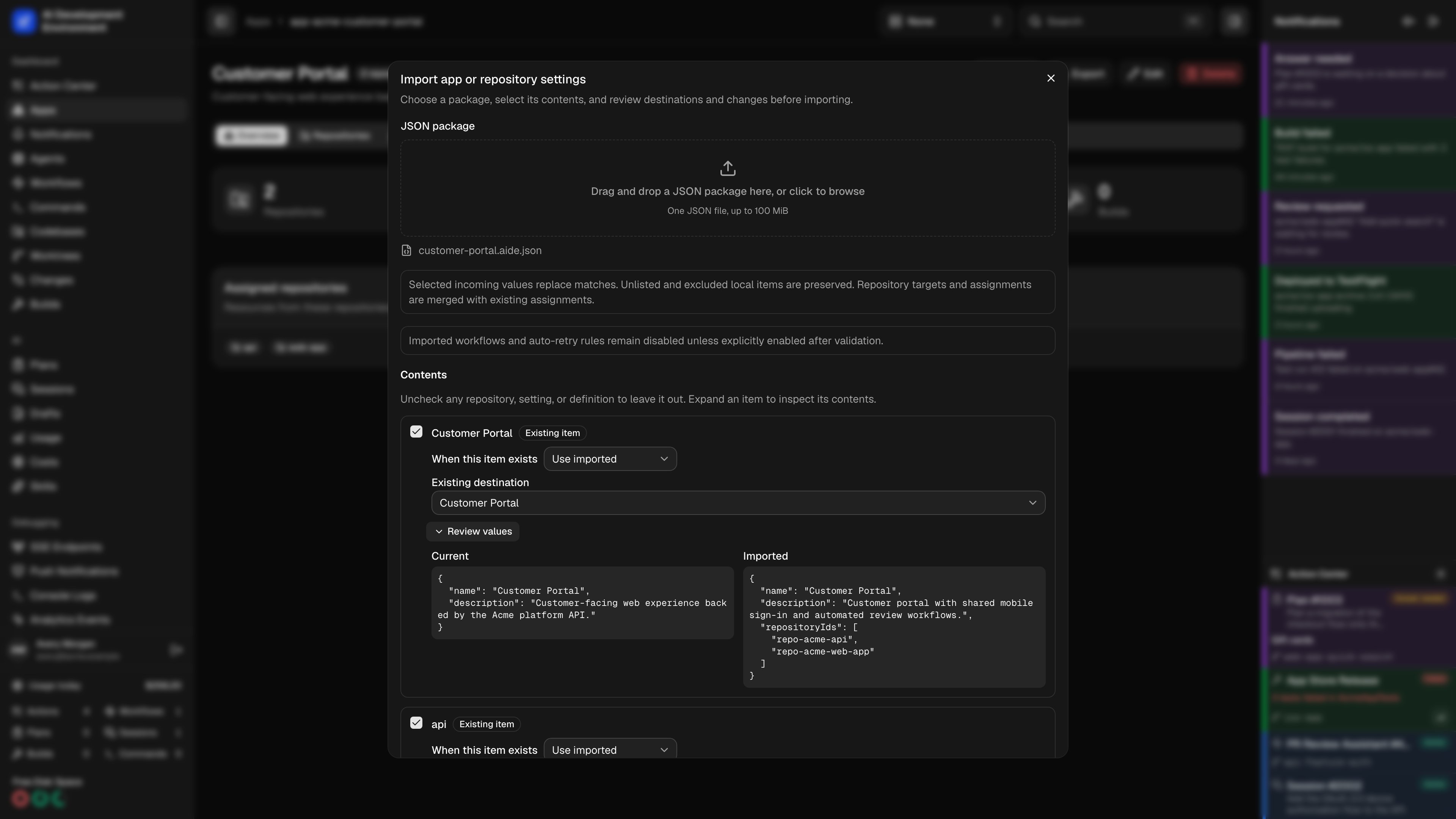 Click **Import**, then drag a JSON package into the upload area or click it to choose a file. The initial preview lists its contents and any unresolved references.
Uncheck anything you want to exclude. Open **Review values** to compare **Current** and **Imported** values. **Also affects** identifies other repositories that use a shared definition.
Choose **Use imported** to replace selected values or **Keep existing** to preserve the matching local item. Where supported, **Create a copy** creates a separately named app, command, workflow, build script, or build configuration. Resolve ambiguous matches before continuing.
Under **Dependencies**, choose local resources for references that cannot be carried across installations. Include a dependency from **Contents** when appropriate. A missing reference blocks the affected import until you map it or exclude the dependent item.
Select **Import to this agent** for each destination agent, including agents that already have the repositories. Existing checkouts show **Already present** and their registered paths. For missing checkouts, review **Folder relative to base directory** and **Clone URL**. Importing an app requires an agent selection. Importing a template into an existing repository makes additional checkouts optional.
Click **Review import** after changing selections, resolutions, mappings, or destinations. Resolve the listed blockers, then click **Import selected**. If local configuration changed since the preview, review again before applying it.
Click **Import**, then drag a JSON package into the upload area or click it to choose a file. The initial preview lists its contents and any unresolved references.
Uncheck anything you want to exclude. Open **Review values** to compare **Current** and **Imported** values. **Also affects** identifies other repositories that use a shared definition.
Choose **Use imported** to replace selected values or **Keep existing** to preserve the matching local item. Where supported, **Create a copy** creates a separately named app, command, workflow, build script, or build configuration. Resolve ambiguous matches before continuing.
Under **Dependencies**, choose local resources for references that cannot be carried across installations. Include a dependency from **Contents** when appropriate. A missing reference blocks the affected import until you map it or exclude the dependent item.
Select **Import to this agent** for each destination agent, including agents that already have the repositories. Existing checkouts show **Already present** and their registered paths. For missing checkouts, review **Folder relative to base directory** and **Clone URL**. Importing an app requires an agent selection. Importing a template into an existing repository makes additional checkouts optional.
Click **Review import** after changing selections, resolutions, mappings, or destinations. Resolve the listed blockers, then click **Import selected**. If local configuration changed since the preview, review again before applying it.
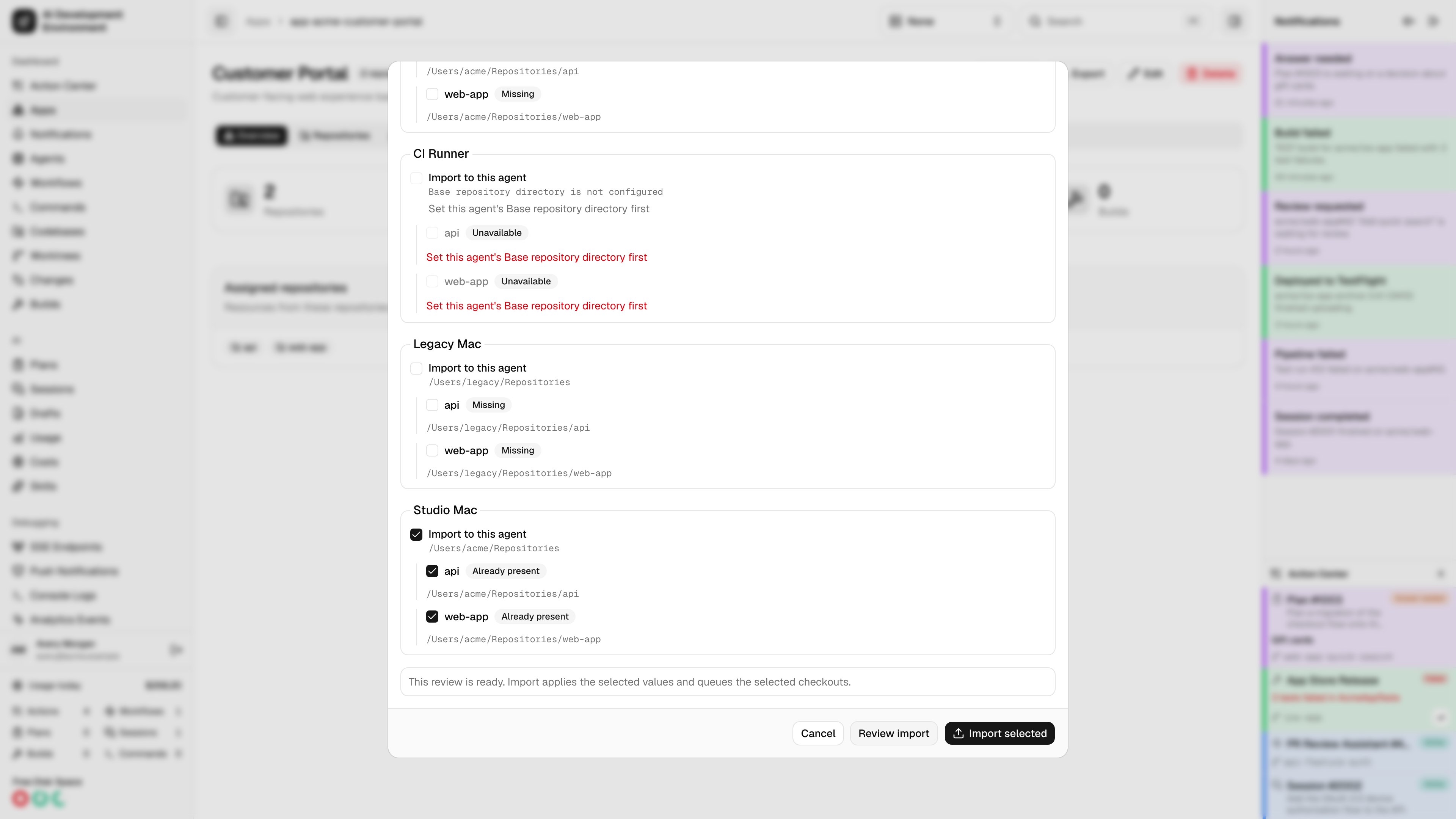
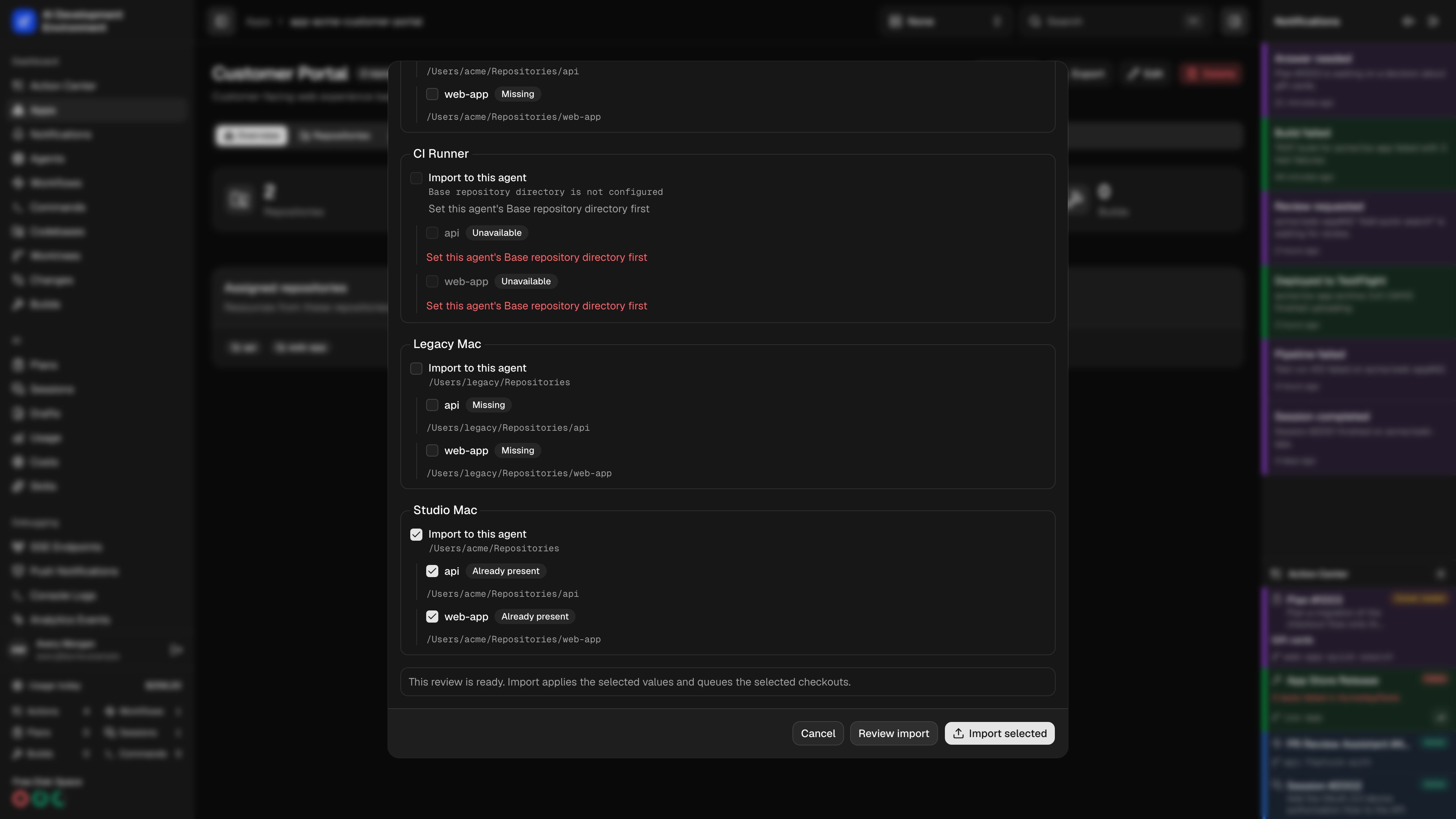 An agent with all the repositories already checked out can still receive the import. Its existing checkouts remain at their registered paths, including paths outside its **Base repository directory**. Only selected missing checkouts need a clone destination.
Unlisted or excluded local items are preserved. Selecting an incoming item updates its selected values; it does not remove other local preparations or unrelated configuration. Commands and workflows keep their existing run history.
Imported workflows remain disabled by default. **Enable this workflow after import** is an explicit choice and requires a selected published version that passes validation. Review executable content and local mappings before enabling automation. Imported Auto Retry rules remain paused until you enable them through their normal controls.
## Apply a repository template
When you import from repository details, the current repository is the destination. Its origin and existing checkouts are preserved even when the template came from a different repository.
If the package includes several repositories, select **Repository to use as the template**. Review settings and definitions as usual, then choose any **Optional additional checkouts**. Excluding a repository setting preserves the destination's current value.
## Clone requirements and progress
Cloning requires an online agent that advertises the current clone capabilities and has **Base repository directory** configured. Git authentication comes from that agent's SSH or Git setup. The package cannot supply embedded HTTP credentials.
Selected destinations are inspected before import. An unrelated existing folder, conflicting repository, or symbolic link blocks a clone. The clone operation checks again before writing, stages a new checkout under the destination parent, and reuses a matching existing checkout without replacing its files.
Settings are saved in one database transaction before the independent clone jobs run. If one clone fails, the imported configuration and successful checkouts remain saved. **Transfer progress** shows per-destination results; **Retry failed checkouts** retries those failures without importing settings again. If the destination base directory changes, start a new reviewed import or Sync instead of redirecting the old retry.
Open the app's [Sync view](/apps/app-detail#sync-repositories-to-other-agents) to add missing checkouts later. Sync uses the same clone validation and progress reporting.
## Use the native iOS app
Choose **Choose JSON Export** to open a file from Files. **Included Settings** provides item toggles and **View Settings** shows the existing and incoming values. Resolve conflicts with **Import Incoming**, **Keep Existing**, or **Create Copy**. Use **Destination Item** to resolve an ambiguous match, then review **Dependency Mappings** and **Import to Agents**. Existing checkouts show their registered paths. Each selected missing **Checkout Destination** lets you edit the relative folder and clone URL.
After changing the selection, tap **Review**, then **Import**. For exports, tap **Export**, then **Save or Share Export**. Unsaved repository details or preparations disable the repository transfer buttons until you save or discard those edits.
App details also has a **Sync** tab with **Clone Selected Repositories**. The **Transfer Progress** sheet includes **View Clone Job** and **Retry Failed Checkouts**. **View Latest Transfer** and **View Latest Sync** reopen the most recent saved operation for that server and resource.
## API clients
Use `repositoryTransferExportPreview` and `exportRepositoryTransfer` for export. For import, send the same choices to `previewRepositoryTransfer` and `applyRepositoryTransfer`, including the preview's `fingerprint` and a unique `requestId`. The server rejects stale previews and reuse of a request identifier with different selections.
Read `repositoryTransferOperation(id:)` or subscribe to `repositoryTransferChanged(operationId:)` for progress. `retryRepositoryTransfer` retries clone failures. `appRepositorySync` and `syncAppRepositories` provide the app Sync view. These operations require control-plane authentication; enrolled agent tokens cannot invoke them.
The package identifies itself with `format: "aide.repository-transfer"` and `version: 1`. Existing workflow-only and command-only JSON imports remain available on their own pages.
## Related pages
Clone an app's missing repositories through Sync.
Manage the shared settings included in a repository package.
Understand uploaded file contents, path rules, and preparation limits.
Authenticate API requests and browse the generated transfer types.
An agent with all the repositories already checked out can still receive the import. Its existing checkouts remain at their registered paths, including paths outside its **Base repository directory**. Only selected missing checkouts need a clone destination.
Unlisted or excluded local items are preserved. Selecting an incoming item updates its selected values; it does not remove other local preparations or unrelated configuration. Commands and workflows keep their existing run history.
Imported workflows remain disabled by default. **Enable this workflow after import** is an explicit choice and requires a selected published version that passes validation. Review executable content and local mappings before enabling automation. Imported Auto Retry rules remain paused until you enable them through their normal controls.
## Apply a repository template
When you import from repository details, the current repository is the destination. Its origin and existing checkouts are preserved even when the template came from a different repository.
If the package includes several repositories, select **Repository to use as the template**. Review settings and definitions as usual, then choose any **Optional additional checkouts**. Excluding a repository setting preserves the destination's current value.
## Clone requirements and progress
Cloning requires an online agent that advertises the current clone capabilities and has **Base repository directory** configured. Git authentication comes from that agent's SSH or Git setup. The package cannot supply embedded HTTP credentials.
Selected destinations are inspected before import. An unrelated existing folder, conflicting repository, or symbolic link blocks a clone. The clone operation checks again before writing, stages a new checkout under the destination parent, and reuses a matching existing checkout without replacing its files.
Settings are saved in one database transaction before the independent clone jobs run. If one clone fails, the imported configuration and successful checkouts remain saved. **Transfer progress** shows per-destination results; **Retry failed checkouts** retries those failures without importing settings again. If the destination base directory changes, start a new reviewed import or Sync instead of redirecting the old retry.
Open the app's [Sync view](/apps/app-detail#sync-repositories-to-other-agents) to add missing checkouts later. Sync uses the same clone validation and progress reporting.
## Use the native iOS app
Choose **Choose JSON Export** to open a file from Files. **Included Settings** provides item toggles and **View Settings** shows the existing and incoming values. Resolve conflicts with **Import Incoming**, **Keep Existing**, or **Create Copy**. Use **Destination Item** to resolve an ambiguous match, then review **Dependency Mappings** and **Import to Agents**. Existing checkouts show their registered paths. Each selected missing **Checkout Destination** lets you edit the relative folder and clone URL.
After changing the selection, tap **Review**, then **Import**. For exports, tap **Export**, then **Save or Share Export**. Unsaved repository details or preparations disable the repository transfer buttons until you save or discard those edits.
App details also has a **Sync** tab with **Clone Selected Repositories**. The **Transfer Progress** sheet includes **View Clone Job** and **Retry Failed Checkouts**. **View Latest Transfer** and **View Latest Sync** reopen the most recent saved operation for that server and resource.
## API clients
Use `repositoryTransferExportPreview` and `exportRepositoryTransfer` for export. For import, send the same choices to `previewRepositoryTransfer` and `applyRepositoryTransfer`, including the preview's `fingerprint` and a unique `requestId`. The server rejects stale previews and reuse of a request identifier with different selections.
Read `repositoryTransferOperation(id:)` or subscribe to `repositoryTransferChanged(operationId:)` for progress. `retryRepositoryTransfer` retries clone failures. `appRepositorySync` and `syncAppRepositories` provide the app Sync view. These operations require control-plane authentication; enrolled agent tokens cannot invoke them.
The package identifies itself with `format: "aide.repository-transfer"` and `version: 1`. Existing workflow-only and command-only JSON imports remain available on their own pages.
## Related pages
Clone an app's missing repositories through Sync.
Manage the shared settings included in a repository package.
Understand uploaded file contents, path rules, and preparation limits.
Authenticate API requests and browse the generated transfer types.