> ## Documentation Index
> Fetch the complete documentation index at: https://ai-development-environment.mintlify.site/llms.txt
> Use this file to discover all available pages before exploring further.
# Codebases
> Track Git repositories and checkouts across every enrolled agent.
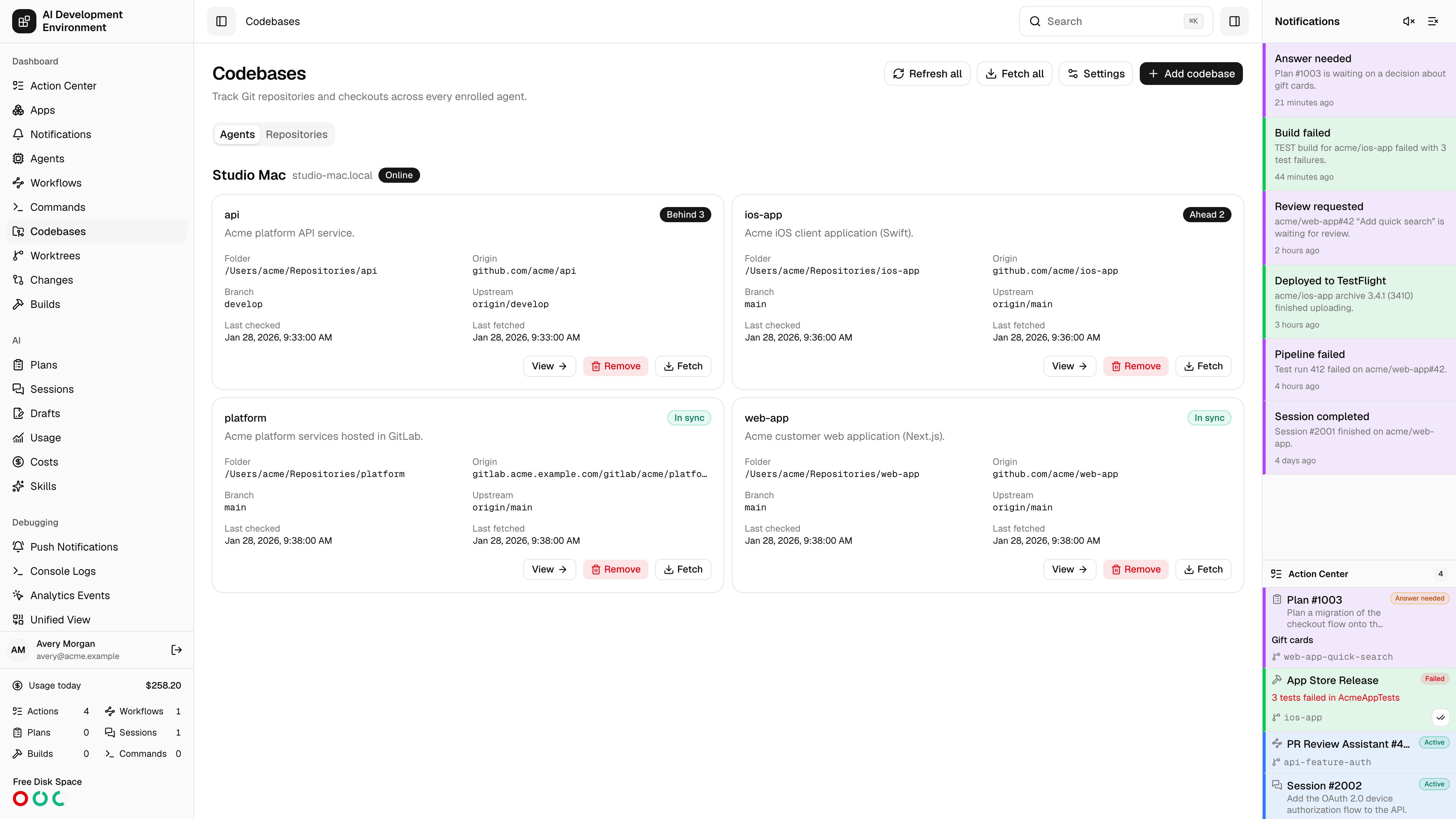
 The **Codebases** page at `/codebases` is the inventory of every Git repository registered on every enrolled machine, with live sync and availability status for each one.
## Codebases and repositories
Two concepts sit behind this page, and the distinction matters:
One checkout on one agent — a folder on a specific Mac. Branches and stashes are managed here.
The logical repository behind every checkout that shares an origin. Skill groups, build configurations, and Auto Retry live here and apply everywhere.
**Group codebases by** switches the view between **Agents** — what each machine is hosting — and **Repositories** — where each repository is checked out.
## Status
Each codebase carries two independent statuses.
### Sync state
| State | Meaning |
| ----------- | --------------------------------------- |
| In sync | Local branch matches its upstream |
| Ahead | Local commits not yet pushed |
| Behind | Upstream commits not yet pulled |
| Diverged | Both sides have commits the other lacks |
| No upstream | The branch tracks nothing |
| Detached | HEAD is not on a branch |
| Unknown | Not yet determined |
### Availability
| State | Meaning |
| -------------------- | ------------------------------------------------------- |
| Available | The folder is present and is the expected repository |
| Folder missing | The registered path no longer exists on the agent |
| Not a Git repository | The folder exists but has no Git metadata |
| Origin changed | The remote origin no longer matches what was registered |
| Unavailable | The agent reported an error inspecting it |
Rows also show the folder, origin, current branch, upstream, ahead and behind counts, last checked, and last fetched.
## Adding a codebase
Only connected agents can be browsed. Offline agents cannot report what is on disk.
Start from the agent's home folder and navigate. **Show hidden folders** reveals dotfiles. Long directories are capped at the first 1,000 entries.
**Add this folder** inspects the repository and reports its origin and current branch, including a detached HEAD. If the origin already has a registered checkout, the page tells you the shared repository name it will join.
Set the **Repository name** and an optional description, then **Confirm codebase**.
## Bulk actions
* **Refresh all** re-inspects registered folders and reports Git status without contacting remotes.
* **Fetch all** runs `git fetch origin` for eligible codebases.
Both skip codebases whose agent is offline, unsupported, or whose folder is unavailable, and report how many were skipped.
## Settings
Cadence defaults that apply to every updated agent:
| Setting | Notes |
| ----------------------------- | ------------------------------------------------------------------------------------------------------------------ |
| **Agent refresh interval** | How long each agent waits after a scan completes before scanning again. Git remotes are not contacted. |
| **Automatic fetch interval** | How often each agent fetches origin. |
| **Default Jira branch regex** | Extracts a ticket key from a branch name. The first capture group is used when present, otherwise the whole match. |
A single agent can override the refresh and fetch intervals on its own [detail page](/agents/agent-detail), and a repository can override the Jira branch regex on its [repository page](/codebases/repository-detail).
## Removing a codebase
**Remove** deletes the registration only. The folder and all of its files stay untouched on the agent — the control plane simply stops tracking it.
## Notes
* Read-only codebase data is also available over REST at `/api/codebases` and through MCP at `/api/mcp`.
* A codebase with a Git operation, Git-blocking command, or Git-blocking workflow terminal step in flight shows a specific in-progress message and blocks conflicting actions until it finishes.
## Related pages
Branches and stashes for one checkout.
Linked worktrees created from these repositories.
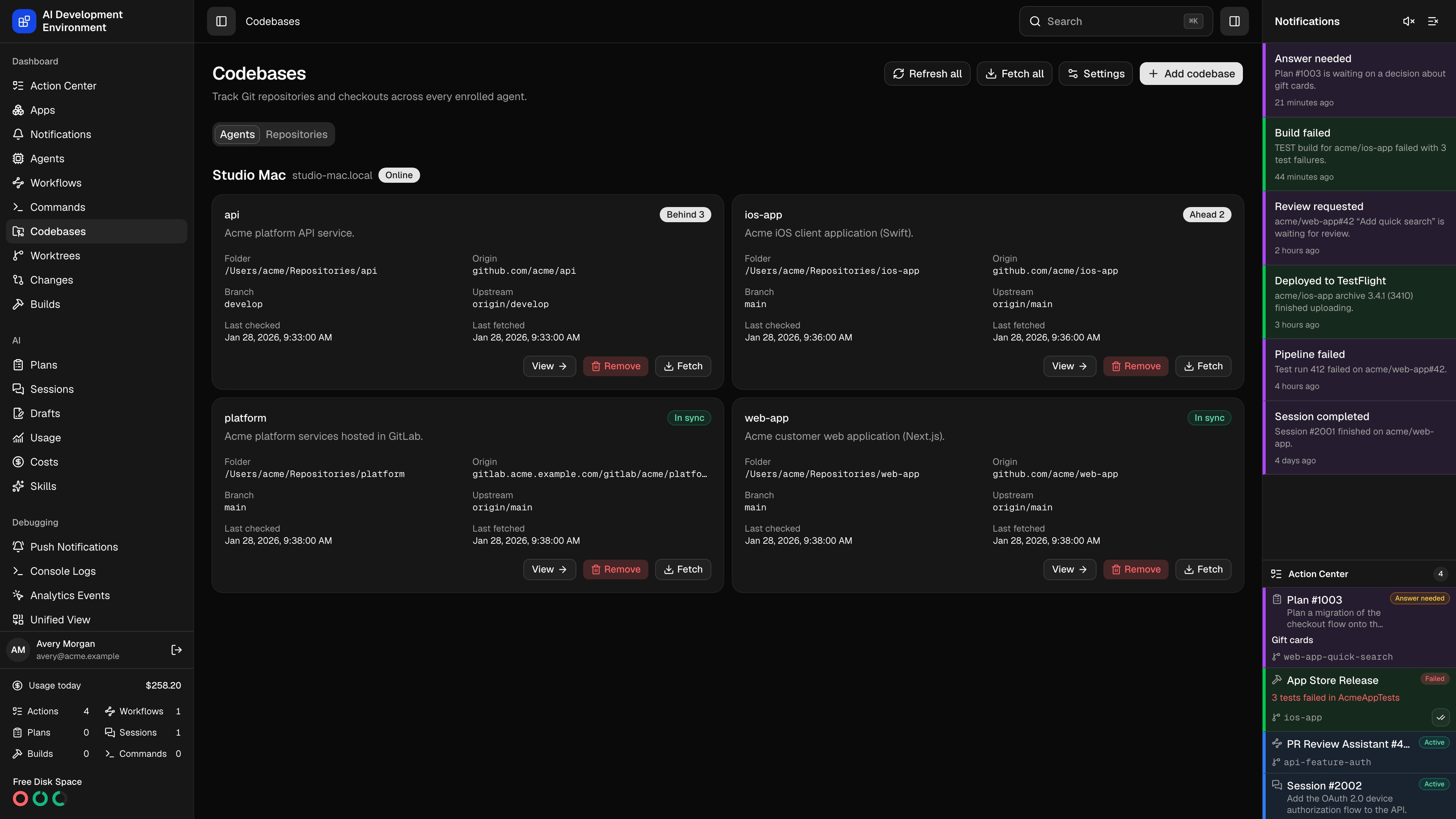
The **Codebases** page at `/codebases` is the inventory of every Git repository registered on every enrolled machine, with live sync and availability status for each one.
## Codebases and repositories
Two concepts sit behind this page, and the distinction matters:
One checkout on one agent — a folder on a specific Mac. Branches and stashes are managed here.
The logical repository behind every checkout that shares an origin. Skill groups, build configurations, and Auto Retry live here and apply everywhere.
**Group codebases by** switches the view between **Agents** — what each machine is hosting — and **Repositories** — where each repository is checked out.
## Status
Each codebase carries two independent statuses.
### Sync state
| State | Meaning |
| ----------- | --------------------------------------- |
| In sync | Local branch matches its upstream |
| Ahead | Local commits not yet pushed |
| Behind | Upstream commits not yet pulled |
| Diverged | Both sides have commits the other lacks |
| No upstream | The branch tracks nothing |
| Detached | HEAD is not on a branch |
| Unknown | Not yet determined |
### Availability
| State | Meaning |
| -------------------- | ------------------------------------------------------- |
| Available | The folder is present and is the expected repository |
| Folder missing | The registered path no longer exists on the agent |
| Not a Git repository | The folder exists but has no Git metadata |
| Origin changed | The remote origin no longer matches what was registered |
| Unavailable | The agent reported an error inspecting it |
Rows also show the folder, origin, current branch, upstream, ahead and behind counts, last checked, and last fetched.
## Adding a codebase
Only connected agents can be browsed. Offline agents cannot report what is on disk.
Start from the agent's home folder and navigate. **Show hidden folders** reveals dotfiles. Long directories are capped at the first 1,000 entries.
**Add this folder** inspects the repository and reports its origin and current branch, including a detached HEAD. If the origin already has a registered checkout, the page tells you the shared repository name it will join.
Set the **Repository name** and an optional description, then **Confirm codebase**.
## Bulk actions
* **Refresh all** re-inspects registered folders and reports Git status without contacting remotes.
* **Fetch all** runs `git fetch origin` for eligible codebases.
Both skip codebases whose agent is offline, unsupported, or whose folder is unavailable, and report how many were skipped.
## Settings
Cadence defaults that apply to every updated agent:
| Setting | Notes |
| ----------------------------- | ------------------------------------------------------------------------------------------------------------------ |
| **Agent refresh interval** | How long each agent waits after a scan completes before scanning again. Git remotes are not contacted. |
| **Automatic fetch interval** | How often each agent fetches origin. |
| **Default Jira branch regex** | Extracts a ticket key from a branch name. The first capture group is used when present, otherwise the whole match. |
A single agent can override the refresh and fetch intervals on its own [detail page](/agents/agent-detail), and a repository can override the Jira branch regex on its [repository page](/codebases/repository-detail).
## Removing a codebase
**Remove** deletes the registration only. The folder and all of its files stay untouched on the agent — the control plane simply stops tracking it.
## Notes
* Read-only codebase data is also available over REST at `/api/codebases` and through MCP at `/api/mcp`.
* A codebase with a Git operation, Git-blocking command, or Git-blocking workflow terminal step in flight shows a specific in-progress message and blocks conflicting actions until it finishes.
## Related pages
Branches and stashes for one checkout.
Linked worktrees created from these repositories.