> ## Documentation Index
> Fetch the complete documentation index at: https://ai-development-environment.mintlify.site/llms.txt
> Use this file to discover all available pages before exploring further.
# Repository preparations
> Define files that AIDE writes, deletes, or marks assume-unchanged in every worktree.
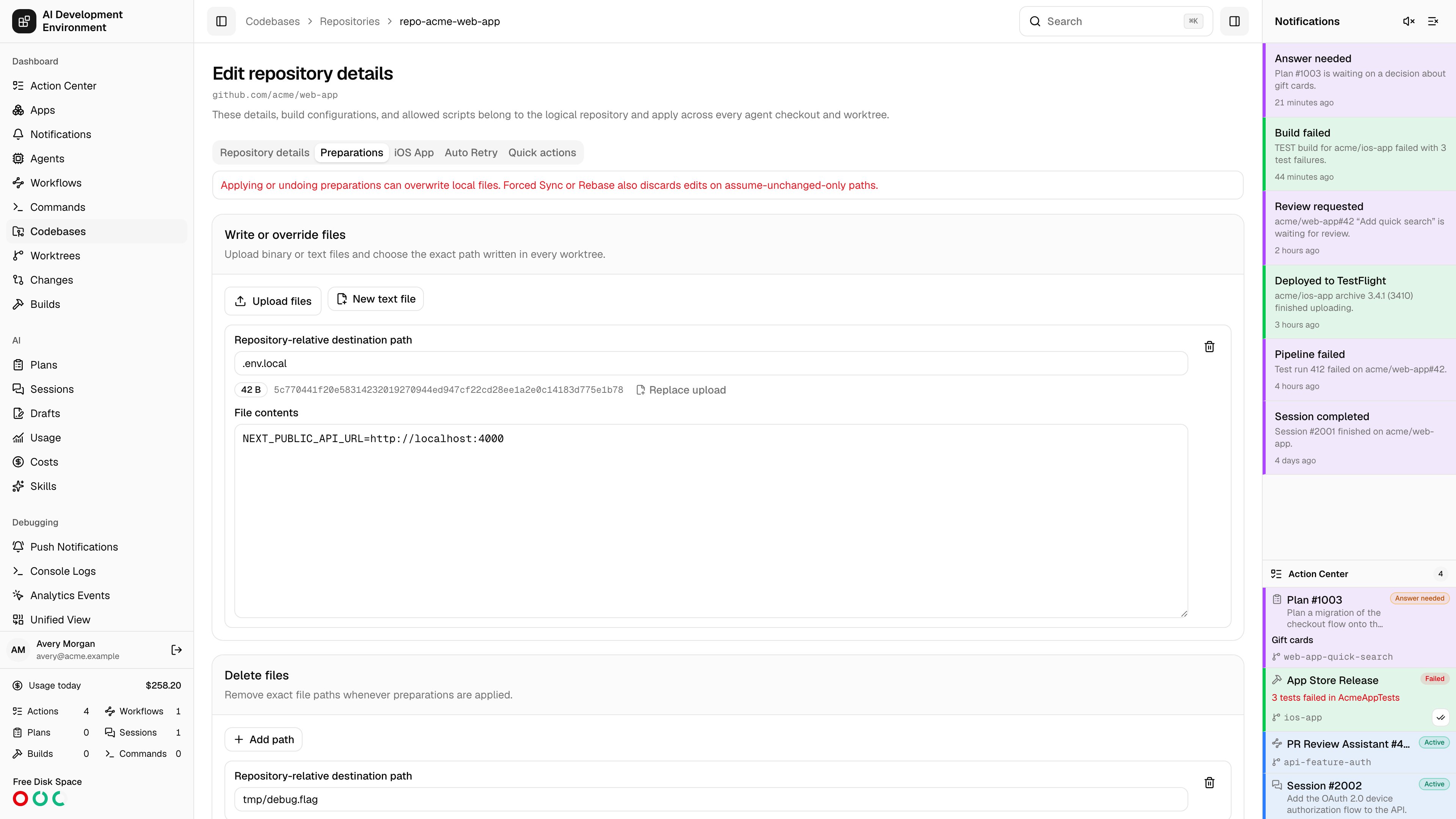
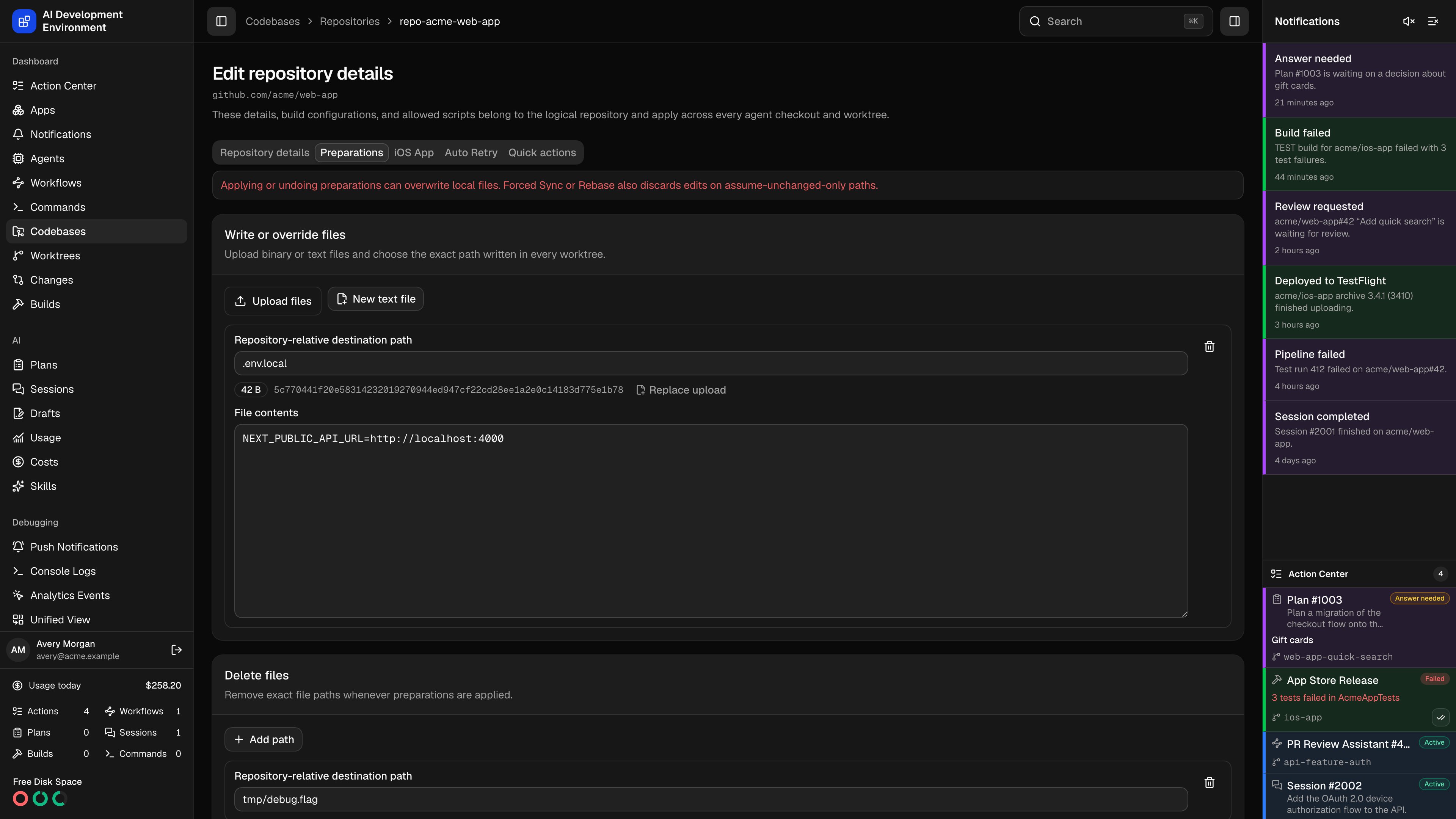 Open a repository from **Codebases**, then select **Preparations**. Rules belong to the logical repository and apply to its primary checkout and every linked worktree on every agent.
## Rule types
| Rule | What Apply does | What Undo does |
| --------------------- | ----------------------------------------------------------------------------------------------------------------------------------- | ---------------------------------------------------------------------------------------- |
| **Write or override** | Writes the uploaded binary bytes to the exact path. Existing executable files keep their executable bit. New files use mode `0644`. | Restores a tracked file from `HEAD`, or removes a file that the rule added as untracked. |
| **Delete** | Removes the exact file when present. | Restores a tracked file from `HEAD`. |
| **Assume unchanged** | Sets Git's assume-unchanged flag when the exact path is tracked. Missing and untracked paths are Not applicable. | Clears the flag without changing file contents. |
Tracked write and delete paths are also marked assume-unchanged. Write paths that are not tracked are added to an AIDE-owned block in `.git/info/exclude`, so preparation changes stay out of the normal Git changes list.
## Add rules
Under **Write or override**, upload binary or text files, or create an empty text file. Edit each destination to the exact repository-relative path you want. UTF-8 contents open in a monospace editor like repository skill files; binary files remain replace-only. The editor also shows the byte size and SHA-256 digest.
Add each exact file that should be absent after preparation.
Add tracked files whose local edits should stay hidden without AIDE changing their contents.
Confirm the atomic replacement. Existing worktrees are not modified by saving. New and changed definitions become **Pending**; unchanged rules retain their latest status.
## Path and upload limits
* Paths use exact POSIX file syntax. Absolute paths, empty segments, `.` or `..`, `.git`, backslashes, control characters, directories, and glob characters are rejected.
* Only one rule can own a path.
* A repository can have up to 500 rules.
* One uploaded file can contain up to 10 MiB. All uploaded content can total up to 20 MiB.
* The agent refuses paths that escape through a symbolic link.
Existing uploads are retained when you edit another field and do not replace the file.
## Worktree creation and Git operations
New worktrees and moved checkouts apply the current rules before they become available. If preparation fails, AIDE removes the new worktree and deletes only a branch created by that job.
A normal **Sync** or **Rebase** first checks whether managed changes block the operation. If they do, no worktree files are modified and the UI lists the affected paths. Only then can you confirm **Force Sync** or **Force Rebase**.
A forced operation restores or removes every preparation-managed path, clears its flags, and discards local edits on assume-only paths. It runs the Git operation and reapplies the latest rules. Confirm only when those local edits can be lost.
A real rebase conflict remains active and suspends preparation statuses. **Cancel rebase** reapplies the rules. If a rebase is completed outside AIDE, use **Apply** on [Prepare](/system/prepare).
## MCP and workflows
The built-in MCP catalog exposes the same preparation lifecycle:
* `get_codebase_repository_preparations` reads repository rules and uploaded write contents.
* `save_codebase_repository_preparations` atomically replaces the rule set. Omitted rules are deleted, so MCP clients treat it as a destructive tool.
* `get_worktree_preparation_overview` reads a compact status matrix without duplicating uploaded file bytes.
* `run_worktree_preparations` dispatches **Inspect**, **Apply**, or **Undo** for one or more worktrees and returns jobs plus explicit skip reasons.
* `run_worktree_operation` accepts `forcePreparations` for an explicitly forced **Sync** or **Rebase**.
* `get_worktree_automations` includes the typed Auto Sync pause reason, and `force_worktree_auto_sync` retries only an Auto Sync paused by a preparation conflict.
In the workflow editor, add **Run worktree preparations** to inspect, apply, or undo one worktree and wait for its per-file agent result. **Run worktree operation** exposes **Force preparation conflicts**, and **Set worktree Auto Sync** includes **Force** for the preparation-conflict recovery path. These force options are destructive for the same reasons as their UI equivalents.
## Related pages
Compare and manage rule status in every worktree.
Manage the repository's other shared settings.
Open a repository from **Codebases**, then select **Preparations**. Rules belong to the logical repository and apply to its primary checkout and every linked worktree on every agent.
## Rule types
| Rule | What Apply does | What Undo does |
| --------------------- | ----------------------------------------------------------------------------------------------------------------------------------- | ---------------------------------------------------------------------------------------- |
| **Write or override** | Writes the uploaded binary bytes to the exact path. Existing executable files keep their executable bit. New files use mode `0644`. | Restores a tracked file from `HEAD`, or removes a file that the rule added as untracked. |
| **Delete** | Removes the exact file when present. | Restores a tracked file from `HEAD`. |
| **Assume unchanged** | Sets Git's assume-unchanged flag when the exact path is tracked. Missing and untracked paths are Not applicable. | Clears the flag without changing file contents. |
Tracked write and delete paths are also marked assume-unchanged. Write paths that are not tracked are added to an AIDE-owned block in `.git/info/exclude`, so preparation changes stay out of the normal Git changes list.
## Add rules
Under **Write or override**, upload binary or text files, or create an empty text file. Edit each destination to the exact repository-relative path you want. UTF-8 contents open in a monospace editor like repository skill files; binary files remain replace-only. The editor also shows the byte size and SHA-256 digest.
Add each exact file that should be absent after preparation.
Add tracked files whose local edits should stay hidden without AIDE changing their contents.
Confirm the atomic replacement. Existing worktrees are not modified by saving. New and changed definitions become **Pending**; unchanged rules retain their latest status.
## Path and upload limits
* Paths use exact POSIX file syntax. Absolute paths, empty segments, `.` or `..`, `.git`, backslashes, control characters, directories, and glob characters are rejected.
* Only one rule can own a path.
* A repository can have up to 500 rules.
* One uploaded file can contain up to 10 MiB. All uploaded content can total up to 20 MiB.
* The agent refuses paths that escape through a symbolic link.
Existing uploads are retained when you edit another field and do not replace the file.
## Worktree creation and Git operations
New worktrees and moved checkouts apply the current rules before they become available. If preparation fails, AIDE removes the new worktree and deletes only a branch created by that job.
A normal **Sync** or **Rebase** first checks whether managed changes block the operation. If they do, no worktree files are modified and the UI lists the affected paths. Only then can you confirm **Force Sync** or **Force Rebase**.
A forced operation restores or removes every preparation-managed path, clears its flags, and discards local edits on assume-only paths. It runs the Git operation and reapplies the latest rules. Confirm only when those local edits can be lost.
A real rebase conflict remains active and suspends preparation statuses. **Cancel rebase** reapplies the rules. If a rebase is completed outside AIDE, use **Apply** on [Prepare](/system/prepare).
## MCP and workflows
The built-in MCP catalog exposes the same preparation lifecycle:
* `get_codebase_repository_preparations` reads repository rules and uploaded write contents.
* `save_codebase_repository_preparations` atomically replaces the rule set. Omitted rules are deleted, so MCP clients treat it as a destructive tool.
* `get_worktree_preparation_overview` reads a compact status matrix without duplicating uploaded file bytes.
* `run_worktree_preparations` dispatches **Inspect**, **Apply**, or **Undo** for one or more worktrees and returns jobs plus explicit skip reasons.
* `run_worktree_operation` accepts `forcePreparations` for an explicitly forced **Sync** or **Rebase**.
* `get_worktree_automations` includes the typed Auto Sync pause reason, and `force_worktree_auto_sync` retries only an Auto Sync paused by a preparation conflict.
In the workflow editor, add **Run worktree preparations** to inspect, apply, or undo one worktree and wait for its per-file agent result. **Run worktree operation** exposes **Force preparation conflicts**, and **Set worktree Auto Sync** includes **Force** for the preparation-conflict recovery path. These force options are destructive for the same reasons as their UI equivalents.
## Related pages
Compare and manage rule status in every worktree.
Manage the repository's other shared settings.