> ## Documentation Index
> Fetch the complete documentation index at: https://ai-development-environment.mintlify.site/llms.txt
> Use this file to discover all available pages before exploring further.
# Crash details
> Read one crash report's symbolicated threads, find the dSYMs it still needs, and compare it with similar crashes.
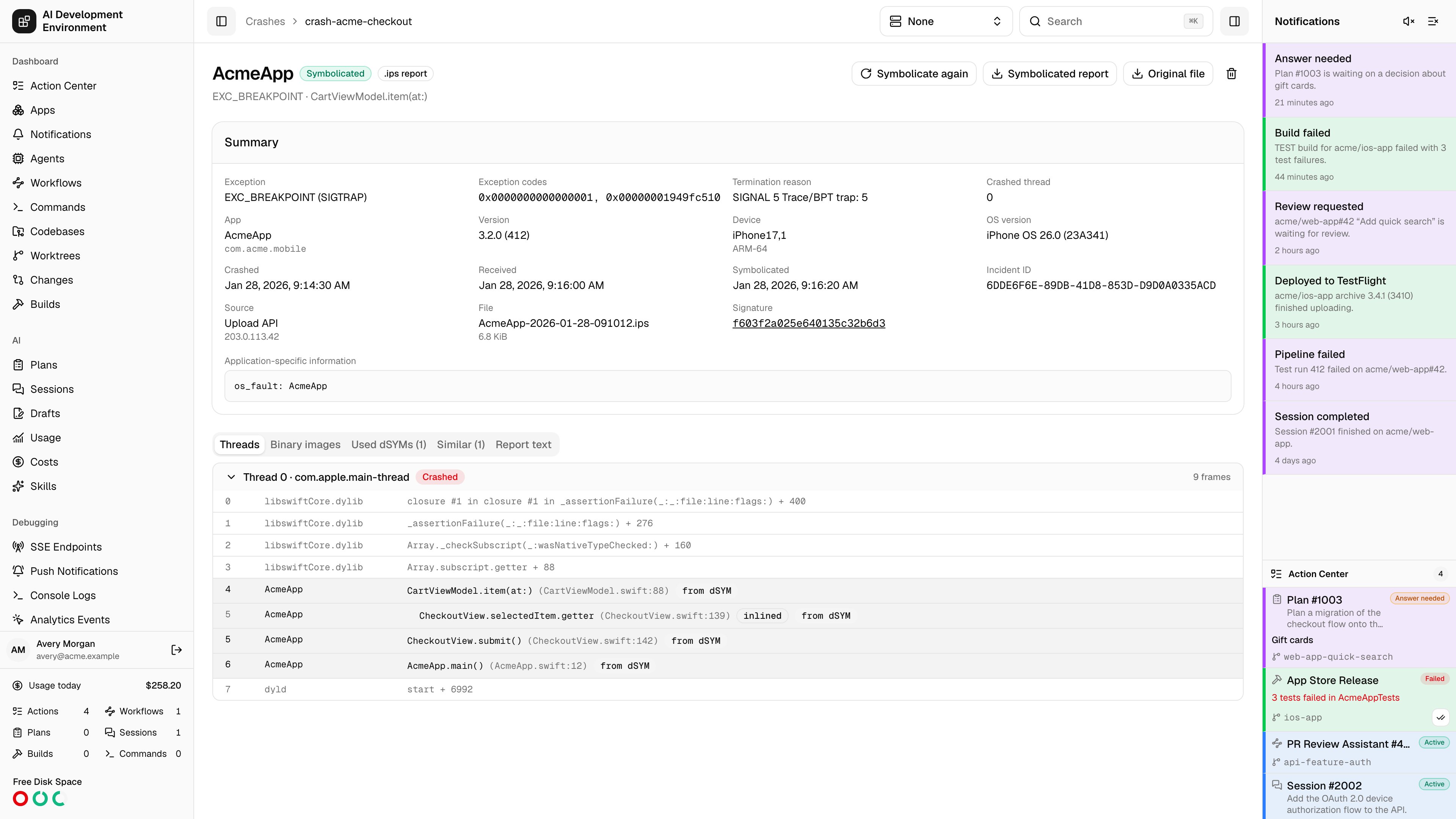
 The crash details page at `/crashes/{id}` shows one crash report with every name the dSYMs could add. The iOS app shows the same summary, threads, missing dSYMs, and similar crashes on its crash detail screen.
## Header actions
| Action | What it does |
| ----------------------- | ------------------------------------------------------------------------------------------------------------------------------------------------- |
| **Symbolicate again** | Discards the stored symbols and symbolicates from scratch with the dSYMs uploaded now. Available once the crash is not already being symbolicated |
| **Symbolicated report** | Downloads the report in Apple's text format with every added symbol, whatever format it arrived in |
| **Original file** | Downloads the file exactly as it was uploaded |
| Delete | Deletes the report and, once no other crash from the same upload needs it, its file |
A MetricKit payload with several diagnostics is stored once and shared by the crash reports it produced.
## Missing dSYMs
When an app binary has frames without names and no uploaded dSYM matches its UUID, the page lists each such binary with its UUID and architecture. Click **Upload dSYMs** to add them from here. The crash is symbolicated again as soon as a matching dSYM arrives, with no further action.
Compare the listed UUID with `xcrun dwarfdump --uuid MyApp.app.dSYM` to find the right dSYM. A mismatch usually means the crash came from a different build than the dSYM you have — for example a TestFlight build made on another machine.
## Summary
The summary card shows the exception type and signal, exception codes, termination reason, crashed thread, app and bundle ID, version and build, device model and OS version, when the app crashed and when the report arrived, when it was last symbolicated, the incident ID, and how the report reached the server — a signed-in user, an API key, or an anonymous address.
**Application-specific information** holds messages the process left behind, such as a Swift `fatalError` message or an uncaught Objective-C exception's reason.
The **Signature** links to every crash with the same signature.
## Threads
The crashed thread is first and expanded. Other threads are collapsed; click one to open it.
Each frame shows its number, binary, and function. App frames are highlighted. A frame a dSYM named is marked **from dSYM** and shows its source file and line. When the compiler inlined functions, `atos` reports each one: the inlined functions come first, marked **inlined**, followed by the function that contains them, all with the same frame number.
Frames in system libraries keep the names the device gave them.
## Other tabs
| Tab | Shows |
| ----------------------- | ------------------------------------------------------------------------------------------------------- |
| **Exception backtrace** | The backtrace of an uncaught exception, when the report has one |
| **Binary images** | Every loaded binary with its UUID and load address. App binaries link to their dSYM or show **Missing** |
| **Used dSYMs** | The dSYMs that named this crash's frames |
| **Similar** | Other crashes with the same signature, newest first |
| **Report text** | The symbolicated report as text |
If a dSYM is deleted after it was used, the crash keeps its names and the binary image shows no dSYM link.
## Related pages
All crash reports, uploads, and crash settings.
Upload the dSYMs a crash is missing.
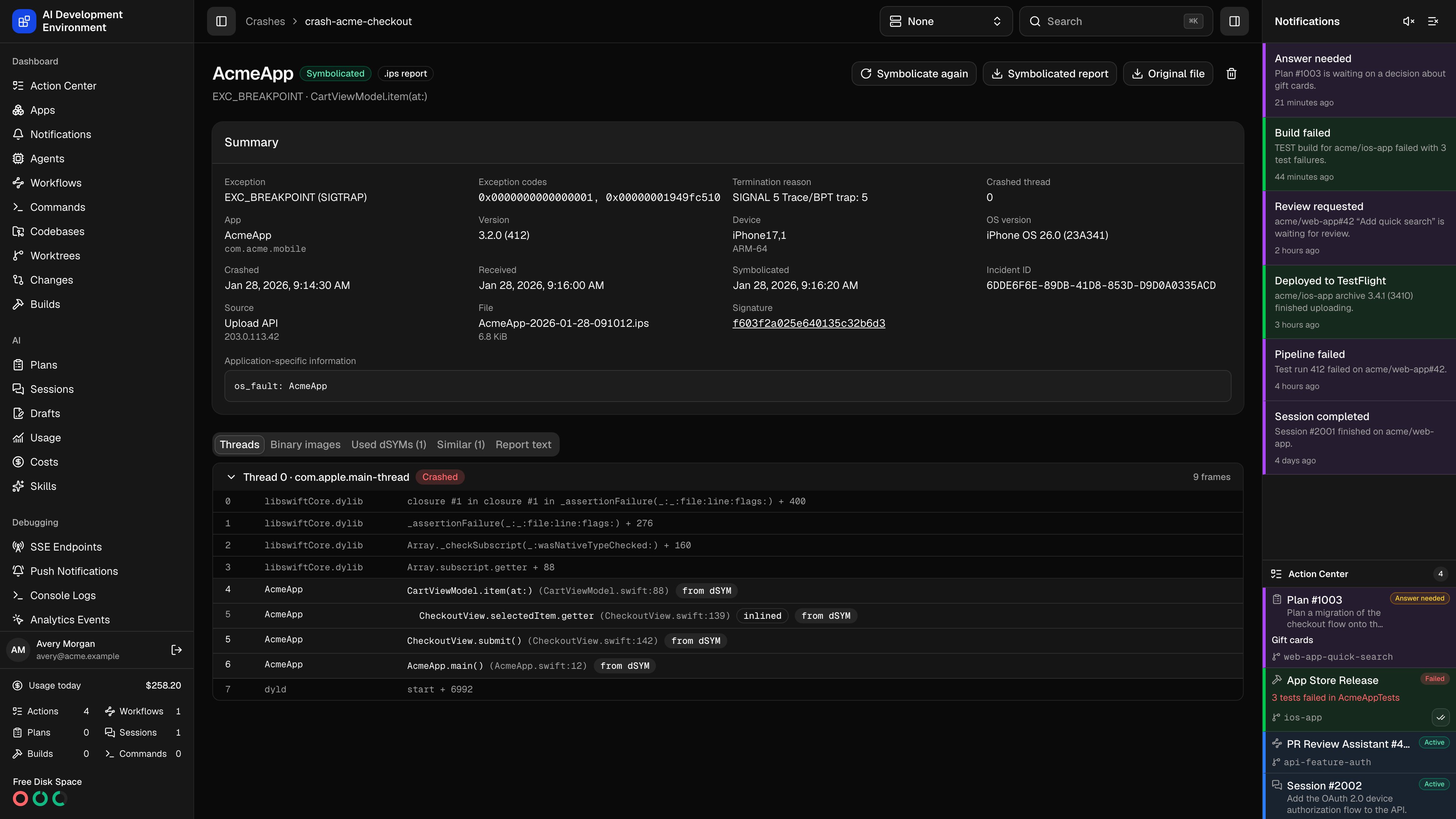
The crash details page at `/crashes/{id}` shows one crash report with every name the dSYMs could add. The iOS app shows the same summary, threads, missing dSYMs, and similar crashes on its crash detail screen.
## Header actions
| Action | What it does |
| ----------------------- | ------------------------------------------------------------------------------------------------------------------------------------------------- |
| **Symbolicate again** | Discards the stored symbols and symbolicates from scratch with the dSYMs uploaded now. Available once the crash is not already being symbolicated |
| **Symbolicated report** | Downloads the report in Apple's text format with every added symbol, whatever format it arrived in |
| **Original file** | Downloads the file exactly as it was uploaded |
| Delete | Deletes the report and, once no other crash from the same upload needs it, its file |
A MetricKit payload with several diagnostics is stored once and shared by the crash reports it produced.
## Missing dSYMs
When an app binary has frames without names and no uploaded dSYM matches its UUID, the page lists each such binary with its UUID and architecture. Click **Upload dSYMs** to add them from here. The crash is symbolicated again as soon as a matching dSYM arrives, with no further action.
Compare the listed UUID with `xcrun dwarfdump --uuid MyApp.app.dSYM` to find the right dSYM. A mismatch usually means the crash came from a different build than the dSYM you have — for example a TestFlight build made on another machine.
## Summary
The summary card shows the exception type and signal, exception codes, termination reason, crashed thread, app and bundle ID, version and build, device model and OS version, when the app crashed and when the report arrived, when it was last symbolicated, the incident ID, and how the report reached the server — a signed-in user, an API key, or an anonymous address.
**Application-specific information** holds messages the process left behind, such as a Swift `fatalError` message or an uncaught Objective-C exception's reason.
The **Signature** links to every crash with the same signature.
## Threads
The crashed thread is first and expanded. Other threads are collapsed; click one to open it.
Each frame shows its number, binary, and function. App frames are highlighted. A frame a dSYM named is marked **from dSYM** and shows its source file and line. When the compiler inlined functions, `atos` reports each one: the inlined functions come first, marked **inlined**, followed by the function that contains them, all with the same frame number.
Frames in system libraries keep the names the device gave them.
## Other tabs
| Tab | Shows |
| ----------------------- | ------------------------------------------------------------------------------------------------------- |
| **Exception backtrace** | The backtrace of an uncaught exception, when the report has one |
| **Binary images** | Every loaded binary with its UUID and load address. App binaries link to their dSYM or show **Missing** |
| **Used dSYMs** | The dSYMs that named this crash's frames |
| **Similar** | Other crashes with the same signature, newest first |
| **Report text** | The symbolicated report as text |
If a dSYM is deleted after it was used, the crash keeps its names and the binary image shows no dSYM link.
## Related pages
All crash reports, uploads, and crash settings.
Upload the dSYMs a crash is missing.