> ## Documentation Index
> Fetch the complete documentation index at: https://ai-development-environment.mintlify.site/llms.txt
> Use this file to discover all available pages before exploring further.
# Actions Cache
> Browse and manage entries on the GitHub Actions Cache Server.
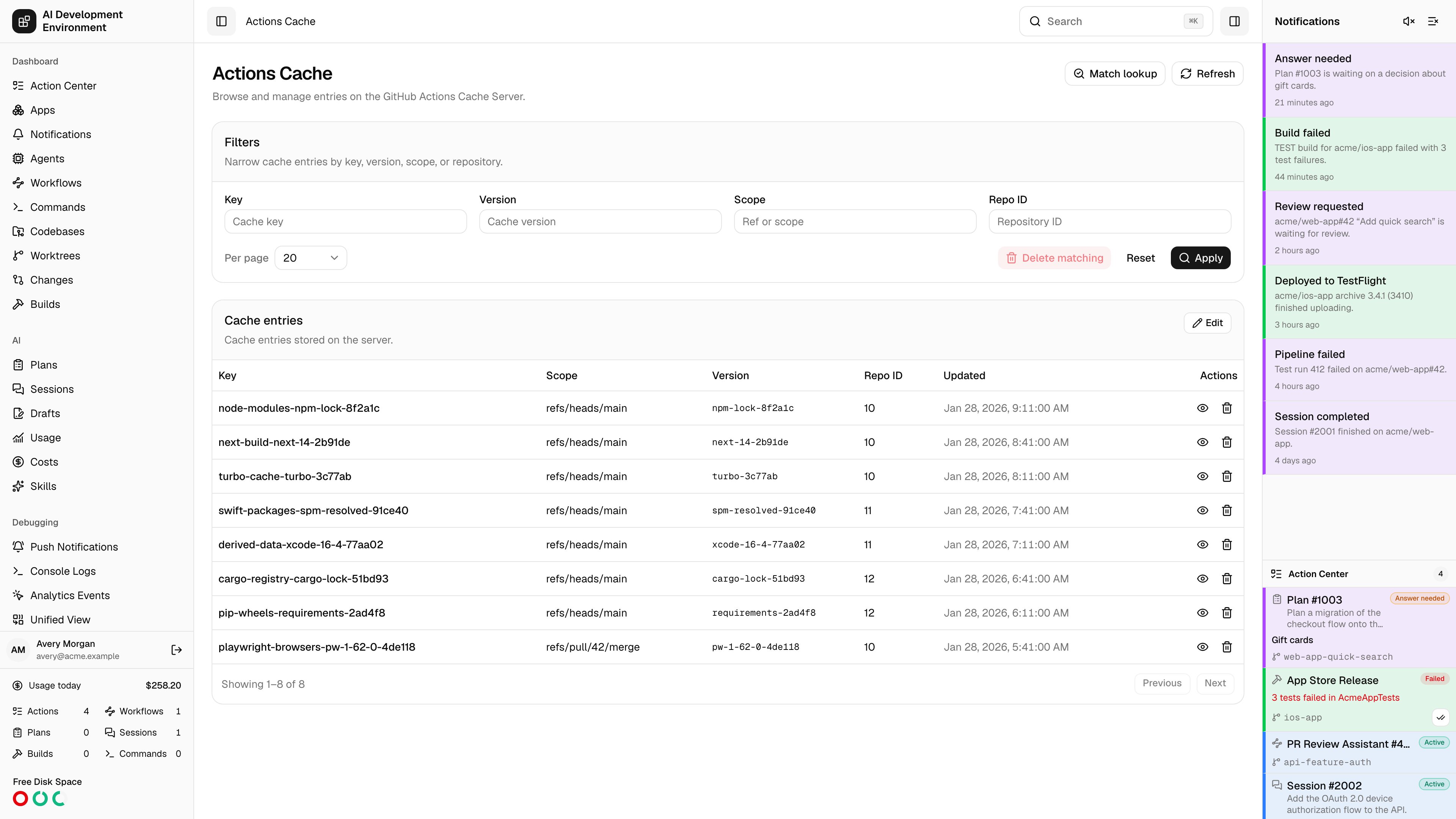
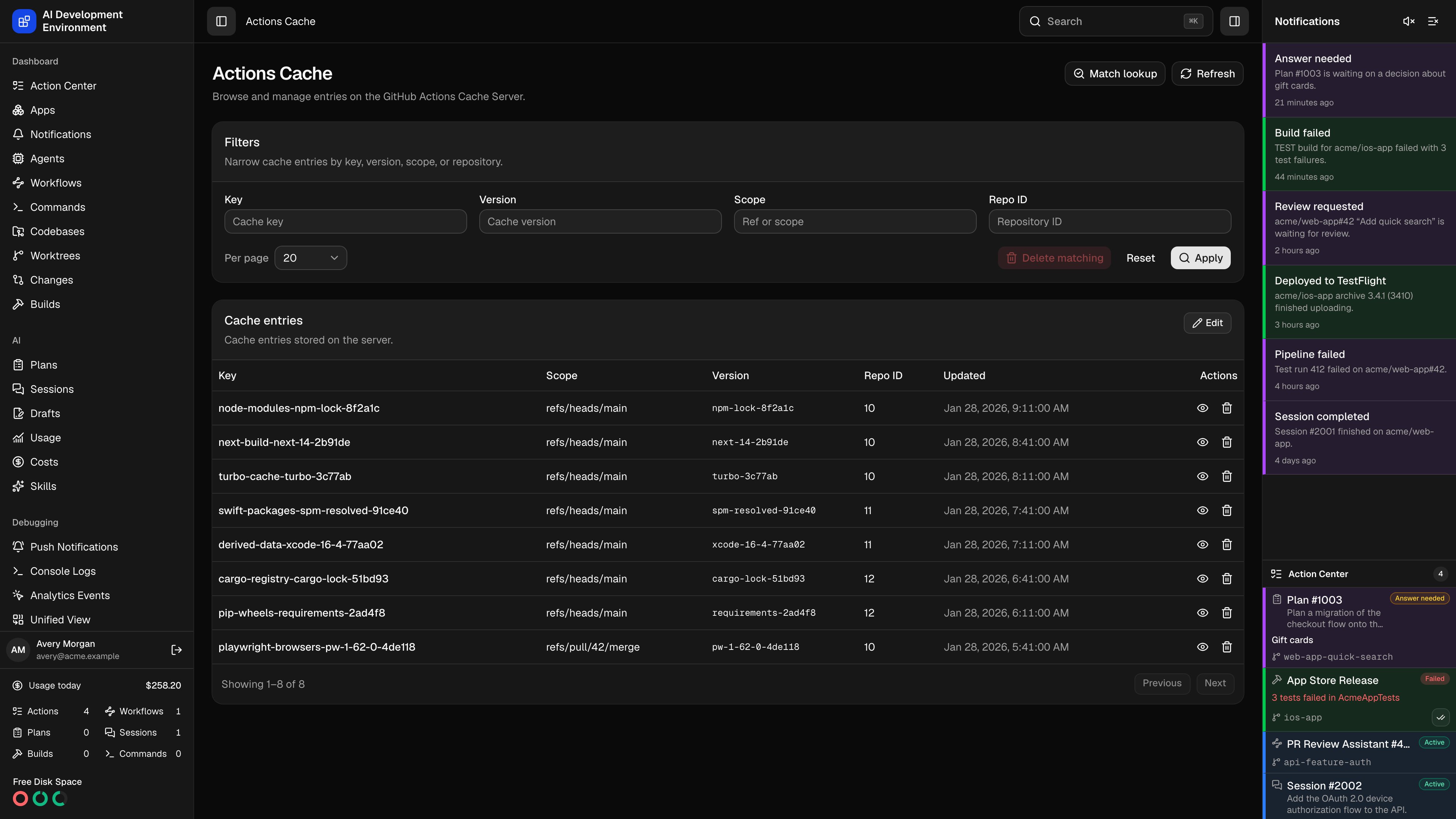 The **Actions Cache** page at `/actions-cache` is a management console for a self-hosted GitHub Actions Cache Server — the service your workflows talk to when they call `actions/cache`. It lists what the server is holding, shows the storage that backs each entry, and answers the question that usually prompts the visit: *which entry would a given set of keys actually restore?*
This page is separate from the [GitHub Cache](/github/github-cache), which caches GitHub API responses. Nothing here touches the GitHub API.
## Filtering entries
| Filter | Matches |
| ----------- | ----------------------------------------------------------------- |
| **Key** | The cache key a workflow saved under |
| **Version** | The cache version, which encodes the paths and compression method |
| **Scope** | The Git ref or scope the entry belongs to |
| **Repo ID** | The repository the entry was saved for |
**Apply** runs the filters, **Reset** clears them, and **Per page** sets the page size. The footer reports the range and total.
## Working with entries
The table lists **Key**, **Scope**, **Version**, **Repo ID**, and **Updated**, with per-row **View details** and **Delete**.
**View details** opens the entry and the storage location behind it.
| Section | Fields |
| -------------------- | ---------------------------------------------------------------------------------------- |
| **Entry** | ID, key, version, scope, repo ID, updated time, and location ID |
| **Storage location** | Folder name, part count, size, merge started, merged, parts deleted, and last downloaded |
An entry whose upload never completed has no storage location, and the dialog says so. **Delete location** removes the storage folder and its data on its own.
**Edit** turns on selection checkboxes, including a select-all in the header, and **Delete selected** removes the checked entries.
**Delete matching** removes *every* entry matching the applied filters — not just the current page.
Deletions go straight to the cache server and cannot be undone. **Delete matching** with empty filters targets the entire cache, so apply and check your filters before using it.
## Match lookup
**Match lookup** reproduces the server's own restore logic. Give it the same inputs a workflow would send — a **Primary key**, optional comma-separated **Restore keys**, **Scopes**, a repo ID, and a version — and it reports the entry that would be returned.
| Match type | Meaning |
| -------------------- | ---------------------------------------- |
| **Exact primary** | The primary key matched an entry exactly |
| **Prefixed primary** | The primary key matched as a prefix |
| **Exact restore** | A restore key matched exactly |
| **Prefixed restore** | A restore key matched as a prefix |
When nothing matches, the lookup says so — which is usually the answer you were after when a workflow keeps rebuilding from scratch.
## Connecting the server
The **Actions Cache Server** card in [Settings](/system/settings) holds the connection:
* **Base URL** — the management API base URL, including any path prefix.
* **API key** — sent as the `x-api-key` header on every request.
* **Custom headers** — extra headers, needed only when an authentication proxy sits in front of the server. Values are stored locally and never returned to the browser.
Get the base URL and key from the cache server's deployment configuration or its administrator. **Test** verifies the connection before you save.
## Notes
* This page is hidden until the cache server is configured, and hides again if you remove the settings.
* Filters, selection, and the match lookup all operate against the live server — there is no local copy of the cache index here.
## Related pages
The workflow runs that read and write these cache entries.
Where the cache server connection is configured.
The **Actions Cache** page at `/actions-cache` is a management console for a self-hosted GitHub Actions Cache Server — the service your workflows talk to when they call `actions/cache`. It lists what the server is holding, shows the storage that backs each entry, and answers the question that usually prompts the visit: *which entry would a given set of keys actually restore?*
This page is separate from the [GitHub Cache](/github/github-cache), which caches GitHub API responses. Nothing here touches the GitHub API.
## Filtering entries
| Filter | Matches |
| ----------- | ----------------------------------------------------------------- |
| **Key** | The cache key a workflow saved under |
| **Version** | The cache version, which encodes the paths and compression method |
| **Scope** | The Git ref or scope the entry belongs to |
| **Repo ID** | The repository the entry was saved for |
**Apply** runs the filters, **Reset** clears them, and **Per page** sets the page size. The footer reports the range and total.
## Working with entries
The table lists **Key**, **Scope**, **Version**, **Repo ID**, and **Updated**, with per-row **View details** and **Delete**.
**View details** opens the entry and the storage location behind it.
| Section | Fields |
| -------------------- | ---------------------------------------------------------------------------------------- |
| **Entry** | ID, key, version, scope, repo ID, updated time, and location ID |
| **Storage location** | Folder name, part count, size, merge started, merged, parts deleted, and last downloaded |
An entry whose upload never completed has no storage location, and the dialog says so. **Delete location** removes the storage folder and its data on its own.
**Edit** turns on selection checkboxes, including a select-all in the header, and **Delete selected** removes the checked entries.
**Delete matching** removes *every* entry matching the applied filters — not just the current page.
Deletions go straight to the cache server and cannot be undone. **Delete matching** with empty filters targets the entire cache, so apply and check your filters before using it.
## Match lookup
**Match lookup** reproduces the server's own restore logic. Give it the same inputs a workflow would send — a **Primary key**, optional comma-separated **Restore keys**, **Scopes**, a repo ID, and a version — and it reports the entry that would be returned.
| Match type | Meaning |
| -------------------- | ---------------------------------------- |
| **Exact primary** | The primary key matched an entry exactly |
| **Prefixed primary** | The primary key matched as a prefix |
| **Exact restore** | A restore key matched exactly |
| **Prefixed restore** | A restore key matched as a prefix |
When nothing matches, the lookup says so — which is usually the answer you were after when a workflow keeps rebuilding from scratch.
## Connecting the server
The **Actions Cache Server** card in [Settings](/system/settings) holds the connection:
* **Base URL** — the management API base URL, including any path prefix.
* **API key** — sent as the `x-api-key` header on every request.
* **Custom headers** — extra headers, needed only when an authentication proxy sits in front of the server. Values are stored locally and never returned to the browser.
Get the base URL and key from the cache server's deployment configuration or its administrator. **Test** verifies the connection before you save.
## Notes
* This page is hidden until the cache server is configured, and hides again if you remove the settings.
* Filters, selection, and the match lookup all operate against the live server — there is no local copy of the cache index here.
## Related pages
The workflow runs that read and write these cache entries.
Where the cache server connection is configured.