> ## Documentation Index
> Fetch the complete documentation index at: https://ai-development-environment.mintlify.site/llms.txt
> Use this file to discover all available pages before exploring further.
# GitHub Actions
> Monitor workflow runs across registered GitHub codebases.
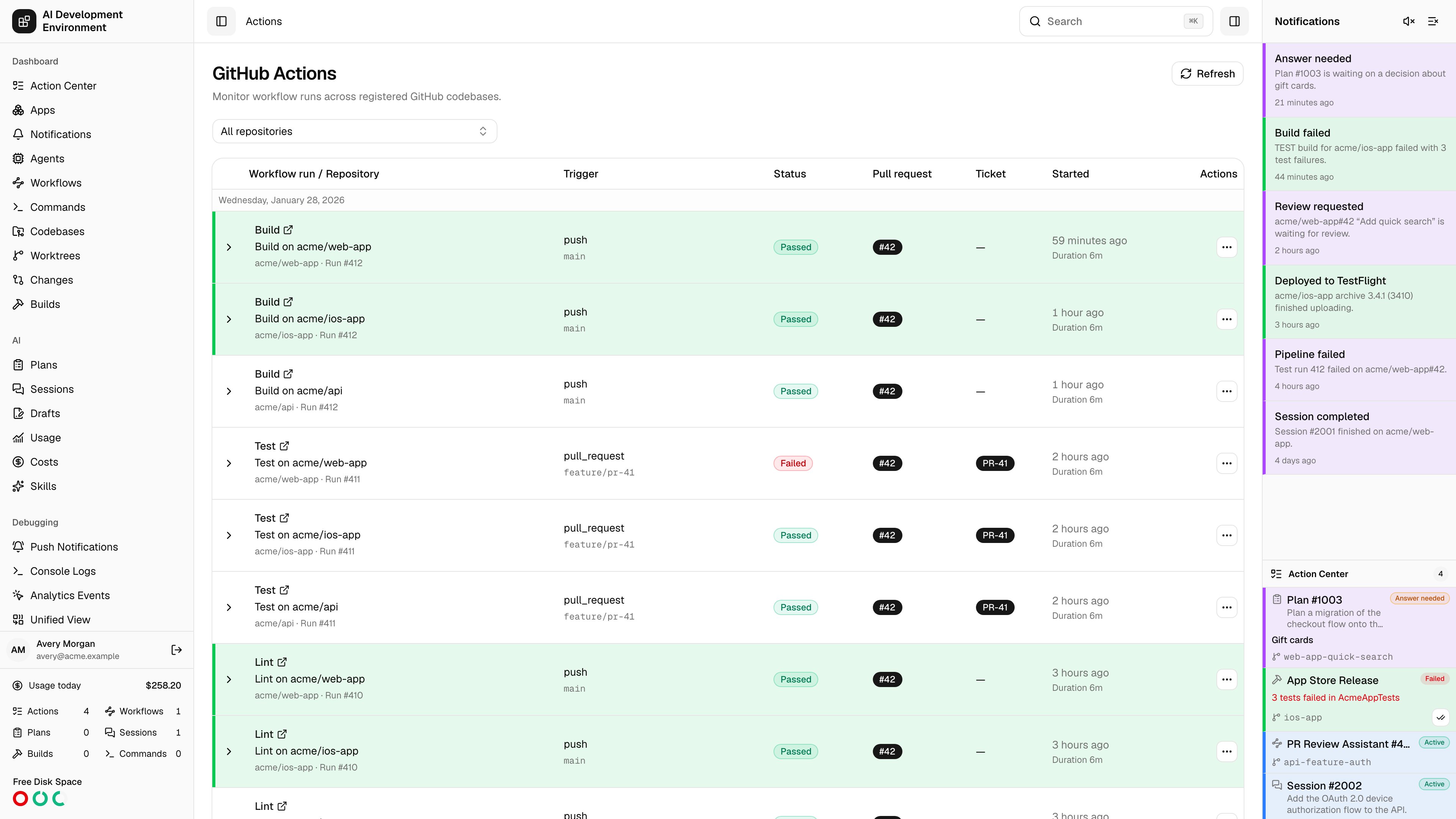
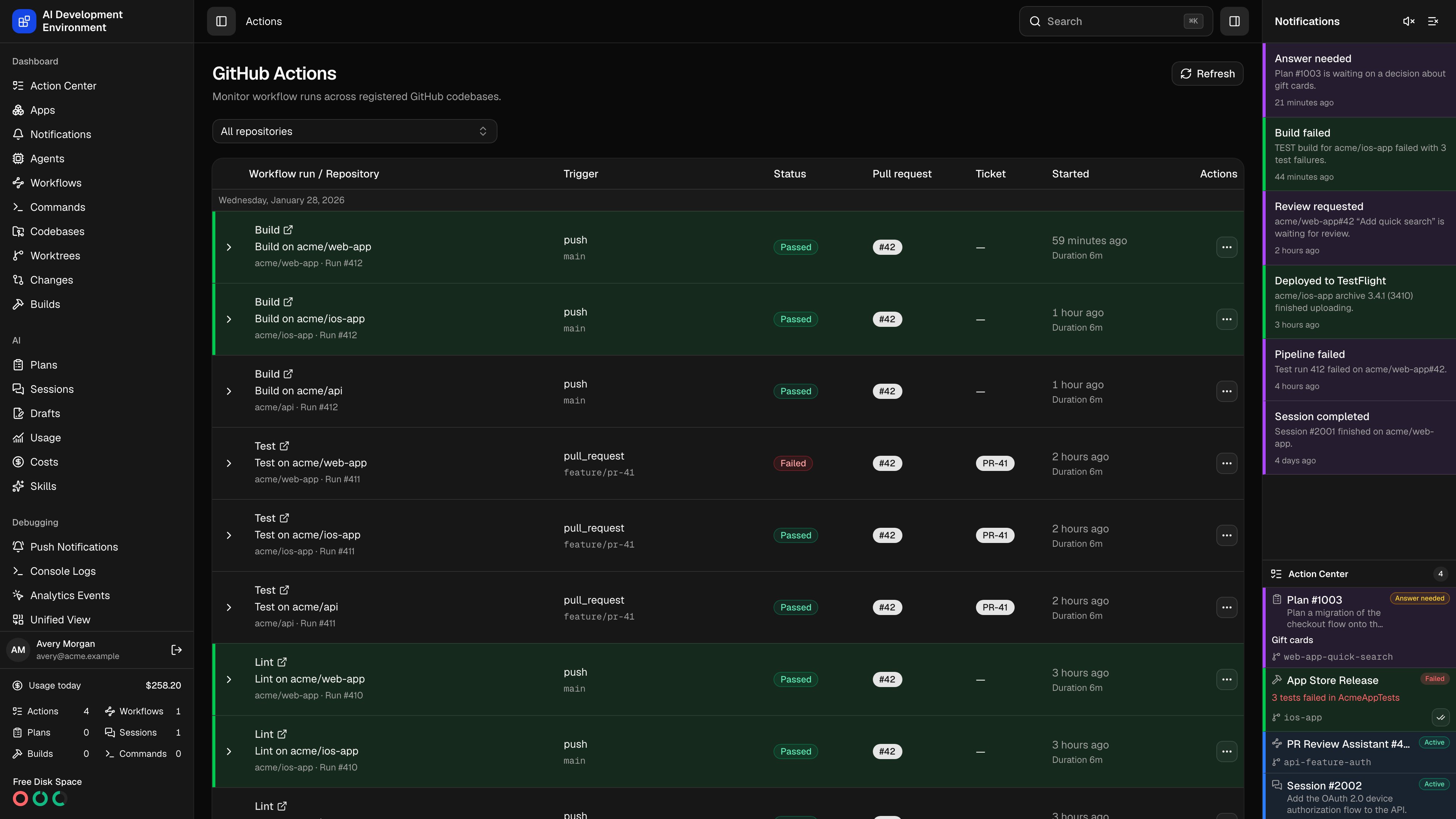 The **GitHub Actions** page at `/actions` is a cross-repository run history. It merges the workflow runs of every registered GitHub codebase into one list, links each run back to the pull request, ticket, and worktree it came from, and lets you drill from a run down to an individual step — then retry, cancel, or set up a rule that retries for you.
Runs come from the codebases you have registered whose origin is on github.com. Nothing appears until at least one exists.
## Filtering
| Filter | Behavior |
| -------------- | --------------------------------------------------------------------------------------------- |
| **Repository** | All repositories, or one registered codebase repository |
| **Branch** | An exact branch name — available once a single repository is selected |
| **Pipeline** | One workflow, chosen from the workflows seen in the loaded runs — also single-repository only |
Filters are written into the page URL, so a filtered view can be bookmarked or shared, and links from a pull request's **View all** button arrive with the repository and branch already set. Runs load 25 at a time and are grouped under the day they started; **Load more** fetches the next page.
When one repository in a multi-repository view fails to load — a revoked token, a repository the token cannot see, a GitHub outage — the page lists that repository's error and still shows the runs it could load.
## Reading a run
| Column | What it shows |
| ----------------------------- | ------------------------------------------------------------------------- |
| **Workflow run / Repository** | Workflow name, run title, `Run #number`, attempt number, and `owner/name` |
| **Trigger** | The GitHub event that started the run |
| **Status** | The normalized run state, using the same vocabulary as pipeline checks |
| **Pull request** | Linked pull requests, if any |
| **Ticket** | The Jira key parsed from the branch |
| **Started** | Start time and duration |
Expanding a run loads its jobs; expanding a job shows its steps in order with their statuses. A run whose branch has a worktree here is tinted with that worktree's highlight color.
## Acting on a run
**View** opens the run on github.com. **Worktree** opens the [worktree](/worktrees/worktree-detail) for the run's branch when one exists.
**Retry** on a job reruns that job. Retry is unavailable — with the reason on hover — when no verified GitHub App is configured, the run has not completed, the check did not come from GitHub Actions, GitHub reported no workflow run, or the attempt is a historical one.
**Cancel** asks GitHub to stop the run. **Force cancel** bypasses the conditions that normally prevent GitHub from stopping a run and asks for confirmation first — use it only when a normal cancellation is stuck.
## Auto Retry
**Auto Retry** creates durable rules that rerun workflows or jobs without you watching. Rules are stored here, not in GitHub, and keep working while the page is closed.
| Setting | Options |
| ------------------------- | ------------------------------------------------------------------------ |
| **Applies to** | Current runs, or future runs |
| **Pipelines and jobs** | Specific workflows and jobs, or all workflows including ones added later |
| **Retry mode** | Retry failures, or retry successful runs by count |
| **When a failure occurs** | Retry failed jobs only, or retry all jobs |
| **Retry limit** | An integer from 1 to 100, or unlimited (failure mode only) |
The scope is derived from where you opened the dialog and what you selected:
| Scope | Set when |
| ------------------- | ----------------------------------------------------- |
| **Current run** | The rule targets runs that already exist |
| **Worktree branch** | Future runs on a branch, opened from a worktree |
| **Pull request** | Future runs opened from a pull request |
| **Repository** | Opened from the repository, covering everything in it |
Saved rules list their progress as automatic retries across runs, and can be paused, resumed, edited, or deleted. A rule reports its state as **Active**, **Paused**, **Completed**, **Exhausted**, or **Error**.
Auto Retry needs both a personal access token and a verified GitHub App with Actions write access. Without them the dialog explains what is missing and refuses to save.
## Requirements
* A GitHub personal access token in [Settings](/system/settings) with Actions read access.
* A registered [codebase](/codebases/codebases) whose origin is on github.com.
* A verified GitHub App with Actions write access for retries, and for Auto Retry.
## Notes
* The **Actions notification and Auto Retry interval** in Settings — 30 to 3600 seconds — controls how often Auto Retry polls. When a signed GitHub App webhook is available, notification polling stops and [webhook deliveries](/github/webhooks) drive updates instead.
* Job and step data is fetched per run when you expand it, so a large history costs nothing until you open it.
* Reads are served from the [GitHub cache](/github/github-cache); **Refresh** re-reads the current filter.
## Related pages
Deliveries from the GitHub App, and what each one triggered.
Entries on a connected GitHub Actions Cache Server.
The **GitHub Actions** page at `/actions` is a cross-repository run history. It merges the workflow runs of every registered GitHub codebase into one list, links each run back to the pull request, ticket, and worktree it came from, and lets you drill from a run down to an individual step — then retry, cancel, or set up a rule that retries for you.
Runs come from the codebases you have registered whose origin is on github.com. Nothing appears until at least one exists.
## Filtering
| Filter | Behavior |
| -------------- | --------------------------------------------------------------------------------------------- |
| **Repository** | All repositories, or one registered codebase repository |
| **Branch** | An exact branch name — available once a single repository is selected |
| **Pipeline** | One workflow, chosen from the workflows seen in the loaded runs — also single-repository only |
Filters are written into the page URL, so a filtered view can be bookmarked or shared, and links from a pull request's **View all** button arrive with the repository and branch already set. Runs load 25 at a time and are grouped under the day they started; **Load more** fetches the next page.
When one repository in a multi-repository view fails to load — a revoked token, a repository the token cannot see, a GitHub outage — the page lists that repository's error and still shows the runs it could load.
## Reading a run
| Column | What it shows |
| ----------------------------- | ------------------------------------------------------------------------- |
| **Workflow run / Repository** | Workflow name, run title, `Run #number`, attempt number, and `owner/name` |
| **Trigger** | The GitHub event that started the run |
| **Status** | The normalized run state, using the same vocabulary as pipeline checks |
| **Pull request** | Linked pull requests, if any |
| **Ticket** | The Jira key parsed from the branch |
| **Started** | Start time and duration |
Expanding a run loads its jobs; expanding a job shows its steps in order with their statuses. A run whose branch has a worktree here is tinted with that worktree's highlight color.
## Acting on a run
**View** opens the run on github.com. **Worktree** opens the [worktree](/worktrees/worktree-detail) for the run's branch when one exists.
**Retry** on a job reruns that job. Retry is unavailable — with the reason on hover — when no verified GitHub App is configured, the run has not completed, the check did not come from GitHub Actions, GitHub reported no workflow run, or the attempt is a historical one.
**Cancel** asks GitHub to stop the run. **Force cancel** bypasses the conditions that normally prevent GitHub from stopping a run and asks for confirmation first — use it only when a normal cancellation is stuck.
## Auto Retry
**Auto Retry** creates durable rules that rerun workflows or jobs without you watching. Rules are stored here, not in GitHub, and keep working while the page is closed.
| Setting | Options |
| ------------------------- | ------------------------------------------------------------------------ |
| **Applies to** | Current runs, or future runs |
| **Pipelines and jobs** | Specific workflows and jobs, or all workflows including ones added later |
| **Retry mode** | Retry failures, or retry successful runs by count |
| **When a failure occurs** | Retry failed jobs only, or retry all jobs |
| **Retry limit** | An integer from 1 to 100, or unlimited (failure mode only) |
The scope is derived from where you opened the dialog and what you selected:
| Scope | Set when |
| ------------------- | ----------------------------------------------------- |
| **Current run** | The rule targets runs that already exist |
| **Worktree branch** | Future runs on a branch, opened from a worktree |
| **Pull request** | Future runs opened from a pull request |
| **Repository** | Opened from the repository, covering everything in it |
Saved rules list their progress as automatic retries across runs, and can be paused, resumed, edited, or deleted. A rule reports its state as **Active**, **Paused**, **Completed**, **Exhausted**, or **Error**.
Auto Retry needs both a personal access token and a verified GitHub App with Actions write access. Without them the dialog explains what is missing and refuses to save.
## Requirements
* A GitHub personal access token in [Settings](/system/settings) with Actions read access.
* A registered [codebase](/codebases/codebases) whose origin is on github.com.
* A verified GitHub App with Actions write access for retries, and for Auto Retry.
## Notes
* The **Actions notification and Auto Retry interval** in Settings — 30 to 3600 seconds — controls how often Auto Retry polls. When a signed GitHub App webhook is available, notification polling stops and [webhook deliveries](/github/webhooks) drive updates instead.
* Job and step data is fetched per run when you expand it, so a large history costs nothing until you open it.
* Reads are served from the [GitHub cache](/github/github-cache); **Refresh** re-reads the current filter.
## Related pages
Deliveries from the GitHub App, and what each one triggered.
Entries on a connected GitHub Actions Cache Server.