> ## Documentation Index
> Fetch the complete documentation index at: https://ai-development-environment.mintlify.site/llms.txt
> Use this file to discover all available pages before exploring further.
# Merge Request Details
> Review GitLab discussions and pipelines, merge with project policy, and track follow-ups.
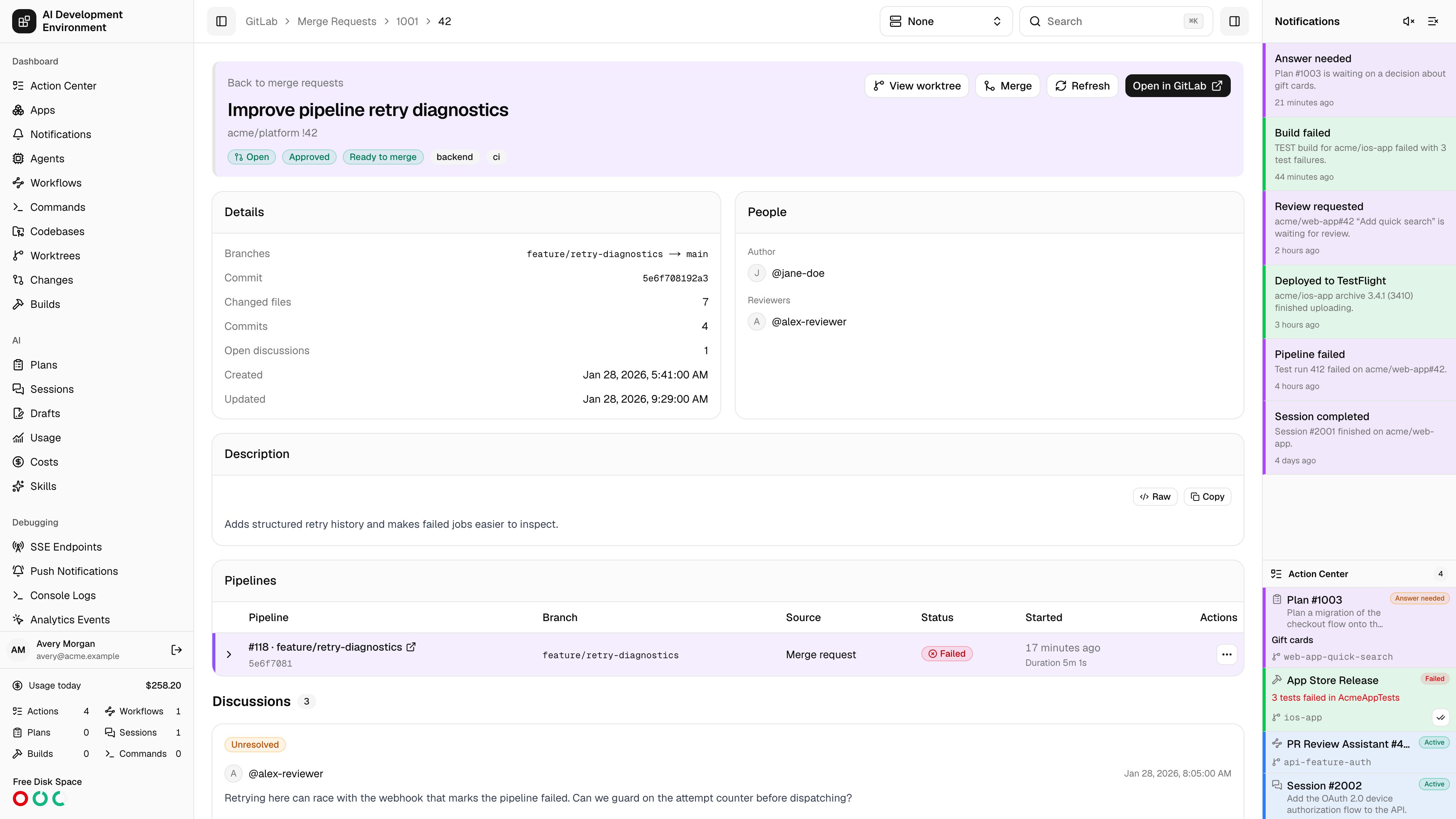
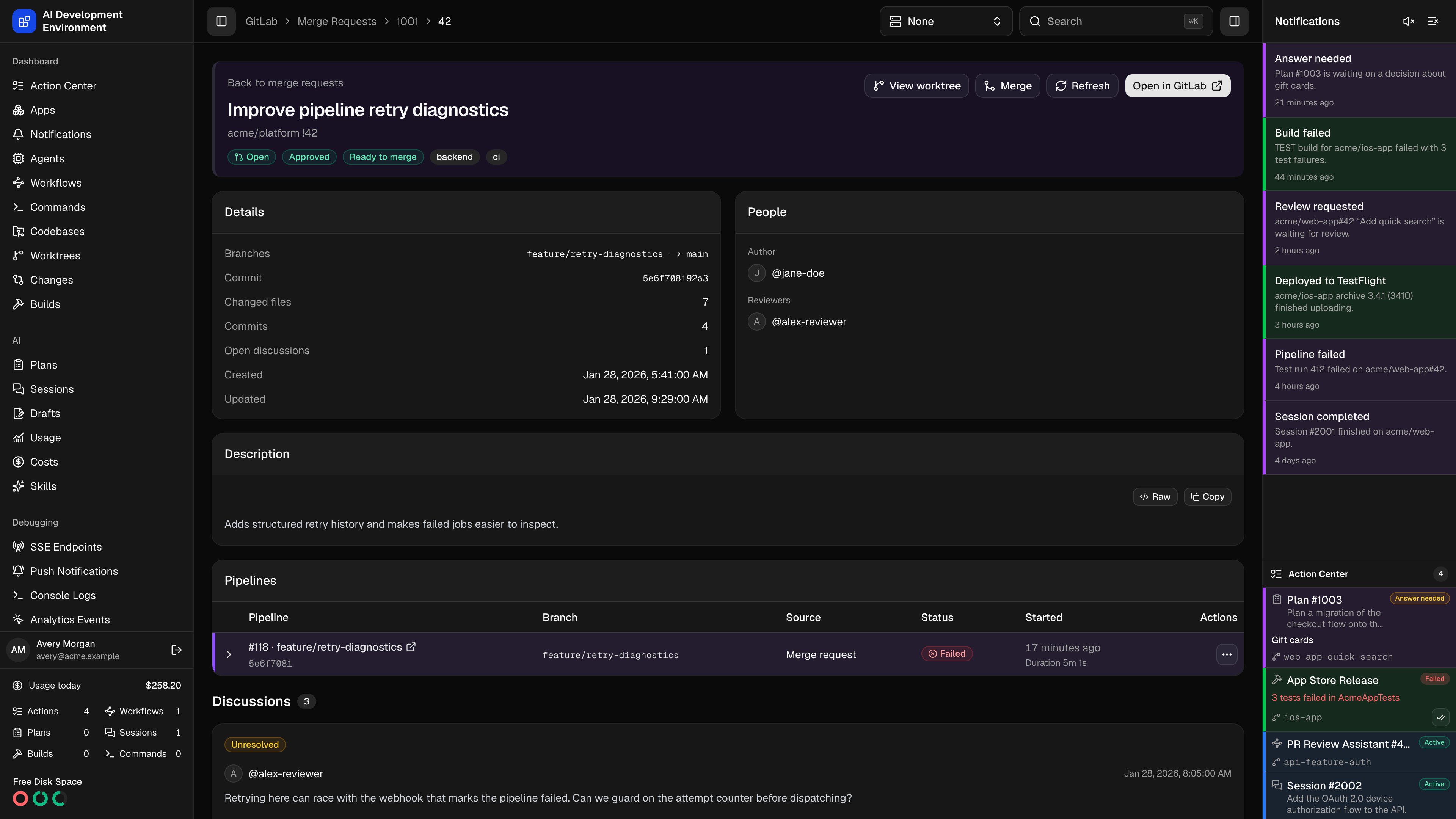 Open a request from [Merge requests](/gitlab/merge-requests), a linked worktree, or a pipeline. The web route is `/gitlab/merge-requests/{projectId}/{iid}`, where `iid` is the project's merge request number.
## Inspect the request
The header shows the request state, approval state, merge readiness, labels, and linked Jira ticket. **Merged** and **Closed** requests display their final state instead of an internal readiness value such as `not_open`.
The details cards show source and target branches, commit SHA, change and commit counts, unresolved discussions, timestamps, author, and reviewers. The description and discussion notes render Markdown. Use **Open in GitLab** to inspect provider-specific details.
Expand a pipeline to inspect its jobs grouped by stage, statuses, timing, allowed failures, and retry history. The same pipeline presentation appears on the [Pipelines](/gitlab/pipelines) and worktree pages.
## Review discussions
Use [Comments](/gitlab/comments) to filter discussions across requests or open the discussion count for this request.
Reply to individual discussions and resolve or reopen threads that GitLab marks as resolvable. Submit **Approve**, **Comment**, or **Request changes** from the review section of an open request. Permission and provider errors stay visible so you can correct the problem and retry.
## Choose merge options
Open a request from [Merge requests](/gitlab/merge-requests), a linked worktree, or a pipeline. The web route is `/gitlab/merge-requests/{projectId}/{iid}`, where `iid` is the project's merge request number.
## Inspect the request
The header shows the request state, approval state, merge readiness, labels, and linked Jira ticket. **Merged** and **Closed** requests display their final state instead of an internal readiness value such as `not_open`.
The details cards show source and target branches, commit SHA, change and commit counts, unresolved discussions, timestamps, author, and reviewers. The description and discussion notes render Markdown. Use **Open in GitLab** to inspect provider-specific details.
Expand a pipeline to inspect its jobs grouped by stage, statuses, timing, allowed failures, and retry history. The same pipeline presentation appears on the [Pipelines](/gitlab/pipelines) and worktree pages.
## Review discussions
Use [Comments](/gitlab/comments) to filter discussions across requests or open the discussion count for this request.
Reply to individual discussions and resolve or reopen threads that GitLab marks as resolvable. Submit **Approve**, **Comment**, or **Request changes** from the review section of an open request. Permission and provider errors stay visible so you can correct the problem and retry.
## Choose merge options
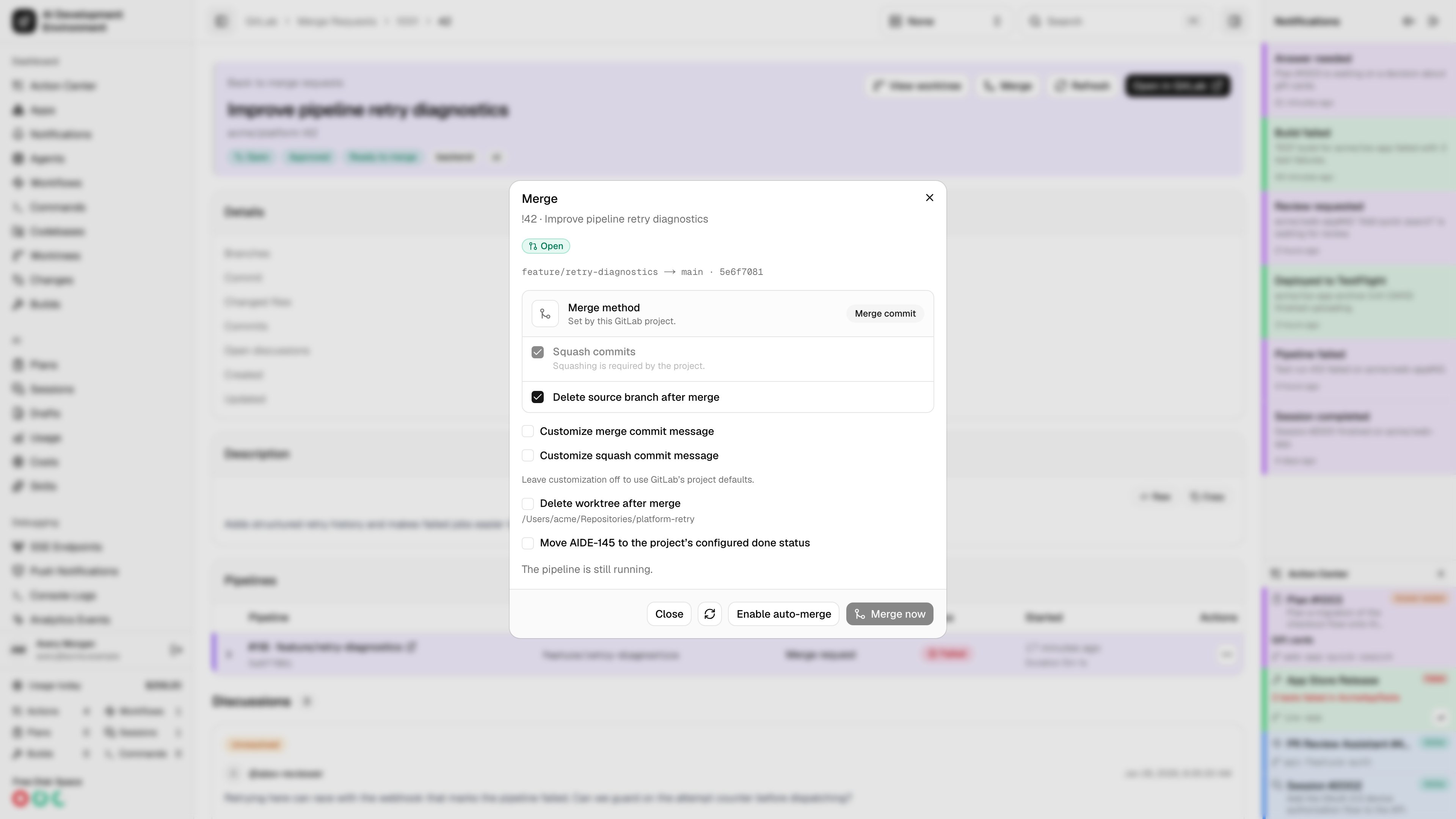
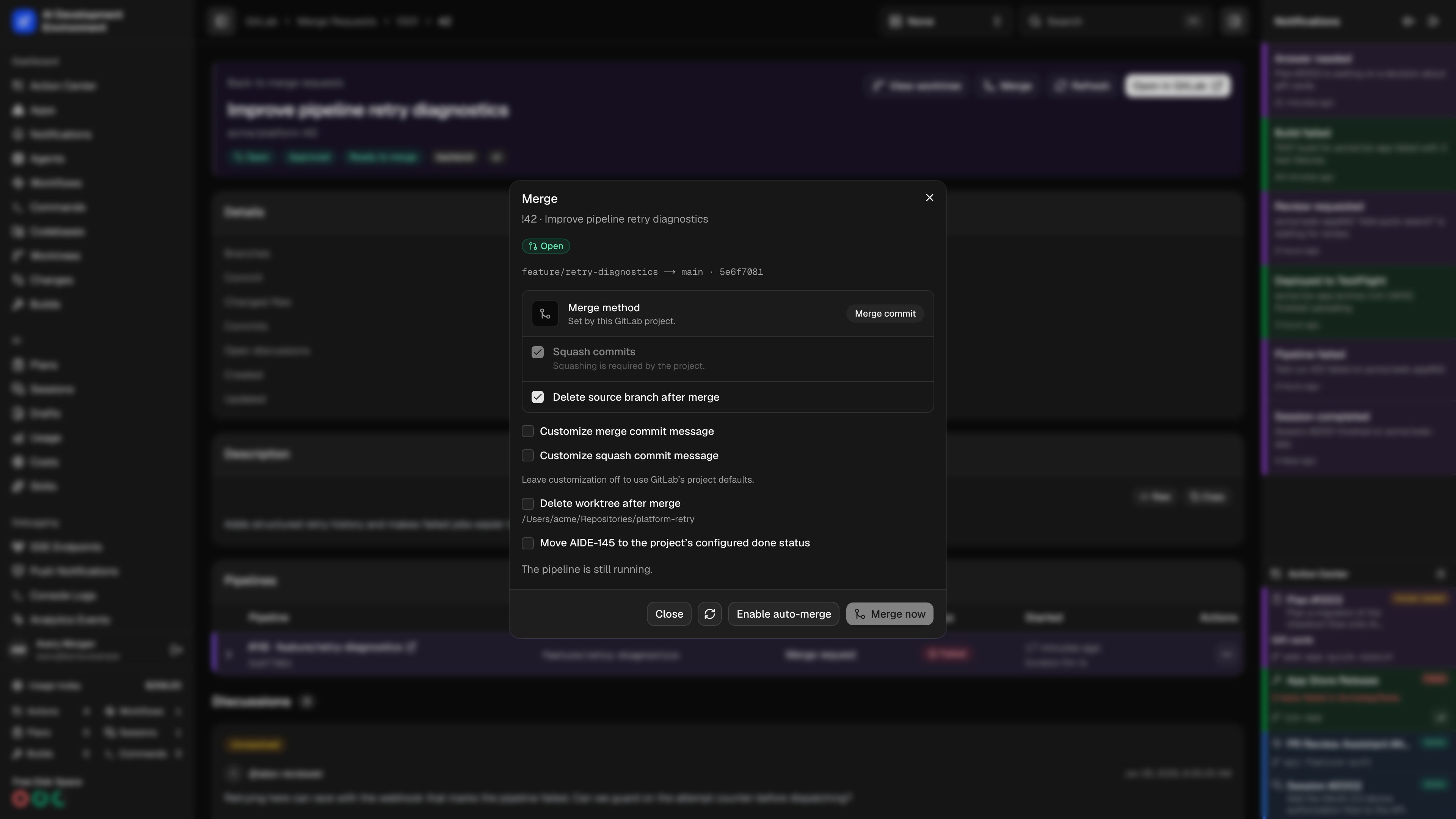 Open **Merge** to fetch current readiness and project policy. The dialog offers:
| Option | Behavior |
| - | - |
| Merge method | Displays the project's merge commit, semi-linear, or fast-forward policy. |
| Squash commits | Honors required or forbidden squash settings; otherwise you can choose. |
| Remove source branch | Uses GitLab's source-branch policy and available capability. |
| Commit messages | Uses GitLab defaults unless you enable and fill a custom merge or squash message. |
| Move Jira ticket to Done | Available when the linked ticket and its configured Done status support it. |
| Delete linked worktree | Available for a matching non-primary worktree; cleanup checks the branch, commit, repository, and clean working tree. |
**Merge now** submits an immediate merge. **Enable auto-merge** asks GitLab to merge when its requirements are met. The dialog explains why an action is unavailable. If auto-merge is already enabled, **Cancel auto-merge** cancels the pending request when your token permits it.
When GitLab allows squash to be changed, and when Jira or worktree follow-ups are eligible, AIDE resolves their initial selections in this order:
1. GitLab's required or forbidden squash policy overrides every AIDE selection.
2. A saved merge operation keeps its explicit selections.
3. Otherwise, the defaults from **Manage GitLab projects** initialize squash, Jira completion, and eligible worktree deletion.
Capability checks still disable Jira completion or worktree deletion when the action is unsupported. These defaults only preselect AIDE's merge controls. They do not modify GitLab project settings or the squash option used when creating a merge request. Removing the remote source branch in GitLab is separate from deleting a local worktree.
The merge submission includes the source commit shown in the dialog. If the branch changes before submission, refresh the options and review the new commit before retrying.
## Track completion and follow-ups
The control plane saves the merge operation and observes GitLab until it confirms completion. **Auto-merge enabled** means the request is still waiting. **Running follow-ups** means GitLab has merged the request and selected Jira or worktree actions remain in progress.
If a follow-up fails, the merged request remains merged. Open **Merge follow-ups**, read the error, resolve the issue, and choose **Retry follow-ups**. Completed steps are recorded so retries continue the remaining work. Worktree cleanup does not run for an unconfirmed merge or a worktree that no longer matches the merged source.
If GitLab disables auto-merge, review the current options and explicitly enable it again. The control plane does not re-enable it automatically.
Pending operations survive a control-plane restart. Changing the configured GitLab instance, replacing the source commit, or losing a required capability can move an operation to **Action required**.
## Use the iOS app or API
The iOS client uses the same project policies, readiness checks, merge results, and operation lifecycle as the web app. The backend exposes `gitlabMergeRequestMergeOptions` for inspection, including its `operation` field, `submitGitLabMergeRequestMerge` for submission, `cancelGitLabAutoMerge` for cancellation, and `retryGitLabMergeFollowUps` for recovery.
Deploy the control-plane schema and database migration before distributing the updated iOS client. The existing merge mutation remains available for older clients.
Saved operations contain the selected options, source commit and branch, optional commit messages, linked Jira ticket and worktree identifiers, completion markers, and failure details. Treat these records as repository and workflow data when setting control-plane access and backup policies.
Open **Merge** to fetch current readiness and project policy. The dialog offers:
| Option | Behavior |
| - | - |
| Merge method | Displays the project's merge commit, semi-linear, or fast-forward policy. |
| Squash commits | Honors required or forbidden squash settings; otherwise you can choose. |
| Remove source branch | Uses GitLab's source-branch policy and available capability. |
| Commit messages | Uses GitLab defaults unless you enable and fill a custom merge or squash message. |
| Move Jira ticket to Done | Available when the linked ticket and its configured Done status support it. |
| Delete linked worktree | Available for a matching non-primary worktree; cleanup checks the branch, commit, repository, and clean working tree. |
**Merge now** submits an immediate merge. **Enable auto-merge** asks GitLab to merge when its requirements are met. The dialog explains why an action is unavailable. If auto-merge is already enabled, **Cancel auto-merge** cancels the pending request when your token permits it.
When GitLab allows squash to be changed, and when Jira or worktree follow-ups are eligible, AIDE resolves their initial selections in this order:
1. GitLab's required or forbidden squash policy overrides every AIDE selection.
2. A saved merge operation keeps its explicit selections.
3. Otherwise, the defaults from **Manage GitLab projects** initialize squash, Jira completion, and eligible worktree deletion.
Capability checks still disable Jira completion or worktree deletion when the action is unsupported. These defaults only preselect AIDE's merge controls. They do not modify GitLab project settings or the squash option used when creating a merge request. Removing the remote source branch in GitLab is separate from deleting a local worktree.
The merge submission includes the source commit shown in the dialog. If the branch changes before submission, refresh the options and review the new commit before retrying.
## Track completion and follow-ups
The control plane saves the merge operation and observes GitLab until it confirms completion. **Auto-merge enabled** means the request is still waiting. **Running follow-ups** means GitLab has merged the request and selected Jira or worktree actions remain in progress.
If a follow-up fails, the merged request remains merged. Open **Merge follow-ups**, read the error, resolve the issue, and choose **Retry follow-ups**. Completed steps are recorded so retries continue the remaining work. Worktree cleanup does not run for an unconfirmed merge or a worktree that no longer matches the merged source.
If GitLab disables auto-merge, review the current options and explicitly enable it again. The control plane does not re-enable it automatically.
Pending operations survive a control-plane restart. Changing the configured GitLab instance, replacing the source commit, or losing a required capability can move an operation to **Action required**.
## Use the iOS app or API
The iOS client uses the same project policies, readiness checks, merge results, and operation lifecycle as the web app. The backend exposes `gitlabMergeRequestMergeOptions` for inspection, including its `operation` field, `submitGitLabMergeRequestMerge` for submission, `cancelGitLabAutoMerge` for cancellation, and `retryGitLabMergeFollowUps` for recovery.
Deploy the control-plane schema and database migration before distributing the updated iOS client. The existing merge mutation remains available for older clients.
Saved operations contain the selected options, source commit and branch, optional commit messages, linked Jira ticket and worktree identifiers, completion markers, and failure details. Treat these records as repository and workflow data when setting control-plane access and backup policies.