> ## Documentation Index
> Fetch the complete documentation index at: https://ai-development-environment.mintlify.site/llms.txt
> Use this file to discover all available pages before exploring further.
# Skill editor
> Edit a skill package's metadata and every file it contains.
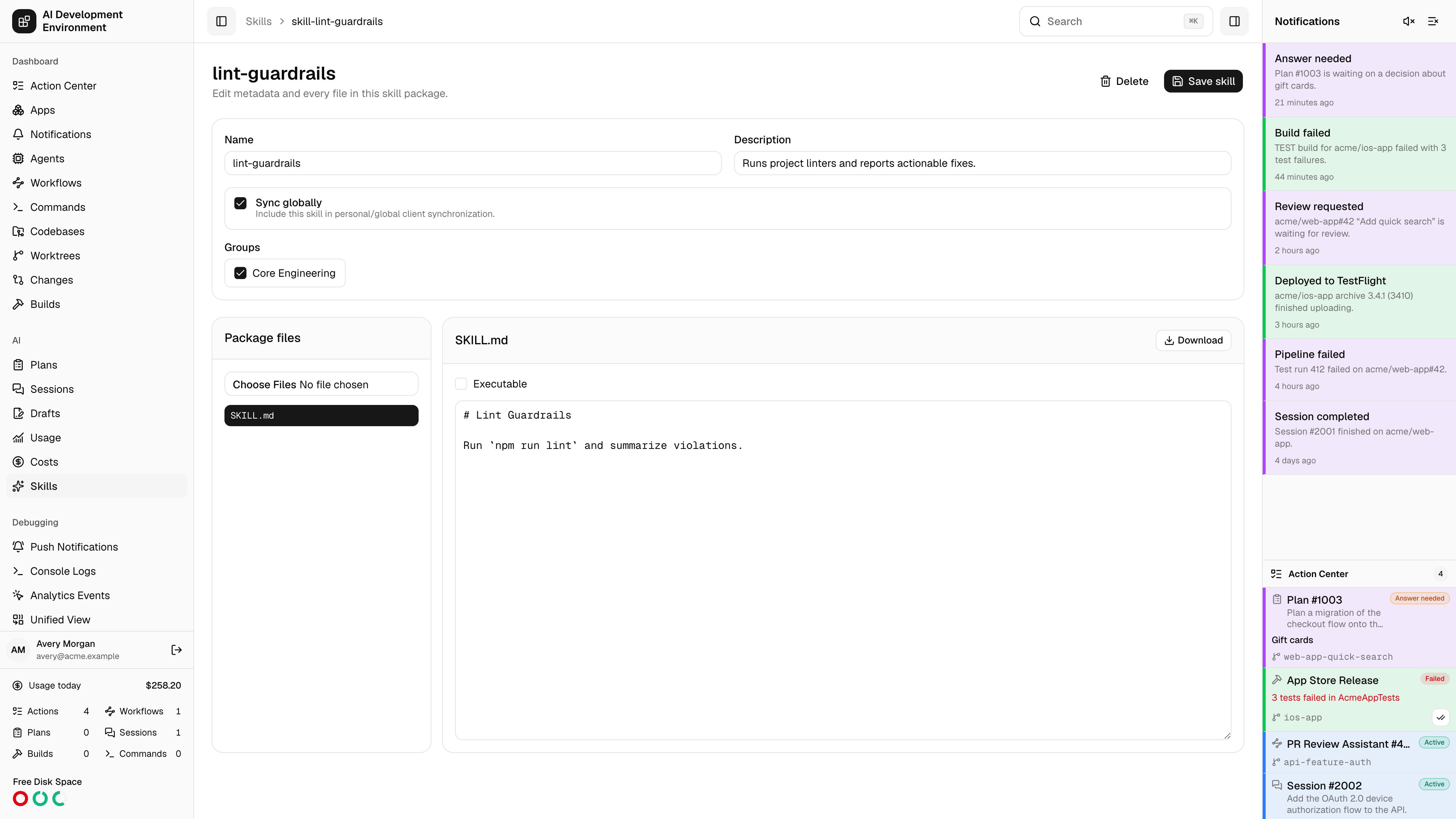
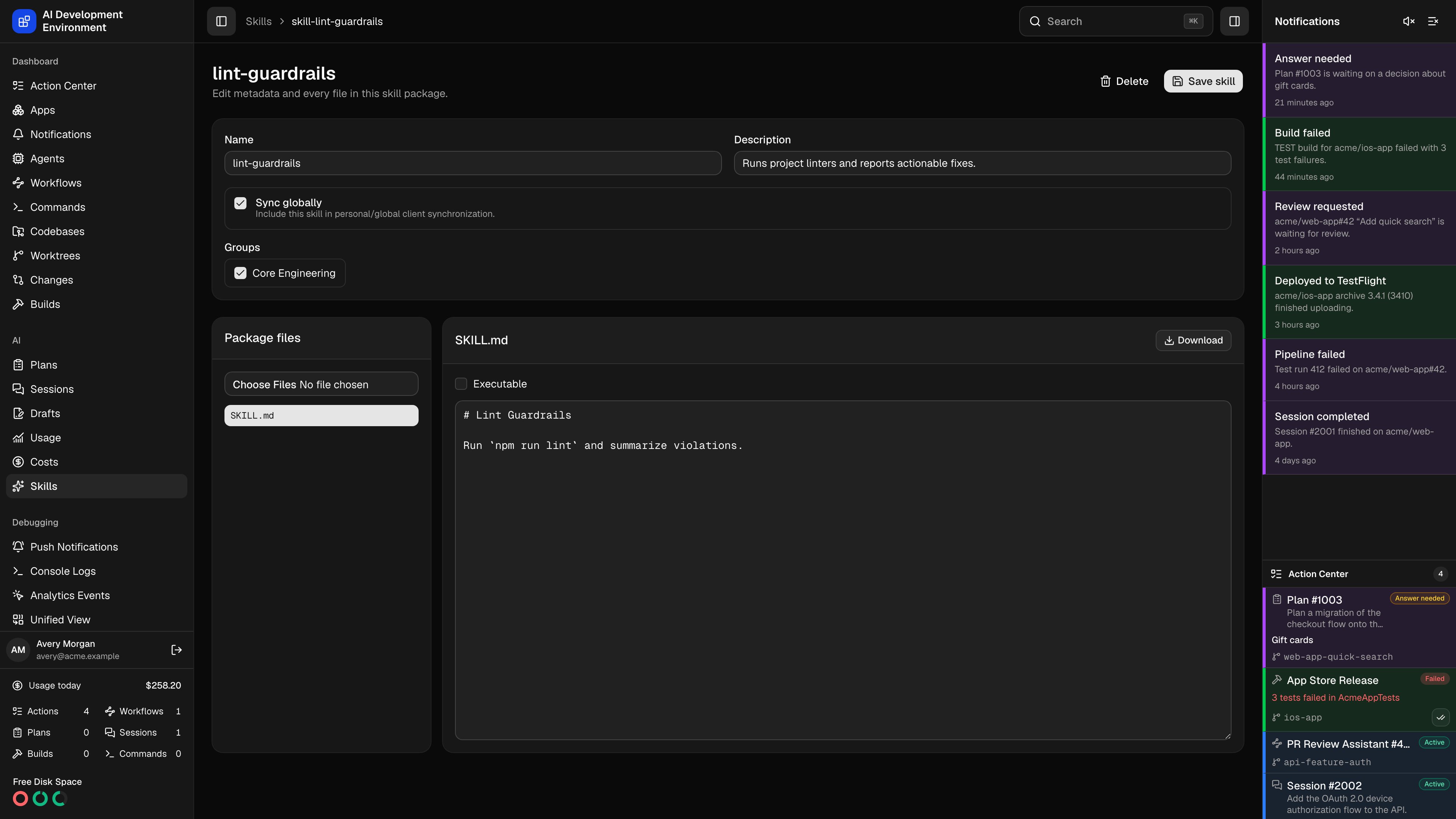 The skill editor at `/skills/{id}` edits one canonical skill package end to end — its metadata, its group assignments, and every file in it. The same editor opens on a blank package at `/skills/new`, prefilled with a `SKILL.md` skeleton.
## Metadata
| Field | What it controls |
| ----------------- | ------------------------------------------------------------------------------------------------------------------ |
| **Name** | The skill's identity, up to 64 characters. Also the folder name it deploys as |
| **Description** | When the skill should be used, up to 1024 characters. This is what an AI client reads to decide whether to load it |
| **Sync globally** | Include this skill in personal and global client synchronization on every agent |
| **Groups** | The [skill groups](/skills/skill-groups) this skill belongs to, which is how it reaches specific repositories |
Name and description are stored as fields *and* written into the `SKILL.md` frontmatter. Editing either updates the frontmatter in place, preserving the rest of it — including any other keys and the body below. A `SKILL.md` without usable frontmatter is regenerated from the skeleton.
A skill with **Sync globally** off and no groups assigned has nowhere to deploy to. Give it at least one group, or turn global sync on.
## Package files
The left panel lists every file in the package, sorted by path, and the file input above it adds or replaces files — uploading a file whose path already exists replaces that entry rather than duplicating it.
Selecting a file opens it on the right:
UTF-8 text opens in a monospaced editor and saves with the package. Everything is stored by content, so line endings and Unicode survive the round trip.
A file that is not valid UTF-8, or that contains a null byte, cannot be edited in place. The editor says so and offers **Download** to inspect it, or a re-upload at the same path to replace it.
Any file except `SKILL.md` can be renamed. Backslashes become forward slashes, so a path pasted from Windows still lands in the right subfolder. A rename onto an existing path is refused.
**Executable** is stored per file and applied when the package is deployed, so a helper script arrives on disk runnable.
Any file except `SKILL.md` can be removed. Removal takes effect when you save.
`SKILL.md` is the package's entry point. It cannot be renamed or removed — every other file is yours to arrange.
## Saving and deleting
**Save skill** writes the whole package at once: metadata, group assignments, and the complete file list. Saving a new skill redirects to its permanent URL.
**Delete** removes the skill from the database and, during the next synchronization, removes the managed copies it deployed. The confirmation names the skill before you commit.
Saving changes the package hash, which is what a sync compares against installed copies. A skill you edit here will show as a pending change on the next [sync run](/skills/skill-sync-run) until it is applied.
## Notes
* File contents are stored base64-encoded, so text and binary assets share one code path and neither is corrupted in transit.
* Editing a skill does not deploy it. Run **Sync all** from the [Skills](/skills/skills) page, or **Sync group** from a group, to push changes out.
## Related pages
The catalog this editor opens from.
How a project-only skill reaches repositories.
Push an edited package out to agents.
Membership and repository assignment for one group.
The skill editor at `/skills/{id}` edits one canonical skill package end to end — its metadata, its group assignments, and every file in it. The same editor opens on a blank package at `/skills/new`, prefilled with a `SKILL.md` skeleton.
## Metadata
| Field | What it controls |
| ----------------- | ------------------------------------------------------------------------------------------------------------------ |
| **Name** | The skill's identity, up to 64 characters. Also the folder name it deploys as |
| **Description** | When the skill should be used, up to 1024 characters. This is what an AI client reads to decide whether to load it |
| **Sync globally** | Include this skill in personal and global client synchronization on every agent |
| **Groups** | The [skill groups](/skills/skill-groups) this skill belongs to, which is how it reaches specific repositories |
Name and description are stored as fields *and* written into the `SKILL.md` frontmatter. Editing either updates the frontmatter in place, preserving the rest of it — including any other keys and the body below. A `SKILL.md` without usable frontmatter is regenerated from the skeleton.
A skill with **Sync globally** off and no groups assigned has nowhere to deploy to. Give it at least one group, or turn global sync on.
## Package files
The left panel lists every file in the package, sorted by path, and the file input above it adds or replaces files — uploading a file whose path already exists replaces that entry rather than duplicating it.
Selecting a file opens it on the right:
UTF-8 text opens in a monospaced editor and saves with the package. Everything is stored by content, so line endings and Unicode survive the round trip.
A file that is not valid UTF-8, or that contains a null byte, cannot be edited in place. The editor says so and offers **Download** to inspect it, or a re-upload at the same path to replace it.
Any file except `SKILL.md` can be renamed. Backslashes become forward slashes, so a path pasted from Windows still lands in the right subfolder. A rename onto an existing path is refused.
**Executable** is stored per file and applied when the package is deployed, so a helper script arrives on disk runnable.
Any file except `SKILL.md` can be removed. Removal takes effect when you save.
`SKILL.md` is the package's entry point. It cannot be renamed or removed — every other file is yours to arrange.
## Saving and deleting
**Save skill** writes the whole package at once: metadata, group assignments, and the complete file list. Saving a new skill redirects to its permanent URL.
**Delete** removes the skill from the database and, during the next synchronization, removes the managed copies it deployed. The confirmation names the skill before you commit.
Saving changes the package hash, which is what a sync compares against installed copies. A skill you edit here will show as a pending change on the next [sync run](/skills/skill-sync-run) until it is applied.
## Notes
* File contents are stored base64-encoded, so text and binary assets share one code path and neither is corrupted in transit.
* Editing a skill does not deploy it. Run **Sync all** from the [Skills](/skills/skills) page, or **Sync group** from a group, to push changes out.
## Related pages
The catalog this editor opens from.
How a project-only skill reaches repositories.
Push an edited package out to agents.
Membership and repository assignment for one group.