> ## Documentation Index
> Fetch the complete documentation index at: https://ai-development-environment.mintlify.site/llms.txt
> Use this file to discover all available pages before exploring further.
# Skill synchronization
> Review proposed skill changes across agents and resolve conflicts before applying.
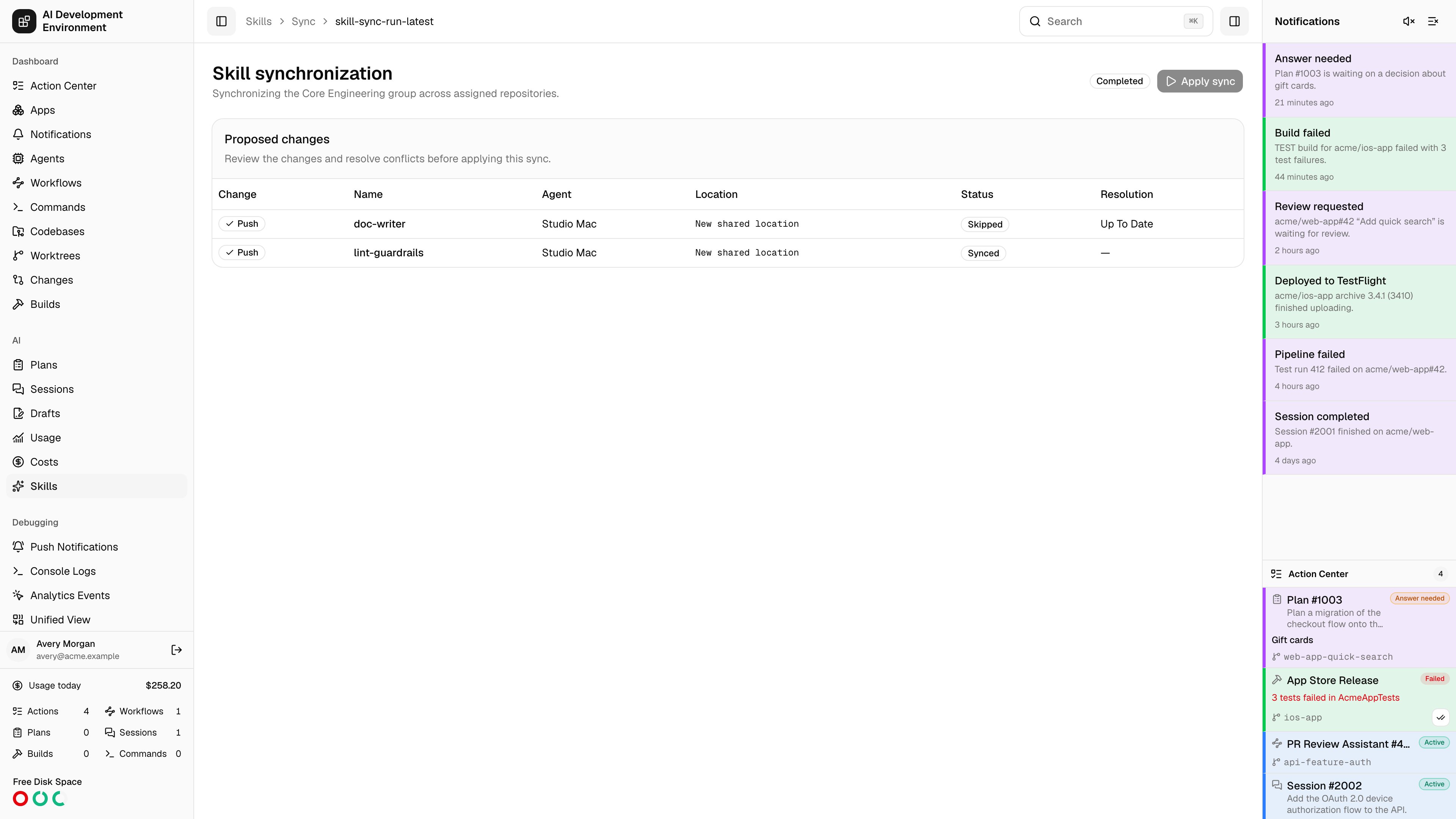
 The skill synchronization page at `/skills/sync/{id}` is the review step between deciding what your skills should be and writing them to disk. A sync scans the enabled AI clients on every participating Mac, compares what it finds against the database, lists every change it proposes, and applies nothing until you say so.
A run is created by **Sync all** on the [Skills](/skills/skills) page, or **Sync group** on a [skill group](/skills/skill-group-detail).
## Phases of a run
Each participating agent enumerates the skill directories of every enabled client and reports what is installed, at global and project scope.
For anything that differs, the agent reads the full package back so the control plane can compare contents rather than just names.
Proposed changes are computed. Anything unambiguous is marked ready; anything that needs a human decision is marked blocked.
**Apply sync** writes the imports into the database and deploys packages out to the agents. It is enabled once the run is **Ready** or **Partial**.
The run's own status appears as a badge in the header: **Preparing** while scanning and reading, **Needs resolution** while anything is blocked, **Ready** when everything is decided, **Applying** while deploying, and **Succeeded** or **Partial** at the end.
## Agent sync status
A table lists every participating Mac with its connection state, the phase it has reached, and its status for that phase. An agent that goes offline mid-run leaves its item **Pending**, which holds the whole run in preparation.
**Skip pending clients** appears when that happens: it marks the stalled agents' items skipped and lets the run proceed with the agents that did report. Skipped agents are excluded from deployment entirely, so their copies are left untouched rather than being treated as deletions.
## Proposed changes
Every row is one change to one package, in one place.
| Change | Meaning |
| -------------------- | ------------------------------------------------------------------------------------- |
| **Unchanged** | The client copy already matches the database |
| **Import** | Bring the client copy into the database as a new or updated skill |
| **Export** | Write the database version out to this location |
| **Delete redundant** | Remove a deployed copy no longer justified by global sync or by any assigned group |
| **Conflict** | The database and the client copy have both changed, and neither can win automatically |
Alongside each change sits its status — **Ready**, **Blocked**, **Complete**, **Skipped**, or **Failed** — the skill name, the agent, and the absolute path (or **New shared location** for a package that has no home on disk yet).
A copy this app deployed is **tracked**, and a tracked copy that has drifted is always a conflict — the app will not silently overwrite an edit someone made on disk. An untracked copy is compared against its baseline to decide whether the change belongs in the database or on the client.
## Resolving a blocked row
Blocked rows carry their own controls:
| Control | Effect |
| ----------------------- | -------------------------------------------------------- |
| **Use database** | Keep the canonical version and overwrite the client copy |
| **Use client copy** | Take the version found on disk as canonical |
| **Compare and resolve** | Open the manual editor described below |
| **Delete client copy** | Remove an untracked client copy instead of importing it |
| **Skip** | Leave this one alone entirely for this run |
Importing a *project* skill needs somewhere to belong, so a row for one shows a **Choose a skill group** selector first. **Use client copy** stays disabled until a group is picked.
Choosing **Use client copy** or **Use edited version** makes that package canonical, so the run's other unresolved conflicts for the same skill name are settled at once — they resolve to the newly canonical database version rather than asking you the same question per Mac.
### Manual resolution
**Compare and resolve** opens a three-way editor: the **Database version** and the **Client version** side by side, and a **Canonical result** you build underneath. A file list on the left spans the union of paths across all three, so a file present in only one version is still reachable.
* **Start from database** or **Start from client copy** seeds the result, then edit from there.
* **Add files** uploads additional files into the result.
* Text files edit inline; binary files show their size and executable flag rather than a garbled preview.
* Files can be renamed, marked executable, or removed — except `SKILL.md`, which the result must contain.
**Use edited version** saves the result as the canonical package for that skill and marks the row ready.
## Applying
**Apply sync** refuses to run while any row is still blocked. It imports the accepted client packages into the database, then deploys the resulting canonical packages to every non-skipped agent. Progress streams back into the same page, and the run finishes as **Succeeded**, or **Partial** when some deployments failed or were skipped.
## Notes
* The page reloads every ten seconds in addition to its live subscription, so it recovers on its own if a subscription drops mid-run.
* A group sync only touches the repositories that group is assigned to; **Sync all** covers global and project skills across every enabled client.
## Related pages
Start a full sync and browse what each client has installed.
Start a sync scoped to one group.
Edit the canonical package a sync deploys.
The Macs a sync scans and deploys to.
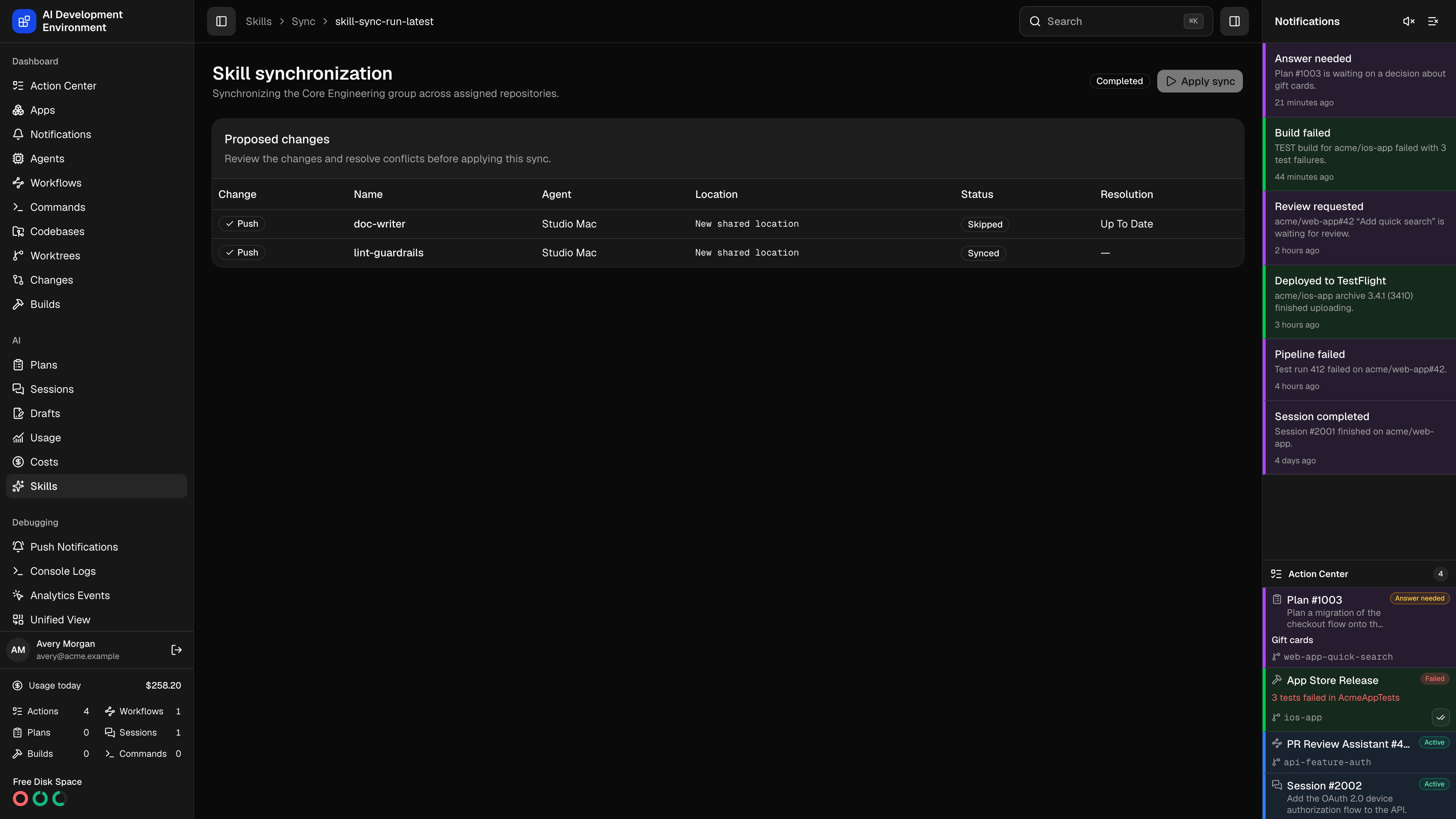
The skill synchronization page at `/skills/sync/{id}` is the review step between deciding what your skills should be and writing them to disk. A sync scans the enabled AI clients on every participating Mac, compares what it finds against the database, lists every change it proposes, and applies nothing until you say so.
A run is created by **Sync all** on the [Skills](/skills/skills) page, or **Sync group** on a [skill group](/skills/skill-group-detail).
## Phases of a run
Each participating agent enumerates the skill directories of every enabled client and reports what is installed, at global and project scope.
For anything that differs, the agent reads the full package back so the control plane can compare contents rather than just names.
Proposed changes are computed. Anything unambiguous is marked ready; anything that needs a human decision is marked blocked.
**Apply sync** writes the imports into the database and deploys packages out to the agents. It is enabled once the run is **Ready** or **Partial**.
The run's own status appears as a badge in the header: **Preparing** while scanning and reading, **Needs resolution** while anything is blocked, **Ready** when everything is decided, **Applying** while deploying, and **Succeeded** or **Partial** at the end.
## Agent sync status
A table lists every participating Mac with its connection state, the phase it has reached, and its status for that phase. An agent that goes offline mid-run leaves its item **Pending**, which holds the whole run in preparation.
**Skip pending clients** appears when that happens: it marks the stalled agents' items skipped and lets the run proceed with the agents that did report. Skipped agents are excluded from deployment entirely, so their copies are left untouched rather than being treated as deletions.
## Proposed changes
Every row is one change to one package, in one place.
| Change | Meaning |
| -------------------- | ------------------------------------------------------------------------------------- |
| **Unchanged** | The client copy already matches the database |
| **Import** | Bring the client copy into the database as a new or updated skill |
| **Export** | Write the database version out to this location |
| **Delete redundant** | Remove a deployed copy no longer justified by global sync or by any assigned group |
| **Conflict** | The database and the client copy have both changed, and neither can win automatically |
Alongside each change sits its status — **Ready**, **Blocked**, **Complete**, **Skipped**, or **Failed** — the skill name, the agent, and the absolute path (or **New shared location** for a package that has no home on disk yet).
A copy this app deployed is **tracked**, and a tracked copy that has drifted is always a conflict — the app will not silently overwrite an edit someone made on disk. An untracked copy is compared against its baseline to decide whether the change belongs in the database or on the client.
## Resolving a blocked row
Blocked rows carry their own controls:
| Control | Effect |
| ----------------------- | -------------------------------------------------------- |
| **Use database** | Keep the canonical version and overwrite the client copy |
| **Use client copy** | Take the version found on disk as canonical |
| **Compare and resolve** | Open the manual editor described below |
| **Delete client copy** | Remove an untracked client copy instead of importing it |
| **Skip** | Leave this one alone entirely for this run |
Importing a *project* skill needs somewhere to belong, so a row for one shows a **Choose a skill group** selector first. **Use client copy** stays disabled until a group is picked.
Choosing **Use client copy** or **Use edited version** makes that package canonical, so the run's other unresolved conflicts for the same skill name are settled at once — they resolve to the newly canonical database version rather than asking you the same question per Mac.
### Manual resolution
**Compare and resolve** opens a three-way editor: the **Database version** and the **Client version** side by side, and a **Canonical result** you build underneath. A file list on the left spans the union of paths across all three, so a file present in only one version is still reachable.
* **Start from database** or **Start from client copy** seeds the result, then edit from there.
* **Add files** uploads additional files into the result.
* Text files edit inline; binary files show their size and executable flag rather than a garbled preview.
* Files can be renamed, marked executable, or removed — except `SKILL.md`, which the result must contain.
**Use edited version** saves the result as the canonical package for that skill and marks the row ready.
## Applying
**Apply sync** refuses to run while any row is still blocked. It imports the accepted client packages into the database, then deploys the resulting canonical packages to every non-skipped agent. Progress streams back into the same page, and the run finishes as **Succeeded**, or **Partial** when some deployments failed or were skipped.
## Notes
* The page reloads every ten seconds in addition to its live subscription, so it recovers on its own if a subscription drops mid-run.
* A group sync only touches the repositories that group is assigned to; **Sync all** covers global and project skills across every enabled client.
## Related pages
Start a full sync and browse what each client has installed.
Start a sync scoped to one group.
Edit the canonical package a sync deploys.
The Macs a sync scans and deploys to.