> ## Documentation Index
> Fetch the complete documentation index at: https://ai-development-environment.mintlify.site/llms.txt
> Use this file to discover all available pages before exploring further.
# Credentials
> Review the active credential backend, protection status, and a metadata-only inventory.
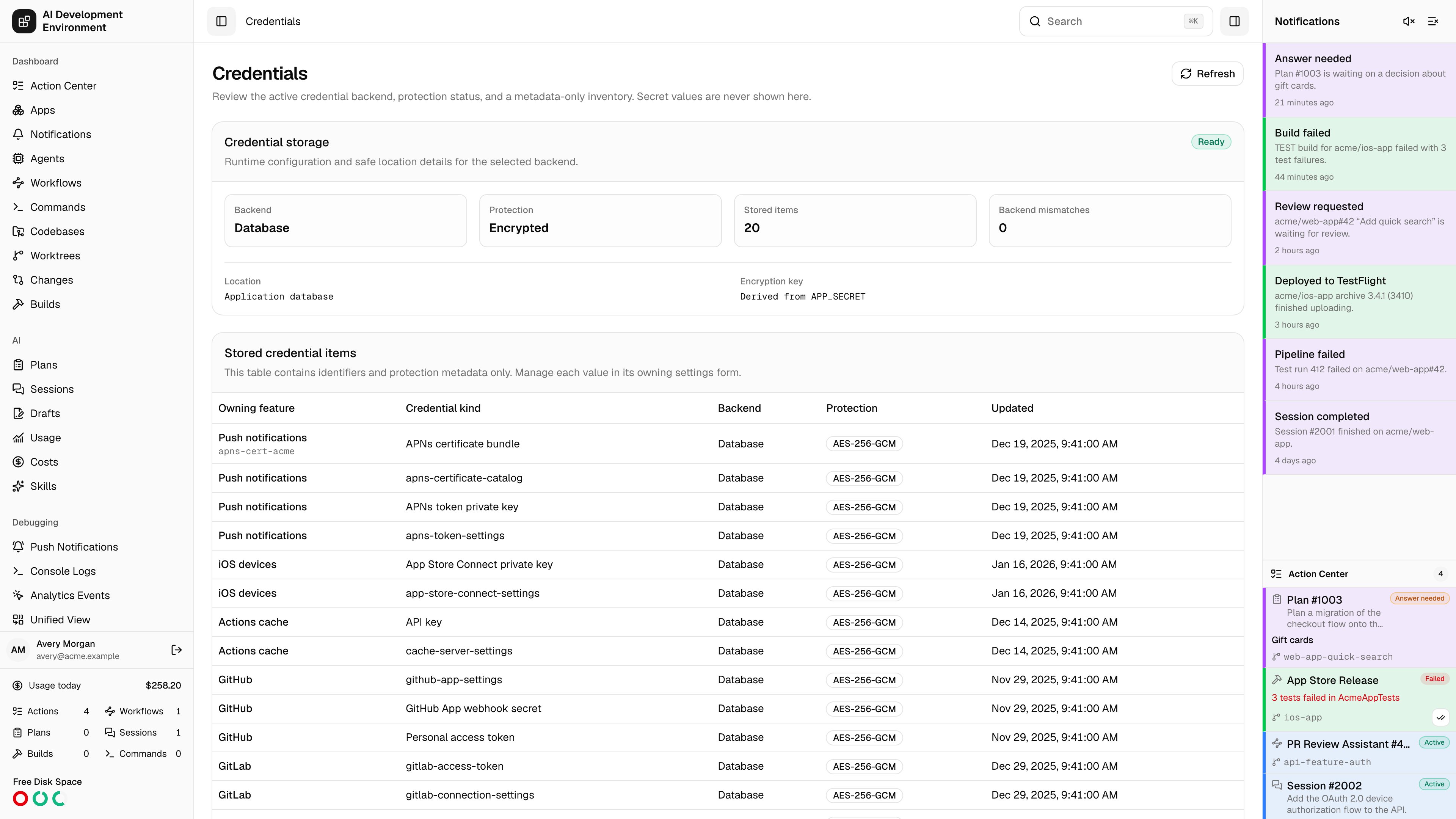
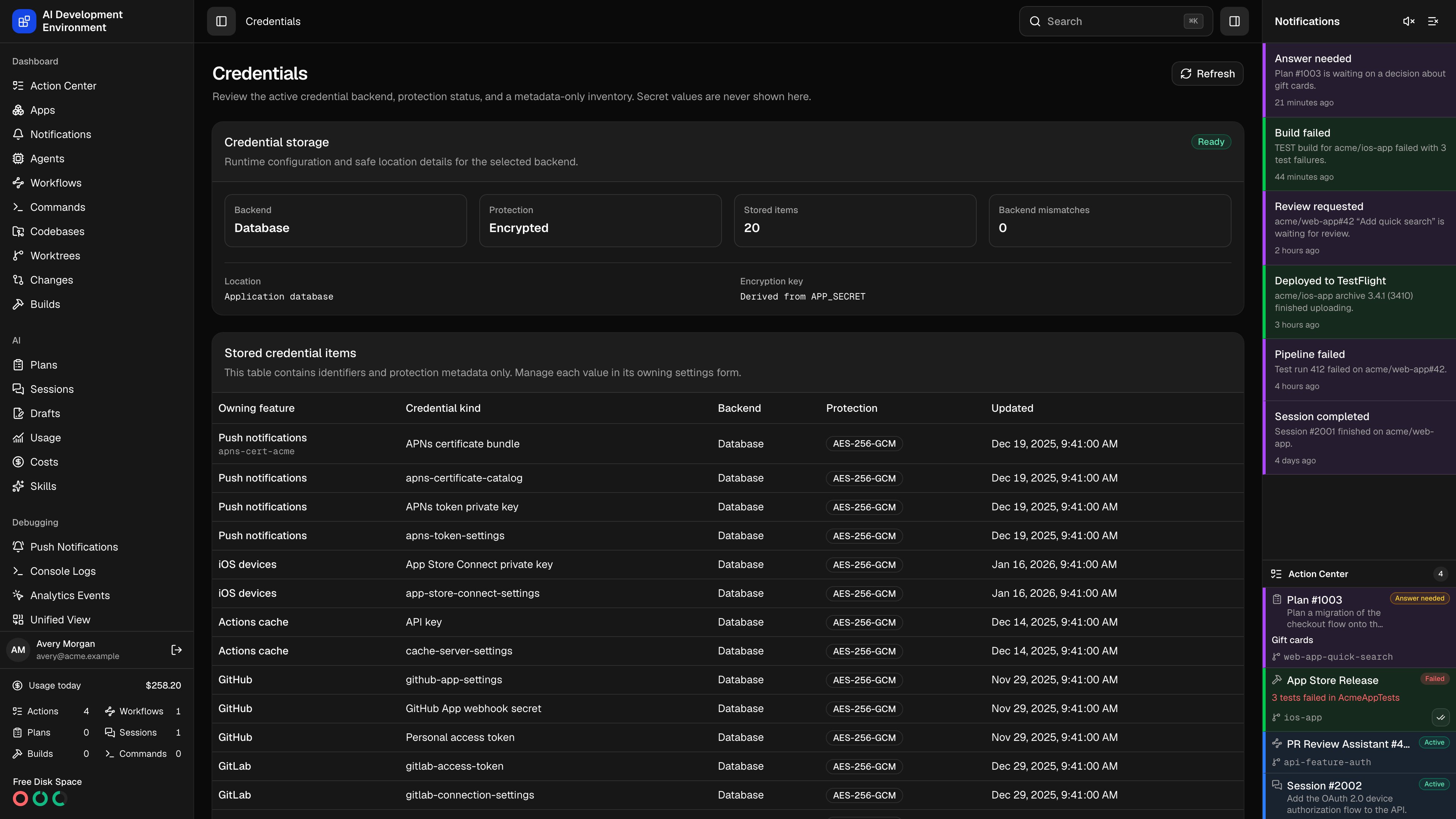 The **Credentials** page at `/credentials` answers one question: *where are my credentials and connection settings, and how well are they protected?*
Every long-lived credential in the app — Jira and GitHub tokens, cache-server settings, external MCP headers, iOS signing keys, App Store Connect settings, and APNs credentials — is written through a single server-only credential service. Related connection data, including URLs and public key identifiers, uses the same backend so an existing Vault can initialize a fresh install. This page reports which backend the service is using, whether payloads are encrypted, and what is stored. It never shows a payload value, and it is entirely read-only: each item is managed in the settings form that owns it.
## Credential storage
The **Credential storage** card is the health check.
| Field | What it shows |
| ---------------------- | ---------------------------------------------------------------------------- |
| **Backend** | Database, HashiCorp Vault, or macOS Keychain |
| **Protection** | AES-256-GCM, Plaintext, Vault KV v2, or Keychain |
| **Stored items** | How many credential records exist |
| **Backend mismatches** | How many records were written by a different backend than the one now active |
The card carries an overall state — **Ready**, **Warning**, or **Error** — alongside backend-specific detail: the Vault address, mount, path prefix, namespace, TLS settings, and **Vault access** value for Vault; the service name and host platform for Keychain; the storage location and encryption key status for the database. A read-only Vault also adds a **Read-only** badge. After startup adoption, the card reports how many external items received new local metadata rows.
### Warnings
Warnings are specific, and each names the fix.
| Warning | What it means |
| ------------------------------------------------- | ------------------------------------------------------------------------------------------------------------------------------------------------------------------- |
| **APP\_SECRET is invalid** | `APP_SECRET` is missing, or is not base64 or hex of exactly 32 bytes. Database storage cannot open without it |
| **APP\_SECRET does not match stored credentials** | The configured root cannot decrypt the existing rows. Restore the original value, or set it as `APP_SECRET_PREVIOUS` so the rows are re-encrypted on the next start |
| **Credential data is invalid** | One or more records have unusable metadata |
| **Storage type is invalid** | `CREDENTIAL_STORAGE_TYPE` must be `database`, `vault`, or `keychain` |
| **Credential store is unavailable** | The backend could not be initialized; check configuration and logs |
| **Vault configuration is invalid** | Vault cannot start with the current address, headers, path, or TLS settings |
| **Vault uses plaintext HTTP** | Secret payloads and auth headers are unprotected in transit |
| **Vault certificate verification is disabled** | `VAULT_SKIP_VERIFY` accepts untrusted certificates |
| **Read-only setting does not apply** | `CREDENTIAL_VAULT_READ_ONLY` is set while the database or Keychain backend is active |
| **Existing credentials could not be adopted** | Startup could not rebuild metadata for the items already in Vault. Check the connection and token capabilities, then restart |
| **Keychain is unsupported on this host** | The Keychain backend was selected on a non-macOS host |
| **Credentials use another backend** | Some records were written by a previous backend and the configured backend does not hold a replacement value |
## Stored credential items
The inventory table holds identifiers and protection metadata only.
| Column | What it shows |
| ------------------- | --------------------------------------------------------------------------------------------------------------------------------------------------------------------------------------- |
| **Owning feature** | Jira, GitHub, Actions cache, External MCP server, iOS devices, Push notifications, or Notifications |
| **Credential kind** | What the record is — connection settings, an API token or key, a private key, a webhook secret, a header bundle, an APNs certificate catalog or bundle, or a Web Push VAPID private key |
| **Updated** | When the value was last written |
To change any of these, open the settings form for its owning feature. Nothing on this page edits a value.
## Encryption on the database backend
The database backend always encrypts payloads with AES-256-GCM. The key is derived from `APP_SECRET` with HKDF, so there is nothing to configure, no plaintext mode, and no second key to keep track of. Vault and Keychain storage never use the derived key — those backends hold the secrets themselves.
Back up `APP_SECRET`. Stored credentials cannot be read without it.
To replace `APP_SECRET`, set the old value as `APP_SECRET_PREVIOUS` alongside the new one. Every credential sealed under the old root is re-encrypted on the next start, after which `APP_SECRET_PREVIOUS` can be removed. Without it the server refuses to start rather than silently losing access. See [Environment variables](/reference/environment-variables#rotating-app-secret).
## What is stored here
Long-lived Jira, GitHub, cache-server, external MCP, iOS-signing, App Store Connect, and APNs credentials all go through this server-only credential service. Companion connection settings use it too:
| Feature | Credential-backed connection settings |
| ----------------- | ---------------------------------------------------- |
| Jira | Site URL, account email, webhook URL, and JQL filter |
| GitHub App | App ID, installation ID, and webhook URL |
| Actions cache | Base URL and custom headers |
| App Store Connect | Issuer ID and key ID |
| APNs token | Team ID and key ID |
| APNs certificates | Certificate name, topic, and environment catalog |
Pick a backend with `CREDENTIAL_STORAGE_TYPE` — see [Set up credential storage](/quickstart#set-up-credential-storage) for the configuration of each one.
The migration that introduces credential-backed connection settings removes the old database copies without moving them. After upgrading from an earlier release, re-enter the affected connection settings on **Settings**. Existing token, key, and certificate payloads remain in their current credential backend.
## Vault options
Beyond `VAULT_ADDR`, the Vault backend accepts `VAULT_TOKEN`, `VAULT_NAMESPACE`, `CREDENTIAL_VAULT_MOUNT` (default `secret`), `CREDENTIAL_VAULT_PATH_PREFIX` (default `ai-development-environment/credentials`), `CREDENTIAL_VAULT_HEADERS`, and `CREDENTIAL_VAULT_READ_ONLY` (default `false`).
`CREDENTIAL_VAULT_HEADERS` must be a JSON object of string values, and should be shell-quoted:
```bash theme={null}
CREDENTIAL_VAULT_HEADERS='{"X-Vault-AWS-IAM-Server-ID":"vault.example.com"}'
```
Custom headers cannot override transport-managed headers or conflict with `VAULT_TOKEN` and `VAULT_NAMESPACE`. The page lists the *names* of any additional headers, never their values.
TLS options are `VAULT_CACERT`, `VAULT_TLS_SERVER_NAME`, and `VAULT_SKIP_VERIFY`. Plaintext HTTP and disabled certificate verification are supported, but produce prominent security warnings.
## Reusing an existing Vault
At startup, a Vault-backed server looks for credentials already stored under its configured mount and path prefix. It validates their payload metadata and creates the missing local `Credential` rows. Vault remains the source of the payload; SQLite receives only metadata.
Known, fixed credential paths are always probed, even when the token cannot list the prefix. Grant `list` on the KV v2 metadata path to discover dynamic entries such as per-server external MCP headers and individual APNs certificate bundles. Unrelated or malformed entries are skipped. An adoption failure does not stop the server, but it produces an **Existing credentials could not be adopted** warning.
If Vault already holds a valid secret for an existing local row that names another backend, startup repoints that row to Vault and removes its superseded database ciphertext. This is a metadata adoption, not a secret copy. A row remains a backend mismatch when Vault does not hold the corresponding secret.
## Read-only Vault installs
Set `CREDENTIAL_VAULT_READ_ONLY=true` when an install may consume shared Vault credentials but must not modify them. The **Credentials** page shows **Read-only**, and credential-backed controls on **Settings** are disabled. Reads and connection tests that use existing values still work. Writes and deletions fail before the server sends a request to Vault.
A token that lacks write permission produces the same read-only error when Vault rejects a write, even if the flag is unset. The flag itself applies only to Vault. Setting it with database or Keychain storage does not block writes and produces a warning.
For the default mount and prefix, a read-only policy is:
```hcl theme={null}
path "secret/data/ai-development-environment/credentials/*" {
capabilities = ["read"]
}
path "secret/metadata/ai-development-environment/credentials/*" {
capabilities = ["read", "list"]
}
```
## Switching backends
Each metadata row records the backend that supplies its payload. Changing `CREDENTIAL_STORAGE_TYPE` never copies a secret into the new backend. When switching to Vault, startup adopts values Vault already holds and repoints their local rows; anything missing from Vault remains in **Backend mismatches** and must be re-entered through its owning settings form. Other backend changes do not have a readable inventory to adopt and require re-entry.
Vault adoption only uses values already present at the configured mount and prefix. It does not transfer secrets from the database or Keychain into Vault.
## Notes
* Secret values, ciphertext, authentication headers, and secret-derived previews are never returned to the browser — including on this page.
* The backend is selected with the `CREDENTIAL_STORAGE_TYPE` environment variable.
* Read-only mode is explicit server configuration, not a property inferred from the Vault token until a write is denied.
* Vault and Keychain outages do not take down the dashboard; only the features that need an unavailable credential fail.
* The `keychain` backend is loaded only on Darwin. Selecting it on Linux or in a container leaves the app running and reports an unsupported-backend error.
## Related pages
The forms that own every value listed here.
Choosing and configuring a credential backend.
The **Credentials** page at `/credentials` answers one question: *where are my credentials and connection settings, and how well are they protected?*
Every long-lived credential in the app — Jira and GitHub tokens, cache-server settings, external MCP headers, iOS signing keys, App Store Connect settings, and APNs credentials — is written through a single server-only credential service. Related connection data, including URLs and public key identifiers, uses the same backend so an existing Vault can initialize a fresh install. This page reports which backend the service is using, whether payloads are encrypted, and what is stored. It never shows a payload value, and it is entirely read-only: each item is managed in the settings form that owns it.
## Credential storage
The **Credential storage** card is the health check.
| Field | What it shows |
| ---------------------- | ---------------------------------------------------------------------------- |
| **Backend** | Database, HashiCorp Vault, or macOS Keychain |
| **Protection** | AES-256-GCM, Plaintext, Vault KV v2, or Keychain |
| **Stored items** | How many credential records exist |
| **Backend mismatches** | How many records were written by a different backend than the one now active |
The card carries an overall state — **Ready**, **Warning**, or **Error** — alongside backend-specific detail: the Vault address, mount, path prefix, namespace, TLS settings, and **Vault access** value for Vault; the service name and host platform for Keychain; the storage location and encryption key status for the database. A read-only Vault also adds a **Read-only** badge. After startup adoption, the card reports how many external items received new local metadata rows.
### Warnings
Warnings are specific, and each names the fix.
| Warning | What it means |
| ------------------------------------------------- | ------------------------------------------------------------------------------------------------------------------------------------------------------------------- |
| **APP\_SECRET is invalid** | `APP_SECRET` is missing, or is not base64 or hex of exactly 32 bytes. Database storage cannot open without it |
| **APP\_SECRET does not match stored credentials** | The configured root cannot decrypt the existing rows. Restore the original value, or set it as `APP_SECRET_PREVIOUS` so the rows are re-encrypted on the next start |
| **Credential data is invalid** | One or more records have unusable metadata |
| **Storage type is invalid** | `CREDENTIAL_STORAGE_TYPE` must be `database`, `vault`, or `keychain` |
| **Credential store is unavailable** | The backend could not be initialized; check configuration and logs |
| **Vault configuration is invalid** | Vault cannot start with the current address, headers, path, or TLS settings |
| **Vault uses plaintext HTTP** | Secret payloads and auth headers are unprotected in transit |
| **Vault certificate verification is disabled** | `VAULT_SKIP_VERIFY` accepts untrusted certificates |
| **Read-only setting does not apply** | `CREDENTIAL_VAULT_READ_ONLY` is set while the database or Keychain backend is active |
| **Existing credentials could not be adopted** | Startup could not rebuild metadata for the items already in Vault. Check the connection and token capabilities, then restart |
| **Keychain is unsupported on this host** | The Keychain backend was selected on a non-macOS host |
| **Credentials use another backend** | Some records were written by a previous backend and the configured backend does not hold a replacement value |
## Stored credential items
The inventory table holds identifiers and protection metadata only.
| Column | What it shows |
| ------------------- | --------------------------------------------------------------------------------------------------------------------------------------------------------------------------------------- |
| **Owning feature** | Jira, GitHub, Actions cache, External MCP server, iOS devices, Push notifications, or Notifications |
| **Credential kind** | What the record is — connection settings, an API token or key, a private key, a webhook secret, a header bundle, an APNs certificate catalog or bundle, or a Web Push VAPID private key |
| **Updated** | When the value was last written |
To change any of these, open the settings form for its owning feature. Nothing on this page edits a value.
## Encryption on the database backend
The database backend always encrypts payloads with AES-256-GCM. The key is derived from `APP_SECRET` with HKDF, so there is nothing to configure, no plaintext mode, and no second key to keep track of. Vault and Keychain storage never use the derived key — those backends hold the secrets themselves.
Back up `APP_SECRET`. Stored credentials cannot be read without it.
To replace `APP_SECRET`, set the old value as `APP_SECRET_PREVIOUS` alongside the new one. Every credential sealed under the old root is re-encrypted on the next start, after which `APP_SECRET_PREVIOUS` can be removed. Without it the server refuses to start rather than silently losing access. See [Environment variables](/reference/environment-variables#rotating-app-secret).
## What is stored here
Long-lived Jira, GitHub, cache-server, external MCP, iOS-signing, App Store Connect, and APNs credentials all go through this server-only credential service. Companion connection settings use it too:
| Feature | Credential-backed connection settings |
| ----------------- | ---------------------------------------------------- |
| Jira | Site URL, account email, webhook URL, and JQL filter |
| GitHub App | App ID, installation ID, and webhook URL |
| Actions cache | Base URL and custom headers |
| App Store Connect | Issuer ID and key ID |
| APNs token | Team ID and key ID |
| APNs certificates | Certificate name, topic, and environment catalog |
Pick a backend with `CREDENTIAL_STORAGE_TYPE` — see [Set up credential storage](/quickstart#set-up-credential-storage) for the configuration of each one.
The migration that introduces credential-backed connection settings removes the old database copies without moving them. After upgrading from an earlier release, re-enter the affected connection settings on **Settings**. Existing token, key, and certificate payloads remain in their current credential backend.
## Vault options
Beyond `VAULT_ADDR`, the Vault backend accepts `VAULT_TOKEN`, `VAULT_NAMESPACE`, `CREDENTIAL_VAULT_MOUNT` (default `secret`), `CREDENTIAL_VAULT_PATH_PREFIX` (default `ai-development-environment/credentials`), `CREDENTIAL_VAULT_HEADERS`, and `CREDENTIAL_VAULT_READ_ONLY` (default `false`).
`CREDENTIAL_VAULT_HEADERS` must be a JSON object of string values, and should be shell-quoted:
```bash theme={null}
CREDENTIAL_VAULT_HEADERS='{"X-Vault-AWS-IAM-Server-ID":"vault.example.com"}'
```
Custom headers cannot override transport-managed headers or conflict with `VAULT_TOKEN` and `VAULT_NAMESPACE`. The page lists the *names* of any additional headers, never their values.
TLS options are `VAULT_CACERT`, `VAULT_TLS_SERVER_NAME`, and `VAULT_SKIP_VERIFY`. Plaintext HTTP and disabled certificate verification are supported, but produce prominent security warnings.
## Reusing an existing Vault
At startup, a Vault-backed server looks for credentials already stored under its configured mount and path prefix. It validates their payload metadata and creates the missing local `Credential` rows. Vault remains the source of the payload; SQLite receives only metadata.
Known, fixed credential paths are always probed, even when the token cannot list the prefix. Grant `list` on the KV v2 metadata path to discover dynamic entries such as per-server external MCP headers and individual APNs certificate bundles. Unrelated or malformed entries are skipped. An adoption failure does not stop the server, but it produces an **Existing credentials could not be adopted** warning.
If Vault already holds a valid secret for an existing local row that names another backend, startup repoints that row to Vault and removes its superseded database ciphertext. This is a metadata adoption, not a secret copy. A row remains a backend mismatch when Vault does not hold the corresponding secret.
## Read-only Vault installs
Set `CREDENTIAL_VAULT_READ_ONLY=true` when an install may consume shared Vault credentials but must not modify them. The **Credentials** page shows **Read-only**, and credential-backed controls on **Settings** are disabled. Reads and connection tests that use existing values still work. Writes and deletions fail before the server sends a request to Vault.
A token that lacks write permission produces the same read-only error when Vault rejects a write, even if the flag is unset. The flag itself applies only to Vault. Setting it with database or Keychain storage does not block writes and produces a warning.
For the default mount and prefix, a read-only policy is:
```hcl theme={null}
path "secret/data/ai-development-environment/credentials/*" {
capabilities = ["read"]
}
path "secret/metadata/ai-development-environment/credentials/*" {
capabilities = ["read", "list"]
}
```
## Switching backends
Each metadata row records the backend that supplies its payload. Changing `CREDENTIAL_STORAGE_TYPE` never copies a secret into the new backend. When switching to Vault, startup adopts values Vault already holds and repoints their local rows; anything missing from Vault remains in **Backend mismatches** and must be re-entered through its owning settings form. Other backend changes do not have a readable inventory to adopt and require re-entry.
Vault adoption only uses values already present at the configured mount and prefix. It does not transfer secrets from the database or Keychain into Vault.
## Notes
* Secret values, ciphertext, authentication headers, and secret-derived previews are never returned to the browser — including on this page.
* The backend is selected with the `CREDENTIAL_STORAGE_TYPE` environment variable.
* Read-only mode is explicit server configuration, not a property inferred from the Vault token until a write is denied.
* Vault and Keychain outages do not take down the dashboard; only the features that need an unavailable credential fail.
* The `keychain` backend is loaded only on Darwin. Selecting it on Linux or in a container leaves the app running and reports an unsupported-backend error.
## Related pages
The forms that own every value listed here.
Choosing and configuring a credential backend.