> ## Documentation Index
> Fetch the complete documentation index at: https://ai-development-environment.mintlify.site/llms.txt
> Use this file to discover all available pages before exploring further.
# Device details
> Review a device's identifiers, IP and enrollment history, firmware, and Apple registration.
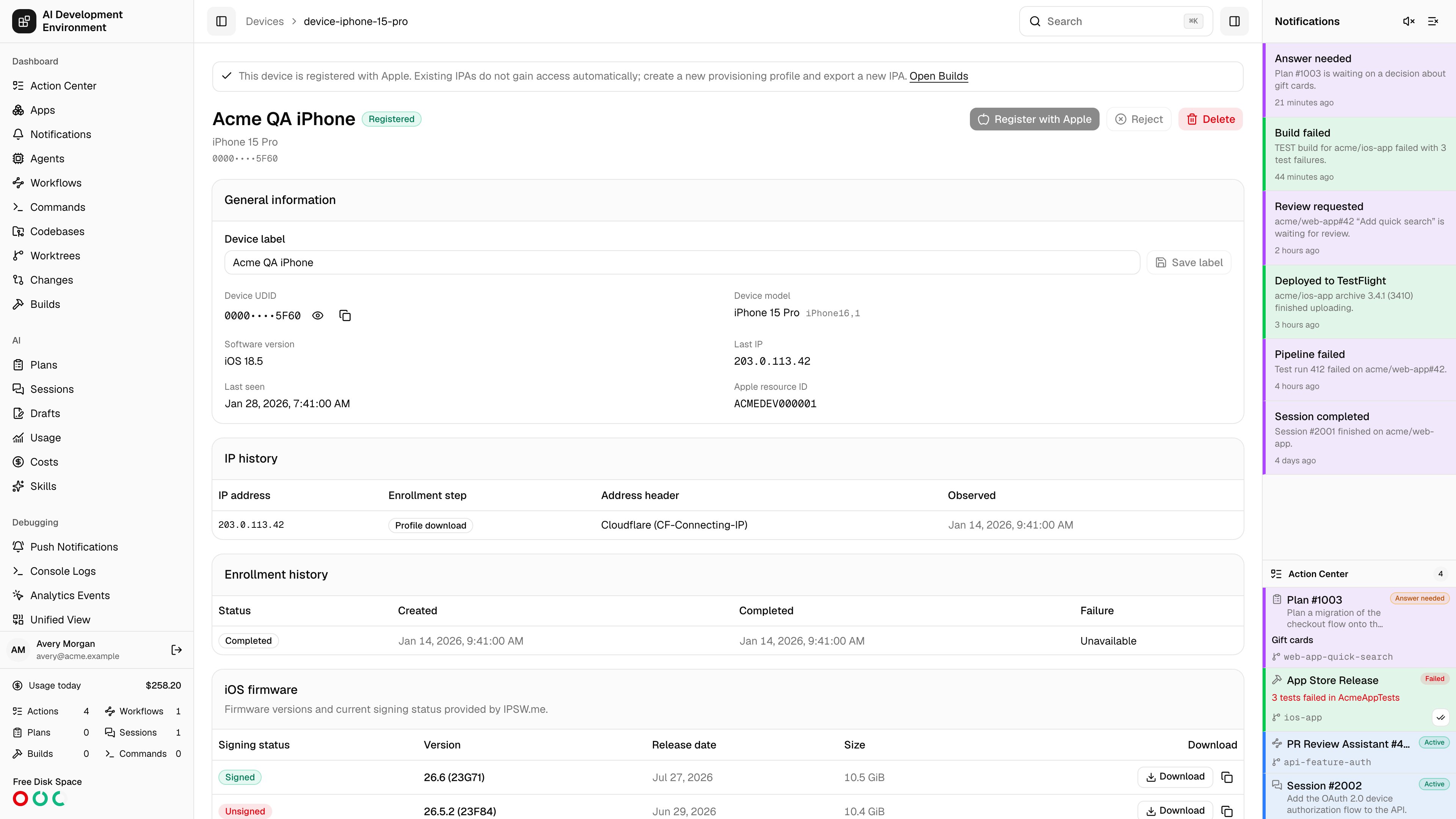
 The device details page at `/devices/{id}` is where a single enrolled iPhone or iPad is reviewed and acted on. Every decision about a device — register it with Apple, refuse it, remove it — is made here rather than from the list, because each one wants the full context first: who enrolled it, from what addresses, and whether earlier attempts failed.
## Actions
The action row adapts to the device's state:
| Action | When it appears | What it does |
| ----------------------- | ----------------------------- | ------------------------------------------------------------------------------------------------- |
| **Register with Apple** | Status is Pending | Reconciles the UDID with your Apple Developer account and adds it only if it is not already there |
| **Retry registration** | Status is Registration failed | Runs the same flow again after you have fixed the cause |
| **Reject** | Device is not yet registered | Marks the device as refused. It stays in local history and can no longer be registered |
| **Delete** | Always | Removes the local device, its enrollment attempts, and its IP history |
Two banners appear above the actions when they apply:
* **Credentials missing** — *Configure and verify App Store Connect credentials before registering this device*, with a link straight to [Settings](/system/settings). Registration is blocked until a key is saved and verified.
* **Already registered** — a reminder that existing IPAs do not gain access to a newly registered device, with a link to [Builds](/builds/builds).
Registering a device changes nothing about builds that already exist. To get an app onto it, create a new provisioning profile that includes the device on [Provisioning Profiles](/system/provisioning-profiles), then export a new IPA.
## General information
| Field | Notes |
| --------------------- | ---------------------------------------------------------------------------------------------------------------------------- |
| **Device label** | Editable. **Save label** renames the device locally; the name sent to Apple at registration is the one stored at that moment |
| **Device UDID** | Hidden by default. Reveal it or copy it to the clipboard without displaying it |
| **Device model** | The marketing name resolved from the reported product identifier, falling back to the raw identifier |
| **Software version** | The iOS or iPadOS version reported at enrollment |
| **Last IP** | The most recent address observed during the enrollment exchange |
| **Last seen** | The most recent enrollment activity |
| **Apple resource ID** | The identifier of the device resource in your Apple Developer account, once registered |
## IP history
Every address seen during an enrollment exchange is recorded, deduplicated per enrollment, step, and address.
| Column | What it shows |
| ------------------- | ---------------------------------------------------------------------------------------------------------------------------- |
| **IP address** | The client address that was resolved |
| **Enrollment step** | **Profile download** or **Profile response** — the two points where iOS contacts the server |
| **Address header** | Which header supplied the address: Cloudflare (`CF-Connecting-IP`), proxy (`X-Forwarded-For`), or origin proxy (`X-Real-IP`) |
| **Observed** | When it was seen |
The **Address header** column is worth checking when addresses look wrong — all devices appearing at the same IP usually means a reverse proxy is not forwarding the client address, not that everyone is on one network.
## Enrollment history
Each enrollment attempt against this device is listed with its status, creation time, completion time, and failure code.
| Enrollment status | Meaning |
| ----------------- | ---------------------------------------------------------------- |
| **Issued** | A token was created but the profile was never downloaded |
| **Downloaded** | The profile was fetched; iOS has not responded yet |
| **Completed** | The device response was verified and the device recorded |
| **Expired** | The 30-minute token window elapsed before completion |
| **Failed** | The response was rejected — most often `INVALID_DEVICE_RESPONSE` |
Multiple rows are normal. A device re-enrolled later matches on UDID and updates the existing record rather than creating a duplicate, so its history accumulates here.
## iOS firmware
Firmware versions and current signing status for this device model, sourced from IPSW\.me.
| Column | What it shows |
| ------------------ | ----------------------------------------------------------------------------------------------- |
| **Signing status** | **Signed** while Apple still accepts the build for restore or downgrade, otherwise **Unsigned** |
| **Version** | The iOS or iPadOS version |
| **Release date** | When Apple shipped it |
| **Size** | The IPSW download size |
| **Download** | A direct download, plus a copy-URL action |
If IPSW\.me is unreachable the card reports the error and the rest of the page still works — firmware data is informational and fetched separately.
## Notes
* The UDID is masked by default to keep it out of screen shares and screenshots, not because it is secret.
* Deleting a device does not remove it from Apple's annual registration list. Apple only allows that during the yearly membership renewal window.
* Rejecting is the reversible choice: the record survives, and you can delete and re-enroll to reconsider.
## Related pages
The full device register and Apple TSV export.
How the identifier in this record was collected.
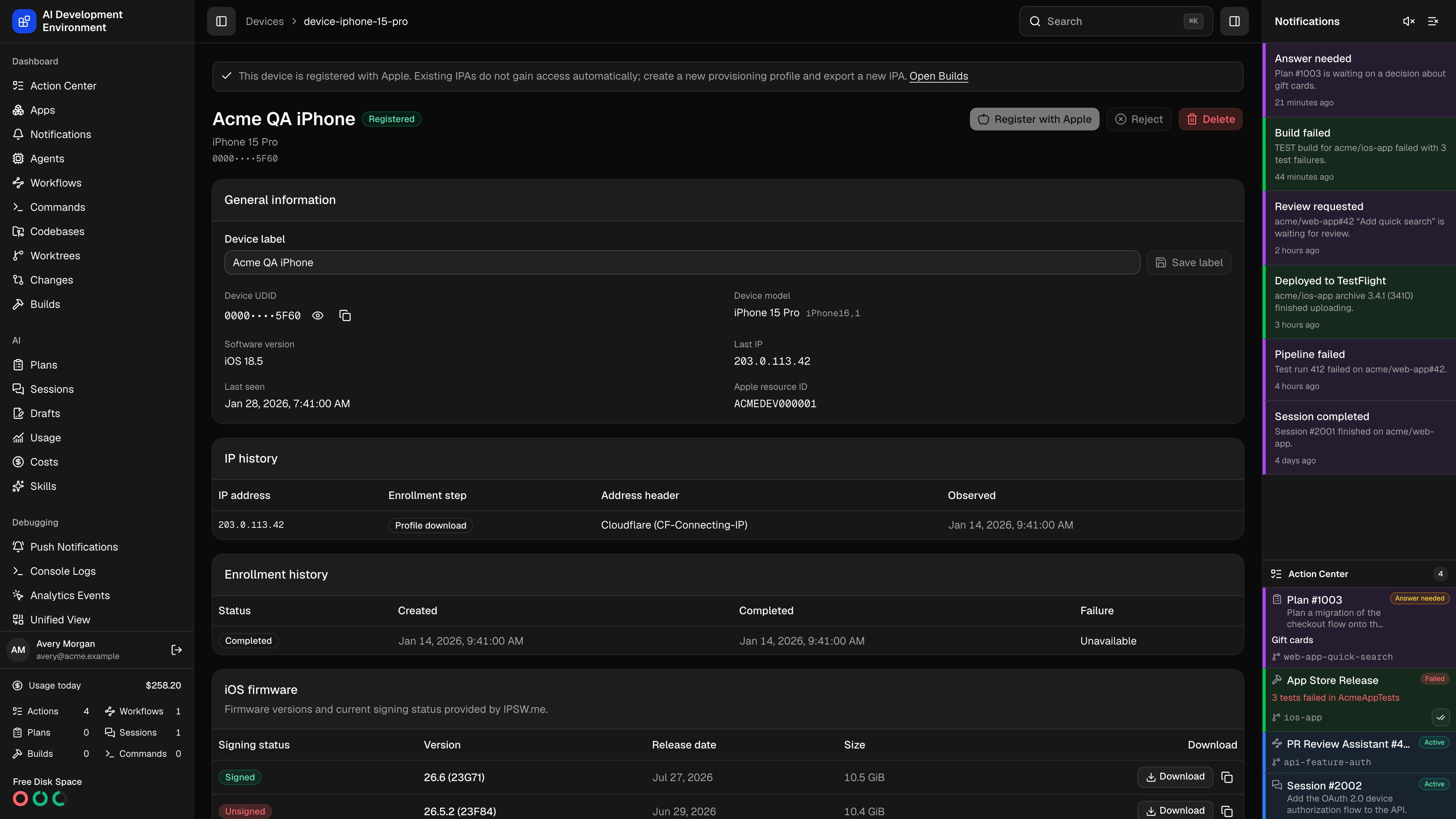
The device details page at `/devices/{id}` is where a single enrolled iPhone or iPad is reviewed and acted on. Every decision about a device — register it with Apple, refuse it, remove it — is made here rather than from the list, because each one wants the full context first: who enrolled it, from what addresses, and whether earlier attempts failed.
## Actions
The action row adapts to the device's state:
| Action | When it appears | What it does |
| ----------------------- | ----------------------------- | ------------------------------------------------------------------------------------------------- |
| **Register with Apple** | Status is Pending | Reconciles the UDID with your Apple Developer account and adds it only if it is not already there |
| **Retry registration** | Status is Registration failed | Runs the same flow again after you have fixed the cause |
| **Reject** | Device is not yet registered | Marks the device as refused. It stays in local history and can no longer be registered |
| **Delete** | Always | Removes the local device, its enrollment attempts, and its IP history |
Two banners appear above the actions when they apply:
* **Credentials missing** — *Configure and verify App Store Connect credentials before registering this device*, with a link straight to [Settings](/system/settings). Registration is blocked until a key is saved and verified.
* **Already registered** — a reminder that existing IPAs do not gain access to a newly registered device, with a link to [Builds](/builds/builds).
Registering a device changes nothing about builds that already exist. To get an app onto it, create a new provisioning profile that includes the device on [Provisioning Profiles](/system/provisioning-profiles), then export a new IPA.
## General information
| Field | Notes |
| --------------------- | ---------------------------------------------------------------------------------------------------------------------------- |
| **Device label** | Editable. **Save label** renames the device locally; the name sent to Apple at registration is the one stored at that moment |
| **Device UDID** | Hidden by default. Reveal it or copy it to the clipboard without displaying it |
| **Device model** | The marketing name resolved from the reported product identifier, falling back to the raw identifier |
| **Software version** | The iOS or iPadOS version reported at enrollment |
| **Last IP** | The most recent address observed during the enrollment exchange |
| **Last seen** | The most recent enrollment activity |
| **Apple resource ID** | The identifier of the device resource in your Apple Developer account, once registered |
## IP history
Every address seen during an enrollment exchange is recorded, deduplicated per enrollment, step, and address.
| Column | What it shows |
| ------------------- | ---------------------------------------------------------------------------------------------------------------------------- |
| **IP address** | The client address that was resolved |
| **Enrollment step** | **Profile download** or **Profile response** — the two points where iOS contacts the server |
| **Address header** | Which header supplied the address: Cloudflare (`CF-Connecting-IP`), proxy (`X-Forwarded-For`), or origin proxy (`X-Real-IP`) |
| **Observed** | When it was seen |
The **Address header** column is worth checking when addresses look wrong — all devices appearing at the same IP usually means a reverse proxy is not forwarding the client address, not that everyone is on one network.
## Enrollment history
Each enrollment attempt against this device is listed with its status, creation time, completion time, and failure code.
| Enrollment status | Meaning |
| ----------------- | ---------------------------------------------------------------- |
| **Issued** | A token was created but the profile was never downloaded |
| **Downloaded** | The profile was fetched; iOS has not responded yet |
| **Completed** | The device response was verified and the device recorded |
| **Expired** | The 30-minute token window elapsed before completion |
| **Failed** | The response was rejected — most often `INVALID_DEVICE_RESPONSE` |
Multiple rows are normal. A device re-enrolled later matches on UDID and updates the existing record rather than creating a duplicate, so its history accumulates here.
## iOS firmware
Firmware versions and current signing status for this device model, sourced from IPSW\.me.
| Column | What it shows |
| ------------------ | ----------------------------------------------------------------------------------------------- |
| **Signing status** | **Signed** while Apple still accepts the build for restore or downgrade, otherwise **Unsigned** |
| **Version** | The iOS or iPadOS version |
| **Release date** | When Apple shipped it |
| **Size** | The IPSW download size |
| **Download** | A direct download, plus a copy-URL action |
If IPSW\.me is unreachable the card reports the error and the rest of the page still works — firmware data is informational and fetched separately.
## Notes
* The UDID is masked by default to keep it out of screen shares and screenshots, not because it is secret.
* Deleting a device does not remove it from Apple's annual registration list. Apple only allows that during the yearly membership renewal window.
* Rejecting is the reversible choice: the record survives, and you can delete and re-enroll to reconsider.
## Related pages
The full device register and Apple TSV export.
How the identifier in this record was collected.