> ## Documentation Index
> Fetch the complete documentation index at: https://ai-development-environment.mintlify.site/llms.txt
> Use this file to discover all available pages before exploring further.
# Polling
> Inspect background server and agent operations, their cadence, freshness, and failures.
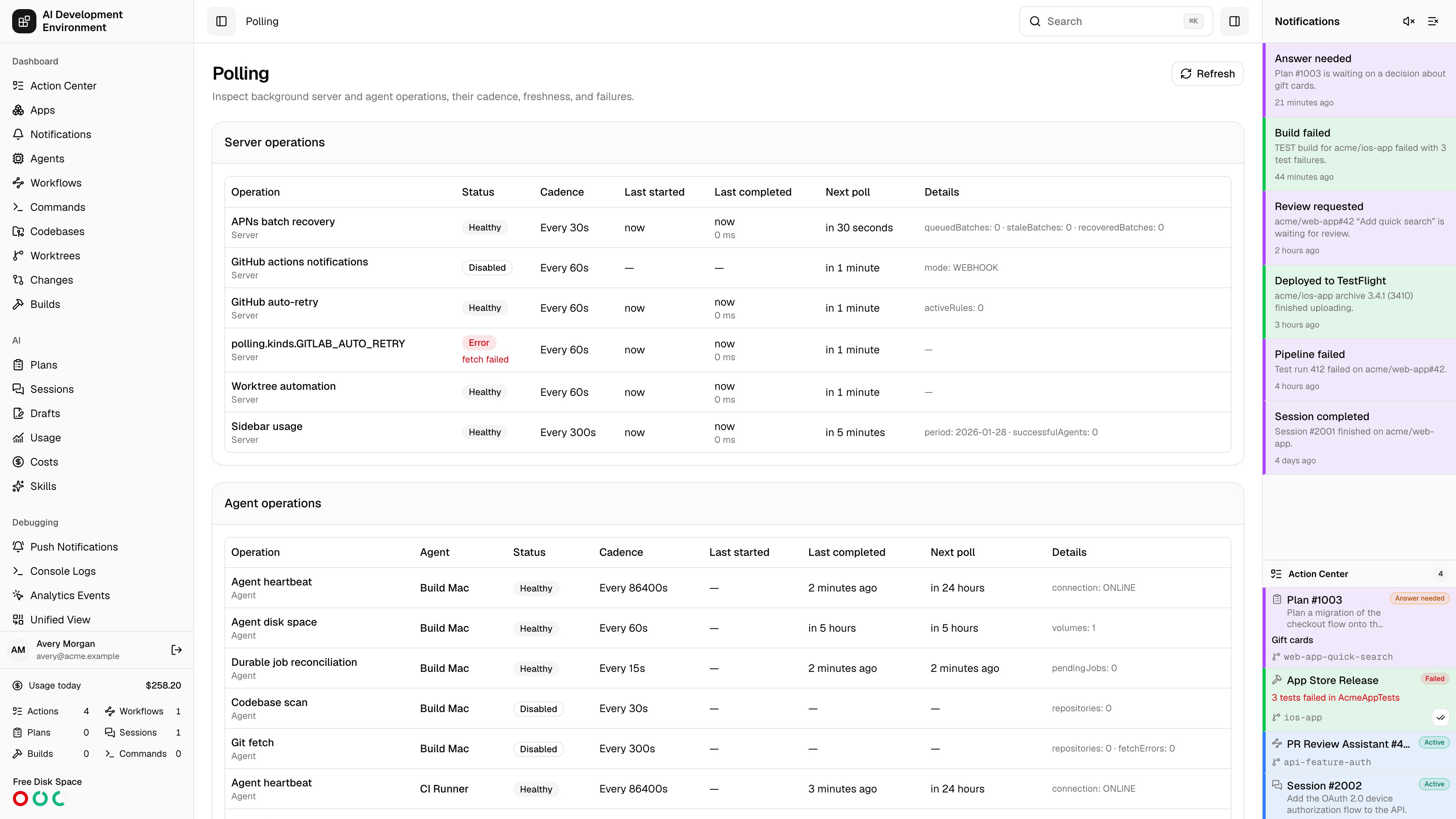
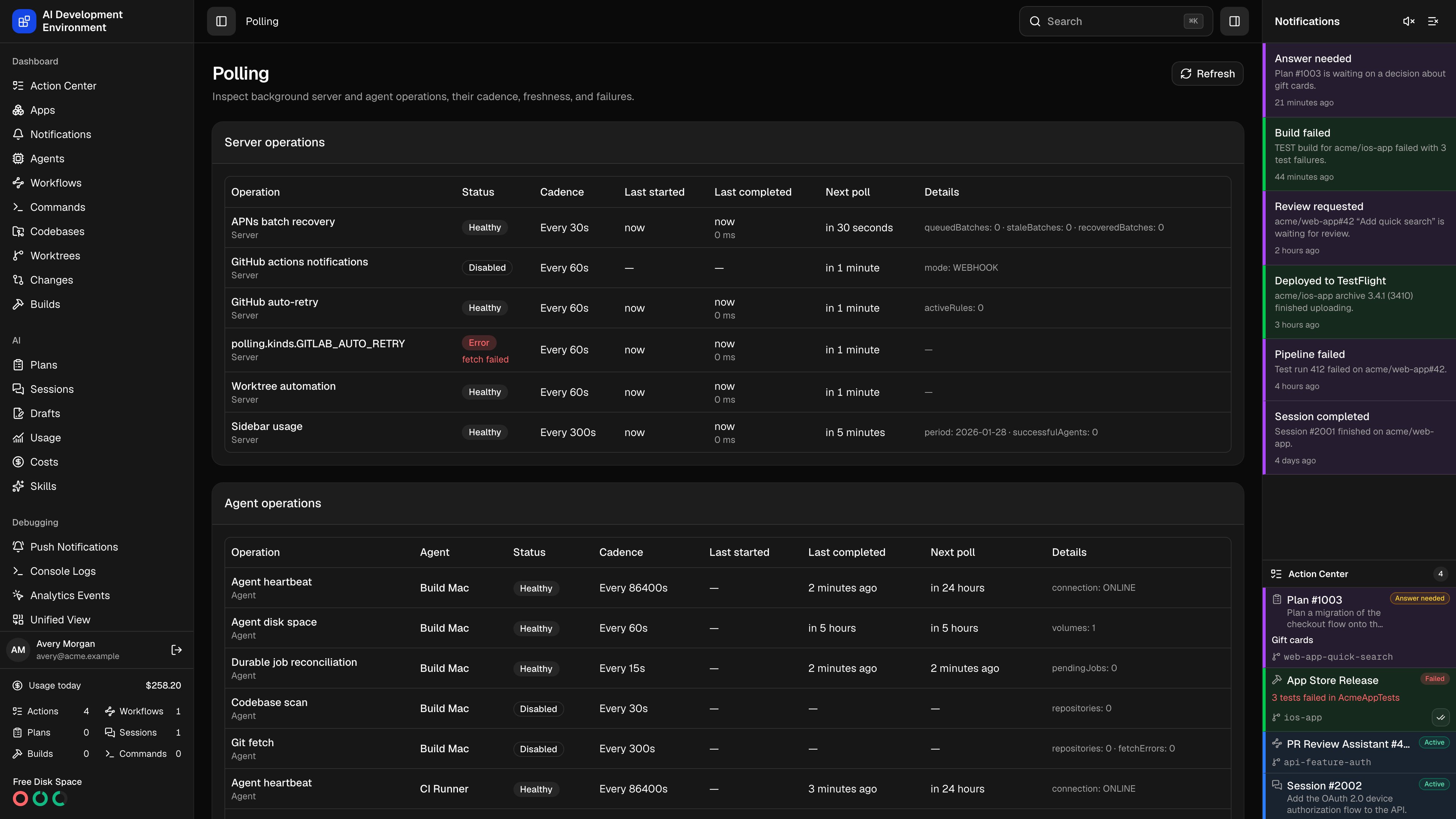 The **Polling** page at `/polling` is the single place to see every recurring background operation that keeps the control plane and its agents in sync — how often each one runs, when it last ran, when it runs next, and why it last failed.
Almost everything on the dashboard that appears to update on its own is driven by one of these operations. When a codebase looks stale, a build never starts, or a GitHub or GitLab notification never arrives, this page tells you whether the responsible loop is running, disabled, or erroring.
## Using the page
The page has two cards. **Server operations** are loops running inside the server process. **Agent operations** are loops running on each enrolled machine — one row per agent per operation, with the agent name linking to its [agent detail](/agents/agent-detail) page.
| Column | What it shows |
| ------------------ | ---------------------------------------------------------------------------------------------- |
| **Operation** | The operation name, with **Server** or **Agent** underneath as the runtime |
| **Agent** | Which Mac runs this loop (agent operations only) |
| **Status** | Disabled, Healthy, Running, Stale, or Error, with the error message beneath when there is one |
| **Cadence** | The configured interval in seconds |
| **Last started** | When the current or most recent pass began |
| **Last completed** | When it finished, with the duration in milliseconds underneath |
| **Next poll** | When the next pass is scheduled |
| **Details** | Operation-specific counters, such as repository counts, pending jobs, or the notification mode |
The table streams — a subscription pushes changes as operations start and finish, so rows update without a reload. **Refresh** re-queries everything if you would rather force it.
### Statuses
| Status | Meaning |
| ------------ | ------------------------------------------------------------------------------------------------------------ |
| **Healthy** | Ran recently enough for its cadence |
| **Running** | A pass is in flight right now |
| **Stale** | Enabled with a cadence, but has either never completed or has not completed within roughly twice its cadence |
| **Error** | The last pass threw; the message is shown under the badge |
| **Disabled** | Not scheduled at all, usually because the feature it serves is unconfigured |
A **Stale** row is not always a problem. Agent operations report the last time an agent said something, so an offline Mac turns all of its rows stale at once. Check the agent's connection state first, then the individual operation.
## Server operations
These loops live in the server process and start with it.
| Operation | Default cadence | What it does |
| -------------------------------- | --------------- | ---------------------------------------------------------------------------------------------- |
| **GitHub actions notifications** | 60s | Polls tracked repositories for workflow run results and raises [notifications](/notifications) |
| **GitHub auto-retry** | 60s | Reconciles [Auto Retry](/github/actions) rules and reruns failed workflows or jobs |
| **GitLab pipeline fallback** | GitLab setting | Polls managed projects when a signed project hook is unavailable |
| **GitLab auto-retry** | GitLab setting | Reconciles provider-scoped [pipeline retry rules](/gitlab/pipelines) |
| **APNs batch recovery** | 30s | Picks up [push notification](/debugging/push-notifications) batches that were interrupted |
| **Worktree automation** | 60s | Drives [worktree](/worktrees/worktrees) auto-sync and automation rules |
| **Sidebar usage** | 300s | Collects the Claude usage totals shown in the sidebar and on [Usage](/ai/usage) |
**GitHub actions notifications** is the one to read closely, because its **Details** column reports a mode rather than a plain on or off:
| Mode | Meaning |
| ----------------------------------------------- | -------------------------------------------------------------------------------------------------------------- |
| `POLLING` | A personal access token is configured and no webhook is set up, so the server polls on the configured interval |
| `WEBHOOK` | A GitHub App webhook is delivering events, so polling is disabled as redundant |
| `DISABLED` with `reason: GITHUB_TOKEN_REQUIRED` | Neither is configured — add a token in [Settings](/system/settings) |
Its interval comes from the GitHub settings rather than from this page. Auto-retry is scheduled at its configured cadence but never runs faster than every 30 seconds.
GitLab follows the same webhook-first model independently. A configured project hook supplies merge-request, pipeline, and job events. Polling remains scheduled as a fallback and shares neither state nor retry counters with GitHub.
## Agent operations
Each enrolled agent contributes five rows. Their cadences come from the per-agent overrides on the [agent detail](/agents/agent-detail) page, falling back to the defaults below — and for scan and fetch, to the global values in [Codebases](/codebases/codebases).
| Operation | Cadence source | What the row reports |
| ------------------------------ | -------------------------------------------------------------- | ------------------------------------------------------------------------------------------------------------------------------- |
| **Agent heartbeat** | Agent override, default 15s | Healthy while the agent is connected and was seen inside its online window; **Details** shows `connection: ONLINE` or `OFFLINE` |
| **Durable job reconciliation** | Agent override, default 15s | How many queued and running [jobs](/agents/job-detail) the agent is reconciling |
| **Agent disk space** | Fixed 60s | The number of volumes reported, or the last collection error; **Disabled** when disk monitoring is off for that agent |
| **Codebase scan** | Agent override, then the global refresh interval (default 30s) | How many registered [codebases](/codebases/codebases) are scanned; **Disabled** when the agent has none |
| **Git fetch** | Agent override, then the global fetch interval (default 300s) | Repository count and fetch-error count; **Error** when any repository failed its last fetch |
The heartbeat online window is three times the heartbeat interval, with a 45-second floor. Raising an agent's heartbeat interval widens that window automatically, so a slow-polling agent is not repeatedly marked offline.
## Reading a failure
A failing server operation affects everyone. A failing agent operation affects only that machine — and if every row for one agent is stale, the problem is the connection, not the operations.
Errors are recorded verbatim from the failed pass. Git fetch is the exception: it summarizes as *N repositories have fetch errors*, and the per-repository reason lives on the [codebase detail](/codebases/codebase-detail) page.
An operation with a recent **Last started** and no matching **Last completed** is stuck mid-pass, not idle. The duration on the previous pass tells you what normal looks like.
Nothing on this page is editable. Cadences live on the agent detail and Codebases pages; whether an operation is enabled follows the feature's own configuration in [Settings](/system/settings).
## Notes
* This page is read-only diagnostics. Every cadence and toggle it displays is configured elsewhere.
* Server operation history is kept in memory, so restarting the server clears last-run times and errors until each loop completes its first pass.
* Agent operation rows are derived from stored agent state rather than from a live probe, so they stay visible — and go stale — while an agent is offline.
* Operations appear only once their owning service has started; a feature that has never been configured may register nothing at all.
## Related pages
Connection state and the per-agent interval overrides these rows use.
The global scan and fetch intervals behind the agent rows.
The **Polling** page at `/polling` is the single place to see every recurring background operation that keeps the control plane and its agents in sync — how often each one runs, when it last ran, when it runs next, and why it last failed.
Almost everything on the dashboard that appears to update on its own is driven by one of these operations. When a codebase looks stale, a build never starts, or a GitHub or GitLab notification never arrives, this page tells you whether the responsible loop is running, disabled, or erroring.
## Using the page
The page has two cards. **Server operations** are loops running inside the server process. **Agent operations** are loops running on each enrolled machine — one row per agent per operation, with the agent name linking to its [agent detail](/agents/agent-detail) page.
| Column | What it shows |
| ------------------ | ---------------------------------------------------------------------------------------------- |
| **Operation** | The operation name, with **Server** or **Agent** underneath as the runtime |
| **Agent** | Which Mac runs this loop (agent operations only) |
| **Status** | Disabled, Healthy, Running, Stale, or Error, with the error message beneath when there is one |
| **Cadence** | The configured interval in seconds |
| **Last started** | When the current or most recent pass began |
| **Last completed** | When it finished, with the duration in milliseconds underneath |
| **Next poll** | When the next pass is scheduled |
| **Details** | Operation-specific counters, such as repository counts, pending jobs, or the notification mode |
The table streams — a subscription pushes changes as operations start and finish, so rows update without a reload. **Refresh** re-queries everything if you would rather force it.
### Statuses
| Status | Meaning |
| ------------ | ------------------------------------------------------------------------------------------------------------ |
| **Healthy** | Ran recently enough for its cadence |
| **Running** | A pass is in flight right now |
| **Stale** | Enabled with a cadence, but has either never completed or has not completed within roughly twice its cadence |
| **Error** | The last pass threw; the message is shown under the badge |
| **Disabled** | Not scheduled at all, usually because the feature it serves is unconfigured |
A **Stale** row is not always a problem. Agent operations report the last time an agent said something, so an offline Mac turns all of its rows stale at once. Check the agent's connection state first, then the individual operation.
## Server operations
These loops live in the server process and start with it.
| Operation | Default cadence | What it does |
| -------------------------------- | --------------- | ---------------------------------------------------------------------------------------------- |
| **GitHub actions notifications** | 60s | Polls tracked repositories for workflow run results and raises [notifications](/notifications) |
| **GitHub auto-retry** | 60s | Reconciles [Auto Retry](/github/actions) rules and reruns failed workflows or jobs |
| **GitLab pipeline fallback** | GitLab setting | Polls managed projects when a signed project hook is unavailable |
| **GitLab auto-retry** | GitLab setting | Reconciles provider-scoped [pipeline retry rules](/gitlab/pipelines) |
| **APNs batch recovery** | 30s | Picks up [push notification](/debugging/push-notifications) batches that were interrupted |
| **Worktree automation** | 60s | Drives [worktree](/worktrees/worktrees) auto-sync and automation rules |
| **Sidebar usage** | 300s | Collects the Claude usage totals shown in the sidebar and on [Usage](/ai/usage) |
**GitHub actions notifications** is the one to read closely, because its **Details** column reports a mode rather than a plain on or off:
| Mode | Meaning |
| ----------------------------------------------- | -------------------------------------------------------------------------------------------------------------- |
| `POLLING` | A personal access token is configured and no webhook is set up, so the server polls on the configured interval |
| `WEBHOOK` | A GitHub App webhook is delivering events, so polling is disabled as redundant |
| `DISABLED` with `reason: GITHUB_TOKEN_REQUIRED` | Neither is configured — add a token in [Settings](/system/settings) |
Its interval comes from the GitHub settings rather than from this page. Auto-retry is scheduled at its configured cadence but never runs faster than every 30 seconds.
GitLab follows the same webhook-first model independently. A configured project hook supplies merge-request, pipeline, and job events. Polling remains scheduled as a fallback and shares neither state nor retry counters with GitHub.
## Agent operations
Each enrolled agent contributes five rows. Their cadences come from the per-agent overrides on the [agent detail](/agents/agent-detail) page, falling back to the defaults below — and for scan and fetch, to the global values in [Codebases](/codebases/codebases).
| Operation | Cadence source | What the row reports |
| ------------------------------ | -------------------------------------------------------------- | ------------------------------------------------------------------------------------------------------------------------------- |
| **Agent heartbeat** | Agent override, default 15s | Healthy while the agent is connected and was seen inside its online window; **Details** shows `connection: ONLINE` or `OFFLINE` |
| **Durable job reconciliation** | Agent override, default 15s | How many queued and running [jobs](/agents/job-detail) the agent is reconciling |
| **Agent disk space** | Fixed 60s | The number of volumes reported, or the last collection error; **Disabled** when disk monitoring is off for that agent |
| **Codebase scan** | Agent override, then the global refresh interval (default 30s) | How many registered [codebases](/codebases/codebases) are scanned; **Disabled** when the agent has none |
| **Git fetch** | Agent override, then the global fetch interval (default 300s) | Repository count and fetch-error count; **Error** when any repository failed its last fetch |
The heartbeat online window is three times the heartbeat interval, with a 45-second floor. Raising an agent's heartbeat interval widens that window automatically, so a slow-polling agent is not repeatedly marked offline.
## Reading a failure
A failing server operation affects everyone. A failing agent operation affects only that machine — and if every row for one agent is stale, the problem is the connection, not the operations.
Errors are recorded verbatim from the failed pass. Git fetch is the exception: it summarizes as *N repositories have fetch errors*, and the per-repository reason lives on the [codebase detail](/codebases/codebase-detail) page.
An operation with a recent **Last started** and no matching **Last completed** is stuck mid-pass, not idle. The duration on the previous pass tells you what normal looks like.
Nothing on this page is editable. Cadences live on the agent detail and Codebases pages; whether an operation is enabled follows the feature's own configuration in [Settings](/system/settings).
## Notes
* This page is read-only diagnostics. Every cadence and toggle it displays is configured elsewhere.
* Server operation history is kept in memory, so restarting the server clears last-run times and errors until each loop completes its first pass.
* Agent operation rows are derived from stored agent state rather than from a live probe, so they stay visible — and go stale — while an agent is offline.
* Operations appear only once their owning service has started; a feature that has never been configured may register nothing at all.
## Related pages
Connection state and the per-agent interval overrides these rows use.
The global scan and fetch intervals behind the agent rows.