> ## Documentation Index
> Fetch the complete documentation index at: https://ai-development-environment.mintlify.site/llms.txt
> Use this file to discover all available pages before exploring further.
# Workflow run
> Watch a live workflow run, answer questions, and repair or replay steps.
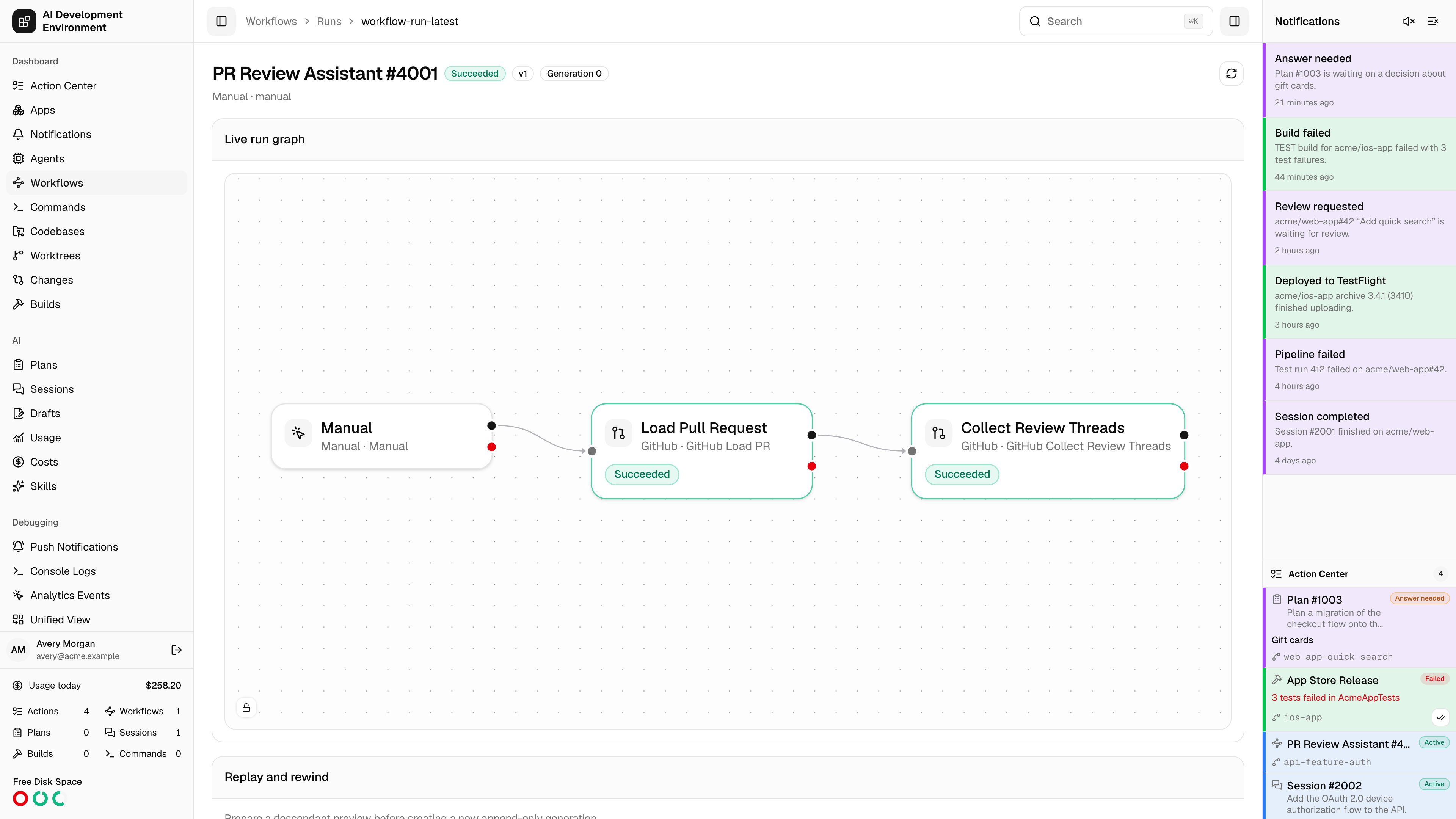
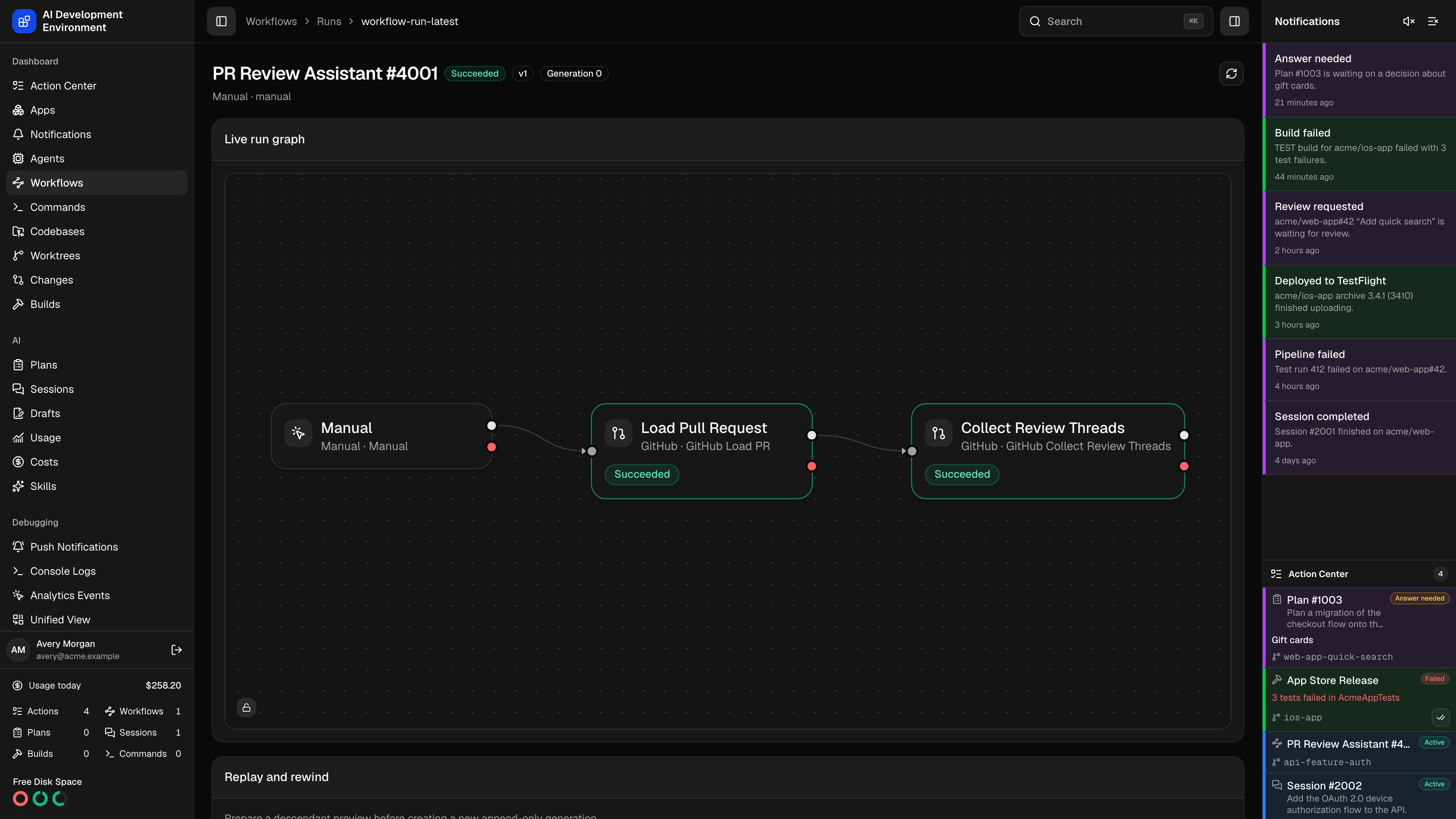 The workflow run page at `/workflows/runs/{id}` is the live view of one execution: which step is running, what happened at each attempt, what is in session data, and what the run has touched. It is also where you intervene when a run needs you.
## Header and controls
The run number, its status badge, and its **generation** — replays append a new generation rather than overwriting the original attempts.
| Control | Available when |
| -------------- | ---------------------------------------- |
| **Pause** | The run is executing |
| **Resume** | The run is paused |
| **Cancel run** | The run has not reached a terminal state |
| **Refresh** | Always |
## Waiting for worktree admission
A queued run shows a live **Queue** card before the run graph. It displays the combined workflow, Plan, and Session admission order for the run's worktree. The current workflow run is highlighted, and workflow rows carry their **Exclusive**, **Non-exclusive**, or **Excluded** admission mode.
The card updates as workflow and AI run state changes. It disappears after this run is admitted and starts scheduling.
Queue position is an effective display order, not a promise that every row starts serially. Plans and Sessions have separate lanes and may advance independently until an exclusive workflow becomes the admission barrier.
## Why a run is waiting
A run that is not finishing shows a **Waiting on** card above the run graph, naming every step that is currently sitting still and why.
Steps sit still for two different reasons, and the card separates them:
| | What it means | What resolves it |
| ---------- | --------------------------------------------------------------------------------------------------------------------------------------------------------------------------------------------------------- | --------------------------------------------------- |
| **Parked** | The step handed work to something outside the runtime — an agent job, a Plan or Session, a build, a command — and is waiting for it to report back. It holds no worktree or codebase lock while it waits. | The external work finishing, or the wait timing out |
| **Held** | The step never started, because the codebase or worktree it needs is busy with another run. | The other run releasing it |
Each parked step lists what it is **Waiting on** — a link straight to the job, Plan, or Session — along with how long it has been waiting, when it **Times out**, and when the runtime next checks. A held step shows the contention that is blocking it instead.
A parked step is normal, not stuck. Use **Times out** to tell the difference: a wait that is still well short of its timeout is simply slow external work, while one approaching it will fail the step and surface a real error.
## Live run graph
The published graph is annotated with live state — which node succeeded, failed, is waiting, or is active. It updates as the run progresses. For command-output matching, the graph shows the actual execution of each emitted match branch instead of the dormant scheduling template; the source command continues to display its own terminal state separately.
## Answering a question
When a step raises a question, the run moves to **Waiting** and the question appears on this page, labeled with the step that asked it. Pick from the offered buttons or type a **Custom answer**, then **Answer**.
The same question also appears in the [Action Center](/dashboard), so you can answer without hunting for the run. Answering in either place resolves it.
## Repairing blocked session data
A run goes **Blocked** when a step cannot proceed with the session data it has — a missing key, a wrong shape, a value an upstream step failed to write.
**Repair blocked session data** applies an atomic JSON merge patch to the run's session data and then resumes scheduling from the blocked step. Enter the patch, then **Apply repair**.
A merge patch only describes what changes. Supply the keys you want to add or correct; everything you leave out is untouched.
## Replaying and rewinding
Replay re-executes part of a run from a chosen step.
Choose the step to rewind to.
**Prepare replay** computes a preview: how many descendant steps will re-run and which ones they are, by name; how many other steps keep their current results; and which external effects the original pass already caused.
* **Replay without Git restore** — leave the working tree exactly as it is.
* **Restore Git and replay** — return the worktree to the state captured at that step first.
* **Stash, restore, and replay** — stash current changes, then restore and replay.
External effects are retained and will not be reversed. A replay does not un-merge a pull request, un-transition a Jira ticket, or un-send a notification — the preview lists exactly what the first pass already did so you can decide before committing.
Replaying creates a new append-only generation. The original attempts stay in history, marked **Superseded**.
### Steps a replay did not re-run
A replay writes a row for every step of the graph, not just the ones it re-executes. Steps outside the replayed branch are carried forward from the previous generation with their earlier result attached, and are marked so you can tell them apart:
* In the run graph they carry a **Reused** marker and a dimmed status badge, and they show no generation label — the generation belongs to the replay, not to a result that was produced earlier.
* In **Step attempts** their **Phase** reads **Reused** and the row is dimmed. Steps queued for the replay itself read **Queued for replay** until they start.
## Tabs
Every event the run has emitted, in order. Event types include run lifecycle events — started, pausing, paused, resumed, cancelled, succeeded, failed, data repaired, replayed — and step events: succeeded, failed, blocked, waiting, wait resolved, retry scheduled, recovery blocked, and waiting for codebase.
A **Step waiting** event names the step and what it parked on. Its matching **Wait resolved** event reports how long the wait lasted and what freed it — the external work reporting back, the runtime's own poll, your answer to a question, or a delay elapsing.
One row per attempt with **Step**, **Status**, **Phase**, **Generation**, **Iteration**, **Attempt**, **Duration**, and **Error**. Phase is the scheduler's own sub-state for the attempt — including **Reused** and **Queued for replay** after a replay, and **Waiting for codebase** or **Waiting for worktree** while a step is held. Iteration distinguishes passes through a **For each** body; attempt distinguishes retries of the same step.
A parked attempt notes what it is waiting on beneath its status badge.
Attempt statuses include Pending, Ready, Running, Waiting, Blocked, Succeeded, Failed, Skipped, Superseded, and Timed out.
The run's current session document — the JSON that steps read from and write to. This is what the repair patch modifies.
Everything this run is linked to — worktrees, builds, pull requests, tickets, AI runs, command runs — each with an **Open** link to its own page.
## Related pages
The published version, its graph, and recent runs.
Every run that is waiting, blocked, or failed, in one queue.
The workflow run page at `/workflows/runs/{id}` is the live view of one execution: which step is running, what happened at each attempt, what is in session data, and what the run has touched. It is also where you intervene when a run needs you.
## Header and controls
The run number, its status badge, and its **generation** — replays append a new generation rather than overwriting the original attempts.
| Control | Available when |
| -------------- | ---------------------------------------- |
| **Pause** | The run is executing |
| **Resume** | The run is paused |
| **Cancel run** | The run has not reached a terminal state |
| **Refresh** | Always |
## Waiting for worktree admission
A queued run shows a live **Queue** card before the run graph. It displays the combined workflow, Plan, and Session admission order for the run's worktree. The current workflow run is highlighted, and workflow rows carry their **Exclusive**, **Non-exclusive**, or **Excluded** admission mode.
The card updates as workflow and AI run state changes. It disappears after this run is admitted and starts scheduling.
Queue position is an effective display order, not a promise that every row starts serially. Plans and Sessions have separate lanes and may advance independently until an exclusive workflow becomes the admission barrier.
## Why a run is waiting
A run that is not finishing shows a **Waiting on** card above the run graph, naming every step that is currently sitting still and why.
Steps sit still for two different reasons, and the card separates them:
| | What it means | What resolves it |
| ---------- | --------------------------------------------------------------------------------------------------------------------------------------------------------------------------------------------------------- | --------------------------------------------------- |
| **Parked** | The step handed work to something outside the runtime — an agent job, a Plan or Session, a build, a command — and is waiting for it to report back. It holds no worktree or codebase lock while it waits. | The external work finishing, or the wait timing out |
| **Held** | The step never started, because the codebase or worktree it needs is busy with another run. | The other run releasing it |
Each parked step lists what it is **Waiting on** — a link straight to the job, Plan, or Session — along with how long it has been waiting, when it **Times out**, and when the runtime next checks. A held step shows the contention that is blocking it instead.
A parked step is normal, not stuck. Use **Times out** to tell the difference: a wait that is still well short of its timeout is simply slow external work, while one approaching it will fail the step and surface a real error.
## Live run graph
The published graph is annotated with live state — which node succeeded, failed, is waiting, or is active. It updates as the run progresses. For command-output matching, the graph shows the actual execution of each emitted match branch instead of the dormant scheduling template; the source command continues to display its own terminal state separately.
## Answering a question
When a step raises a question, the run moves to **Waiting** and the question appears on this page, labeled with the step that asked it. Pick from the offered buttons or type a **Custom answer**, then **Answer**.
The same question also appears in the [Action Center](/dashboard), so you can answer without hunting for the run. Answering in either place resolves it.
## Repairing blocked session data
A run goes **Blocked** when a step cannot proceed with the session data it has — a missing key, a wrong shape, a value an upstream step failed to write.
**Repair blocked session data** applies an atomic JSON merge patch to the run's session data and then resumes scheduling from the blocked step. Enter the patch, then **Apply repair**.
A merge patch only describes what changes. Supply the keys you want to add or correct; everything you leave out is untouched.
## Replaying and rewinding
Replay re-executes part of a run from a chosen step.
Choose the step to rewind to.
**Prepare replay** computes a preview: how many descendant steps will re-run and which ones they are, by name; how many other steps keep their current results; and which external effects the original pass already caused.
* **Replay without Git restore** — leave the working tree exactly as it is.
* **Restore Git and replay** — return the worktree to the state captured at that step first.
* **Stash, restore, and replay** — stash current changes, then restore and replay.
External effects are retained and will not be reversed. A replay does not un-merge a pull request, un-transition a Jira ticket, or un-send a notification — the preview lists exactly what the first pass already did so you can decide before committing.
Replaying creates a new append-only generation. The original attempts stay in history, marked **Superseded**.
### Steps a replay did not re-run
A replay writes a row for every step of the graph, not just the ones it re-executes. Steps outside the replayed branch are carried forward from the previous generation with their earlier result attached, and are marked so you can tell them apart:
* In the run graph they carry a **Reused** marker and a dimmed status badge, and they show no generation label — the generation belongs to the replay, not to a result that was produced earlier.
* In **Step attempts** their **Phase** reads **Reused** and the row is dimmed. Steps queued for the replay itself read **Queued for replay** until they start.
## Tabs
Every event the run has emitted, in order. Event types include run lifecycle events — started, pausing, paused, resumed, cancelled, succeeded, failed, data repaired, replayed — and step events: succeeded, failed, blocked, waiting, wait resolved, retry scheduled, recovery blocked, and waiting for codebase.
A **Step waiting** event names the step and what it parked on. Its matching **Wait resolved** event reports how long the wait lasted and what freed it — the external work reporting back, the runtime's own poll, your answer to a question, or a delay elapsing.
One row per attempt with **Step**, **Status**, **Phase**, **Generation**, **Iteration**, **Attempt**, **Duration**, and **Error**. Phase is the scheduler's own sub-state for the attempt — including **Reused** and **Queued for replay** after a replay, and **Waiting for codebase** or **Waiting for worktree** while a step is held. Iteration distinguishes passes through a **For each** body; attempt distinguishes retries of the same step.
A parked attempt notes what it is waiting on beneath its status badge.
Attempt statuses include Pending, Ready, Running, Waiting, Blocked, Succeeded, Failed, Skipped, Superseded, and Timed out.
The run's current session document — the JSON that steps read from and write to. This is what the repair patch modifies.
Everything this run is linked to — worktrees, builds, pull requests, tickets, AI runs, command runs — each with an **Open** link to its own page.
## Related pages
The published version, its graph, and recent runs.
Every run that is waiting, blocked, or failed, in one queue.