

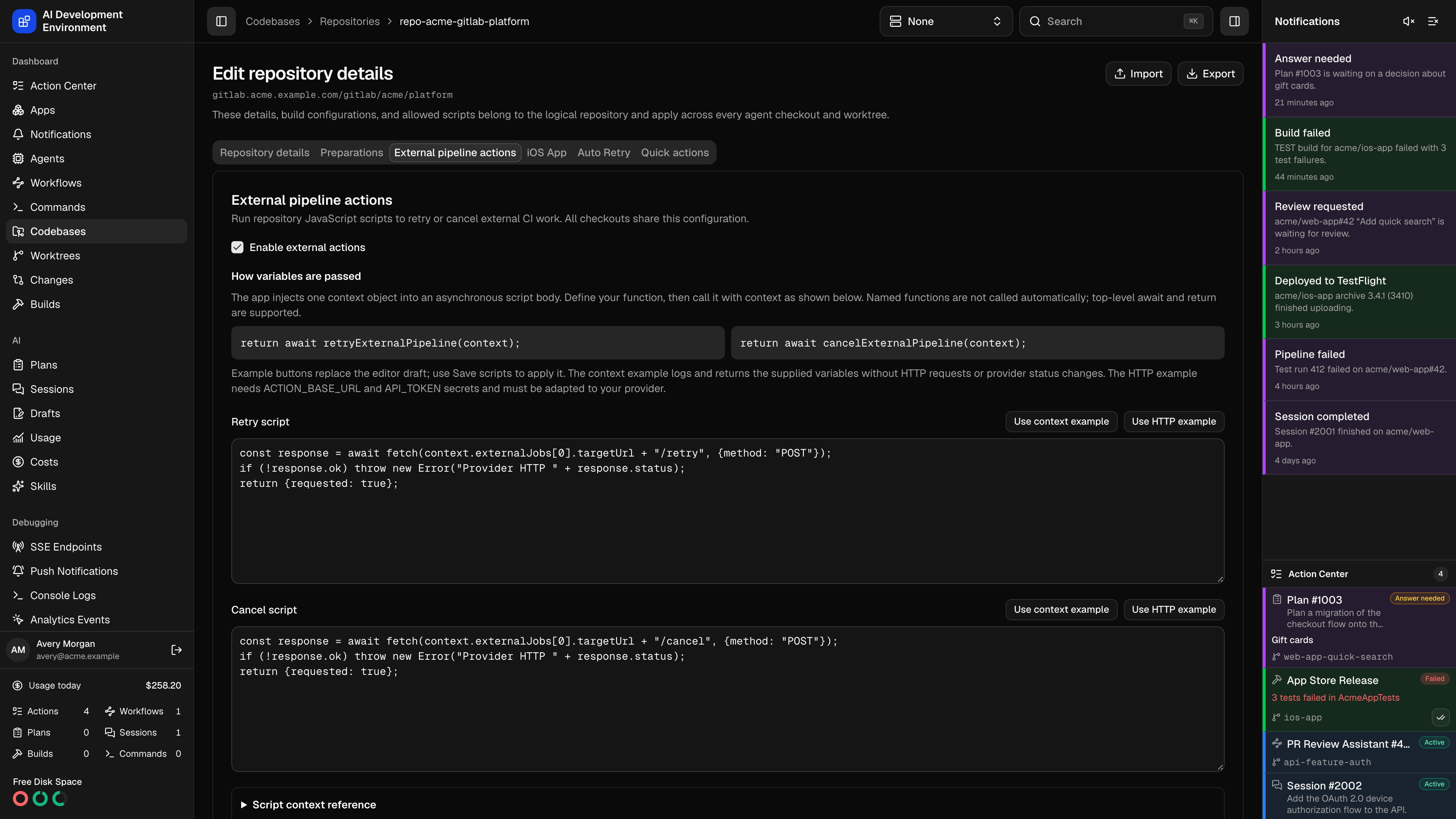
/codebases/repositories/{id} and select External pipeline actions. In iOS, open Edit Repository → External pipeline actions. Enable the feature, enter a JavaScript Retry script and Cancel script, and save. Each canonical repository has one script pair shared by all checkouts. New repositories and existing installations start disabled.
Configure secrets
Add named values under Secrets. Names begin with a letter or underscore and contain letters, digits, and underscores, up to 128 characters. Values contain 1–65,536 characters. Replace writes a new value; Delete removes it. Existing values are never returned to either client. The control plane stores scripts in its database and secret values through Credential storage, using the configured encrypted database, Vault, or Keychain backend. Read-only Vault installations can edit scripts but cannot change secrets. Scripts receive only this repository’s named secrets; the application’s GitLab credential is never injected.Script contract
Scripts run as an asynchronous JavaScript function body. Useawait fetch(...), JSON, encodeURIComponent, and console.log/info/warn/error; return an optional JSON-serializable result. The sandbox provides no filesystem, shell, process, require, or persistent storage.
Call a function with the supplied variables
The app injects one global object,context, when you click Retry or Cancel or an automated action runs. You do not type the real pipeline, branch, MR, or secret values into the script. Define a function that accepts this object, then call it explicitly. Defining a named function alone does not execute it; top-level await and return work because the app runs the script as an asynchronous function body. Do not use module imports or exports.
In the web and iOS editors, select Use context example under either script to insert a runnable preview, or Use HTTP example to insert an integration template. These buttons replace your editor draft. Select Save scripts (Save Scripts on iOS) to apply it. The HTTP example requires ACTION_BASE_URL and API_TOKEN secrets and a request adapted to your provider’s API.
This Retry script displays the arguments passed to your function without making HTTP requests. It prints secret names only:
cancelExternalPipeline and end with return await cancelExternalPipeline(context);. Function names are your choice: the app supplies context rather than discovering or calling a function by name. You can also use the object directly, for example return { sha: context.pipeline.sha, mrIid: context.mergeRequest?.iid ?? null };.
Enable external actions, save the preview script, then open a pipeline’s jobs and select Retry or Cancel on an eligible external job. Expand External action results to inspect the captured console and returned JSON. The preview leaves provider statuses unchanged. It still records an accepted action, so the same observed status cannot be retried with the preview again until a provider status update arrives. Use an individual external-job control to test the script on its own; a whole-pipeline control also dispatches eligible native work.
Context fields
context.version is 1. Fields are:
Use
pipeline.sha for original-commit retries. pipeline.rawRef can be refs/merge-requests/{iid}/head or /merge; use pipeline.branch for the source branch. Preserve fork project IDs and original MR parameters when calling your provider.
A whole-pipeline action runs the script once with all eligible externalJobs. An individual action supplies one job and sets job. Several statuses can point to the same provider run: group them by run identity before sending requests. Missing target URLs are allowed; resolve the run with your provider’s lookup API and reject absent or ambiguous matches.
For example, a whole-pipeline retry for MR !2 receives an object like this. Fields are shortened here; Script context reference → Example context object in either editor shows a longer example. The values are illustrative, and secrets contains your configured values only during execution.
job from null to the selected external status and includes only that status in externalJobs. A cancel action sets action to cancel. mergeRequest is null without a unique match; inspect mergeRequests before using MR data. A fork’s source and target project IDs can differ.
Runtime limits and failures
fetch accepts HTTP and HTTPS URLs and returns ok, status, statusText, url, redirected, headers, text(), and json(). HTTP errors do not throw automatically. Check response.ok and throw when the provider rejects a request.
Execution records retain the action, origin, targeted status IDs, start/completion times, component outcomes, captured console, and returned result. Accepted means the action request completed. Provider callbacks determine build completion; scripts never fabricate success or cancellation statuses. Partial means one component completed and another failed. Uncertain means a timeout or interrupted request may have reached the provider: await status updates before repeating it.
Configured secret values and their URL/JSON-escaped forms are redacted from captured logs, errors, and results. Avoid returning sensitive provider payloads or derived secrets: redaction cannot recognize arbitrary transformations. Execution records remain in the application database until the canonical repository is deleted; the API returns the latest 20 per pipeline.
Durable claims prevent overlapping pipeline/job requests and automated processing from sending the same observed action twice. An accepted or uncertain action remains claimed until its provider status changes. Definitive external failures can be retried without repeating an already accepted native component.
Generic recipe
AddACTION_BASE_URL and API_TOKEN secrets. This example calls an integration endpoint at {ACTION_BASE_URL}/{action} once per unique provider run URL. Adapt the endpoint, headers, and body to the API you use. The explicit function call passes in the original commit, resolved branch, and MR context: