

tailscaled directly. It queues typed jobs, and each macOS or Linux agent runs its local tailscale CLI. Older agents remain visible as Unsupported until they advertise the Tailscale job capabilities.
Use a Tailscale address as Proxy
After serving the control plane at an HTTPS Tailscale hostname, set Settings → Server URLs → Proxy URL to its origin, for examplehttps://aide.example.ts.net. Do not include a mount path. The Proxy choice then appears in endpoint help, agent enrollment, MCP configurations, build selection, and artifact links. Set it as the global or simulator default when appropriate; simulators otherwise inherit the global default.
Saving a Proxy address records how clients reach the control plane. It does not create a Serve route, enable Funnel, or change the native app’s Server Connection. Keep the route and client network access configured separately. Private Serve addresses require tailnet access; external webhook providers must be able to reach the chosen URL. Enrollment and OTA installs retain their HTTPS requirements.
Inspect the fleet
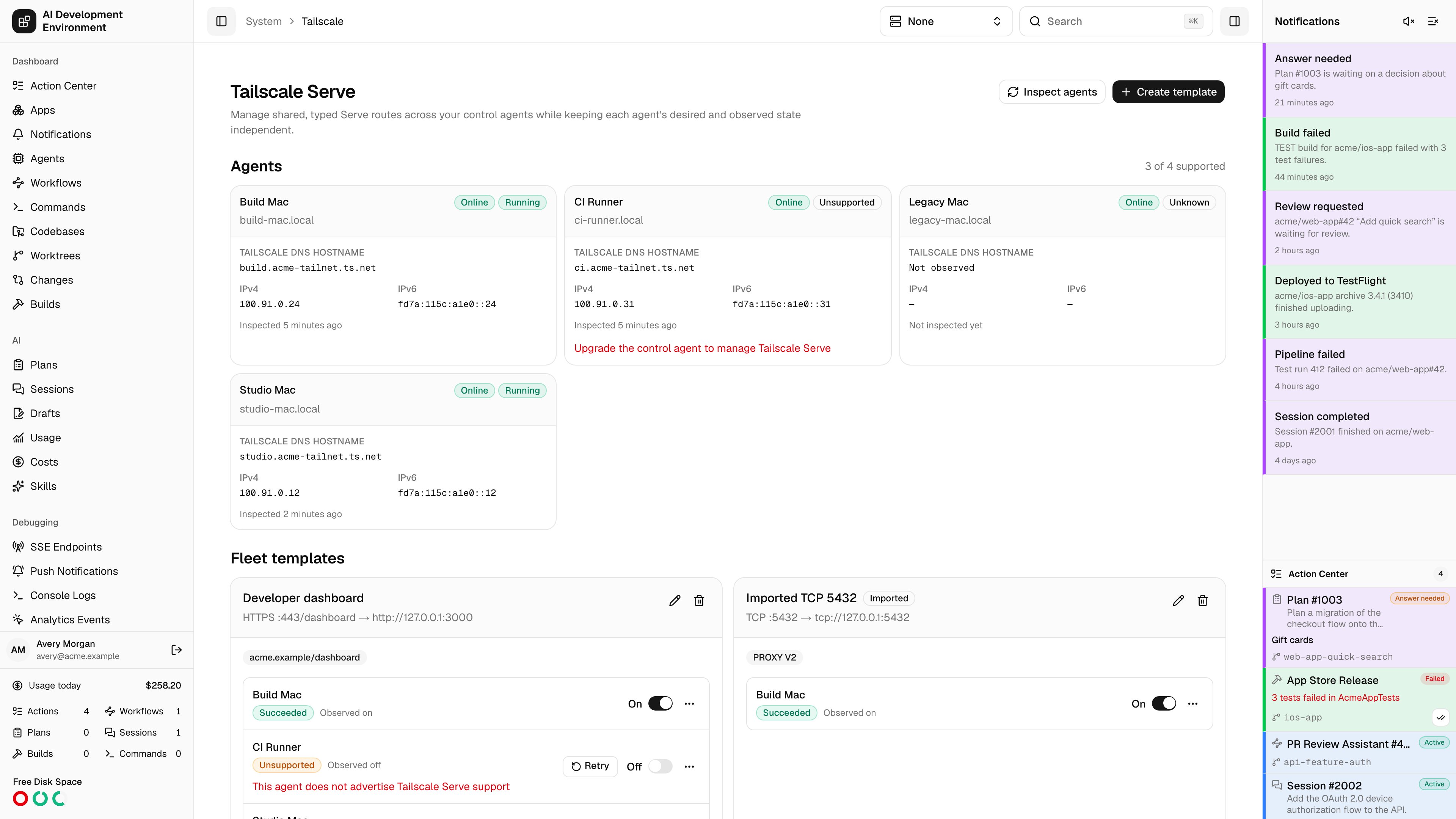
Select Inspect agents to runtailscale status --json and tailscale serve status --json on the chosen agents. Each agent card then shows:
- Its control-plane connection and Tailscale backend state.
- Its Tailscale DNS hostname and IPv4/IPv6 addresses.
- When its configuration was last inspected.
- Any CLI, daemon, permission, or parsing error.
Create or edit a template
Select Create template, then choose its protocol and incoming listener:
Incoming and destination ports must be from
1 through 65535. Mount and destination paths are normalized to start with /. Multiple web routes can share a compatible listener when their mount paths differ, but one agent cannot have conflicting protocols, Funnel modes, or TCP forwarding definitions on the same port.
Choose every agent that should receive the template. A newly selected agent defaults to enabled. Turning an agent off removes the observed route but keeps its assignment, so you can turn it back on later without rebuilding the template. Editing a template updates enabled agents and leaves disabled agents alone.
The page distinguishes Desired from Observed state. A queued or failed job does not discard what you asked for: the assignment stays enabled or disabled as requested, shows the mismatch, and offers Retry. Offline jobs remain queued and apply when the agent reconnects.
Funnel and advanced settings
Funnel publishes a listener to the public internet. It is available only for HTTPS and TCP modes on ports443, 8443, and 10000; the editor asks for explicit confirmation before enabling it. Confirm your upstream application has its own authentication and review the Tailscale Funnel access controls before exposing it.
App capabilities use {domain}/{name} and are available only for private HTTP(S) templates. Support depends on the Tailscale version installed on each agent. A version-specific Funnel or capability failure remains attached to that agent so you can upgrade or change the route.
Deleting a template asks for confirmation, marks it as deleting, and removes it from every enabled or observed agent. The saved template disappears only after every removal succeeds. Failed removals remain available to retry.
Automation interfaces
The built-inbuiltin:tailscale MCP group exposes:
get_tailscale_serve_overviewinspect_tailscale_serveupsert_tailscale_serve_templateset_tailscale_serve_agent_enableddelete_tailscale_serve_template
/system/tailscale, and write operation data under tailscale.*. A partial fleet result follows the workflow’s failure handle, where your existing retry or error-handling branch can catch it.
GraphQL clients can use tailscaleServeOverview and tailscaleServeOperation, the corresponding inspect, upsert, toggle, and delete mutations, and the two live subscriptions. Updates use expectedRevision; assignment inputs always send explicit {agentId, enabled} values.
Troubleshooting
The agent says Unsupported
The agent says Unsupported
Tailscale Serve jobs are advertised only by current macOS and Linux agents.
Upgrade and restart the control agent, then inspect again. This feature does
not install Tailscale or configure a tailnet for you.
The tailscale executable is missing
The tailscale executable is missing
Install the Tailscale CLI and make it available on the agent’s service
PATH. The agent also checks standard Homebrew locations and the executable
bundled with the macOS Tailscale app. For a custom installation, set
CONTROL_AGENT_TAILSCALE_EXECUTABLE to the absolute executable path and
restart the agent.The daemon or permissions fail
The daemon or permissions fail
Run
tailscale status as the same account that starts the control agent.
Start tailscaled or the macOS Tailscale app, sign in, and grant that
account whatever local permissions your installation requires. The agent
invokes argument arrays without a shell and never accepts a free-form
command.A route conflicts or keeps drifting
A route conflicts or keeps drifting
Inspect first to refresh observed state. Move or remove the conflicting
listener, or edit the template so protocols and Funnel modes agree. A
template edit includes its previous listener selector, so moving a port or
path removes the old route instead of leaving it behind.
TS_SERVE_CONFIG, or svc: Tailscale Services.