

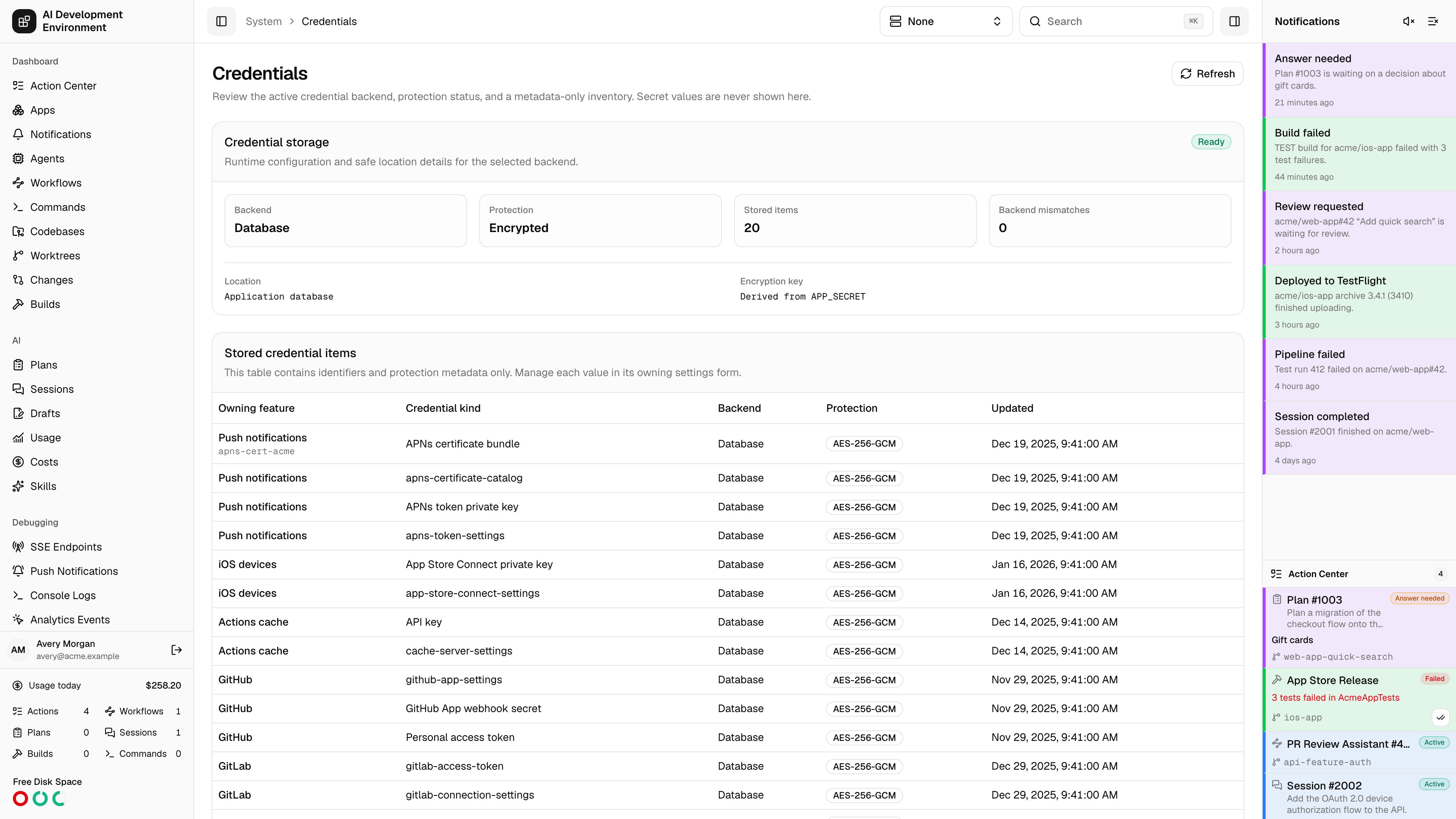
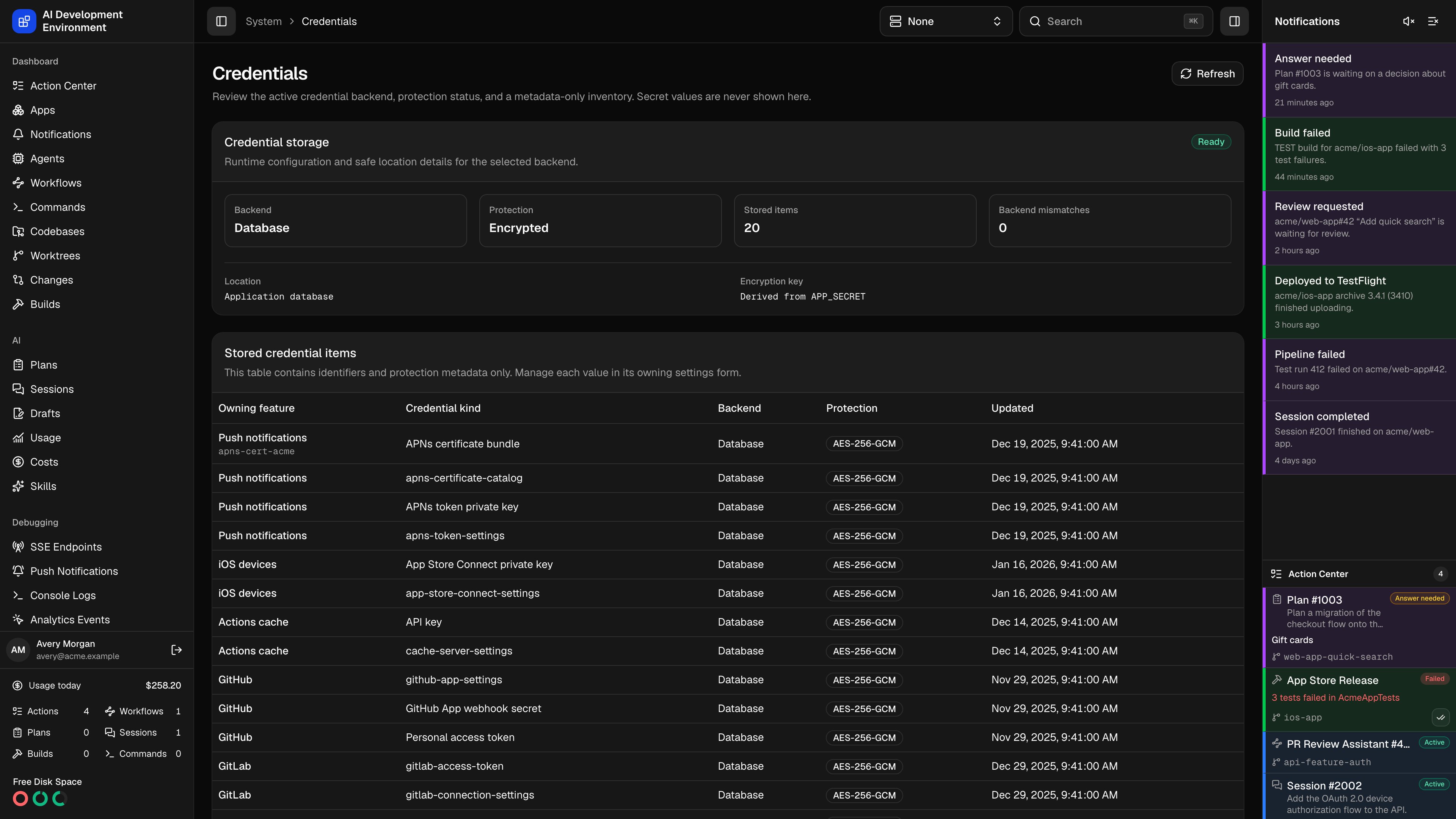
/system/credentials answers one question: where are my credentials and connection settings, and how well are they protected?
Every long-lived credential in the app — Jira and GitHub tokens, cache-server settings, external MCP headers, iOS signing keys, App Store Connect settings, and APNs credentials — is written through a single server-only credential service. Related connection data, including URLs and public key identifiers, uses the same backend so an existing Vault can initialize a fresh install. This page reports which backend the service is using, whether payloads are encrypted, and what is stored. It never shows a payload value, and it is entirely read-only: each item is managed in the settings form that owns it.
Credential storage
The Credential storage card is the health check.
The card carries an overall state — Ready, Warning, or Error — alongside backend-specific detail: the Vault address, mount, path prefix, namespace, TLS settings, and Vault access value for Vault; the service name and host platform for Keychain; the storage location and encryption key status for the database. A read-only Vault also adds a Read-only badge. After startup adoption, the card reports how many external items received new local metadata rows.
Warnings
Warnings are specific, and each names the fix.Stored credential items
The inventory table holds identifiers and protection metadata only.
To change any of these, open the settings form for its owning feature. Nothing on this page edits a value.
Encryption on the database backend
The database backend always encrypts payloads with AES-256-GCM. The key is derived fromAPP_SECRET with HKDF, so there is nothing to configure, no plaintext mode, and no second key to keep track of. Vault and Keychain storage never use the derived key — those backends hold the secrets themselves.
To replace APP_SECRET, set the old value as APP_SECRET_PREVIOUS alongside the new one. Every credential sealed under the old root is re-encrypted on the next start, after which APP_SECRET_PREVIOUS can be removed. Without it the server refuses to start rather than silently losing access. See Environment variables.
What is stored here
Long-lived Jira, GitHub, cache-server, external MCP, iOS-signing, App Store Connect, and APNs credentials all go through this server-only credential service. Companion connection settings use it too:
Pick a backend with
CREDENTIAL_STORAGE_TYPE — see Set up credential storage for the configuration of each one.
Vault options
BeyondVAULT_ADDR, the Vault backend accepts VAULT_TOKEN, VAULT_NAMESPACE, CREDENTIAL_VAULT_MOUNT (default secret), CREDENTIAL_VAULT_PATH_PREFIX (default ai-development-environment/credentials), CREDENTIAL_VAULT_HEADERS, and CREDENTIAL_VAULT_READ_ONLY (default false).
CREDENTIAL_VAULT_HEADERS must be a JSON object of string values, and should be shell-quoted:
VAULT_TOKEN and VAULT_NAMESPACE. The page lists the names of any additional headers, never their values.
TLS options are VAULT_CACERT, VAULT_TLS_SERVER_NAME, and VAULT_SKIP_VERIFY. Plaintext HTTP and disabled certificate verification are supported, but produce prominent security warnings.
Reusing an existing Vault
At startup, a Vault-backed server looks for credentials already stored under its configured mount and path prefix. It validates their payload metadata and creates the missing localCredential rows. Vault remains the source of the payload; SQLite receives only metadata.
Known, fixed credential paths are always probed, even when the token cannot list the prefix. Grant list on the KV v2 metadata path to discover dynamic entries such as per-server external MCP headers and individual APNs certificate bundles. Unrelated or malformed entries are skipped. An adoption failure does not stop the server, but it produces an Existing credentials could not be adopted warning.
If Vault already holds a valid secret for an existing local row that names another backend, startup repoints that row to Vault and removes its superseded database ciphertext. This is a metadata adoption, not a secret copy. A row remains a backend mismatch when Vault does not hold the corresponding secret.
Read-only Vault installs
SetCREDENTIAL_VAULT_READ_ONLY=true when an install may consume shared Vault credentials but must not modify them. The Credentials page shows Read-only, and credential-backed controls on Settings are disabled. Reads and connection tests that use existing values still work. Writes and deletions fail before the server sends a request to Vault.
A token that lacks write permission produces the same read-only error when Vault rejects a write, even if the flag is unset. The flag itself applies only to Vault. Setting it with database or Keychain storage does not block writes and produces a warning.
For the default mount and prefix, a read-only policy is:
Switching backends
Each metadata row records the backend that supplies its payload. ChangingCREDENTIAL_STORAGE_TYPE never copies a secret into the new backend. When switching to Vault, startup adopts values Vault already holds and repoints their local rows; anything missing from Vault remains in Backend mismatches and must be re-entered through its owning settings form. Other backend changes do not have a readable inventory to adopt and require re-entry.
Notes
- Secret values, ciphertext, authentication headers, and secret-derived previews are never returned to the browser — including on this page.
- The backend is selected with the
CREDENTIAL_STORAGE_TYPEenvironment variable. - Read-only mode is explicit server configuration, not a property inferred from the Vault token until a write is denied.
- Vault and Keychain outages do not take down the dashboard; only the features that need an unavailable credential fail.
- The
keychainbackend is loaded only on Darwin. Selecting it on Linux or in a container leaves the app running and reports an unsupported-backend error.
Related pages
Settings
The forms that own every value listed here.
Quickstart
Choosing and configuring a credential backend.