

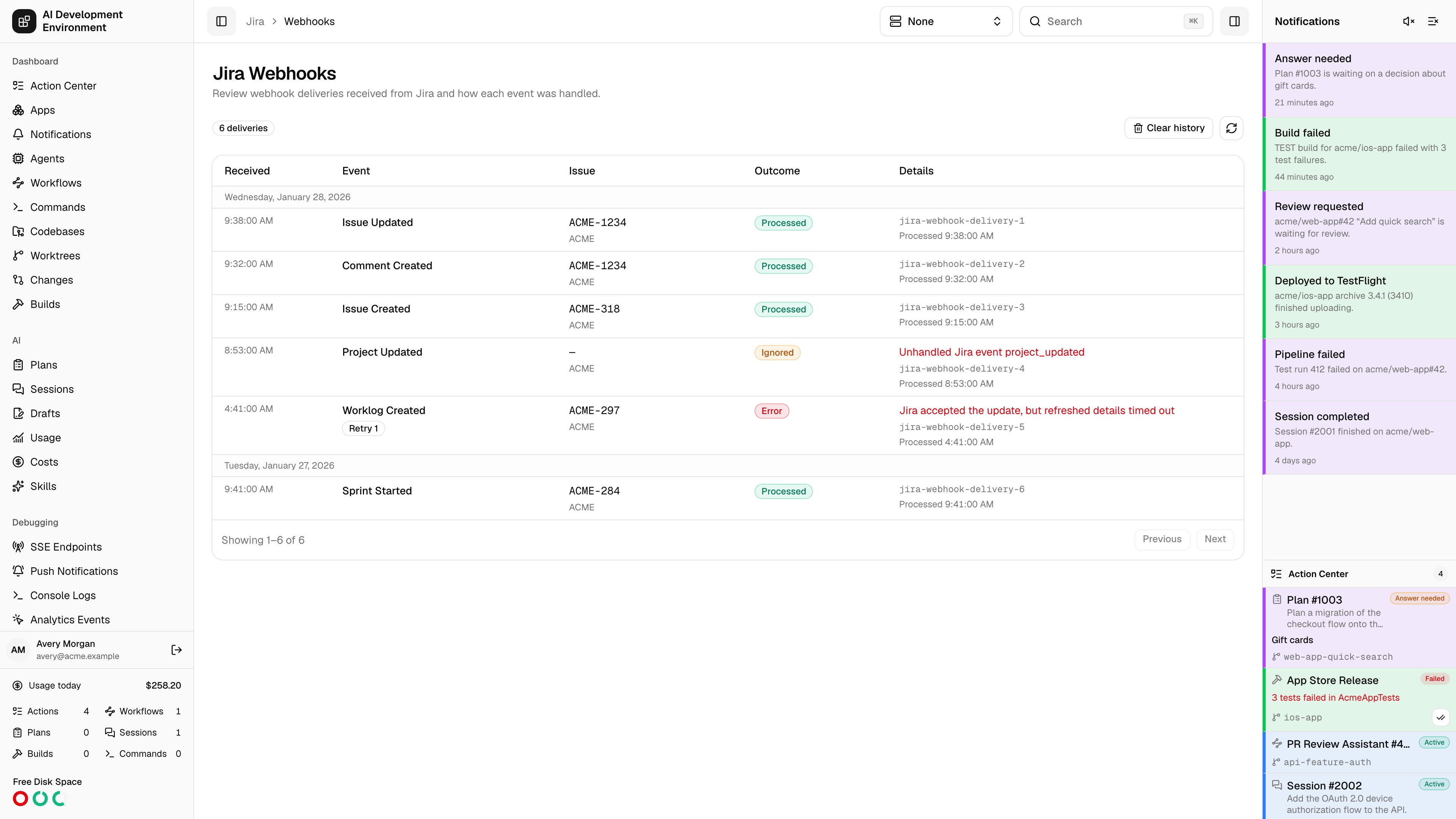
/jira/webhooks reviews webhook deliveries received from Jira and how each event was processed.
The webhook is optional. Without it, Jira triggers only fire when something already fetched a ticket — a page load, a query, or a workflow step. With it, Jira pushes changes as they happen, so workflows start on their own and Jira pages update live.
Using the page
Deliveries are listed newest first, 50 per page. New ones appear at the top of the first page without a refresh.
Clear history empties the list; new deliveries keep arriving afterwards.
Outcomes
Setting up the webhook
The Jira webhook card in Settings registers the webhook for you, using the same API token as every other Jira call.1
Check the webhook URL
Choose Local, Remote, or configured Proxy. Edit addresses in Settings →
Server URLs. The URL must use publicly
trusted HTTPS; HTTP, private, and loopback addresses are rejected before
registration.
2
Scope it with JQL
Set a filter such as
project in (ABC, XYZ) so only the projects you
automate send deliveries. Each issue-mutating delivery costs one Jira API
call to refresh the ticket, so keep the filter tight. Leave it empty to
receive every issue event.3
Register in Jira
Register in Jira creates the webhook, subscribes it to the events below,
and stores the signing secret on both sides. Selecting a different address
or editing the filter and registering again updates the same webhook rather
than creating a second one.
jira:issue_created, jira:issue_updated, jira:issue_deleted, comment_created, worklog_created, attachment_created, issuelink_created, sprint_started, and sprint_closed.
Adding the webhook by hand
If the token’s account is not a Jira admin, Generate secret mints a signing secret without touching Jira.1
Generate a signing secret
Click Generate secret and copy the webhook URL and the secret. The
secret is shown once and is never returned again.
2
Create the webhook in Jira
In Jira, go to Settings → System → WebHooks and choose Create a
WebHook. Paste the URL into URL and the secret into Secret.
3
Select the events and scope
Subscribe to the nine events listed above and set the same kind of JQL
filter.
Workflow triggers
The webhook drives the existing Jira triggers — status changed, label set, assigned to me, comment added, ticket updated, worklog added, sprint started, sprint ended — without waiting for a fetch. It also enables five triggers that only a webhook can produce:
Ticket comment command is the only Jira trigger that lets outside text start a workflow, so it is deliberately strict: publishing fails unless the trigger has an explicit list of Jira account IDs and a pattern anchored with
^ and $. Copy account IDs from the user’s Jira profile URL — Jira has no stable handle.
Ticket update changelog
Forjira:issue_updated, the app reads Jira’s changelog before it refreshes the cached ticket. The changelog identifies the specialized trigger observations that are relevant to the delivery:
- A
statuschange updates Ticket status changed. - A
labelorlabelschange updates Jira label set. - An
assigneechange updates Ticket assigned to me when the ticket is now assigned to the configured Jira account. - A
sprintchange updates Sprint started and Sprint ended. - Every issue update updates Jira ticket updated, including updates to fields without a specialized trigger.
changelog.id and changelog.items. Each item includes field, fieldId, and fieldType, plus the raw from and to values and the human-readable fromString and toString values. Use the string values when you need the names shown in Jira. Use the raw values when automation needs stable Jira identifiers.
Notes
- This page appears only when the Jira webhook is configured in Settings.
- Deliveries arrive at
/api/public/jira/webhookand are rejected unless signed with the stored secret. - Jira identifies each delivery with
X-Atlassian-Webhook-Identifier, which stays the same across retries. A retry of a delivery that already finished is recorded as a duplicate and does no work; a retry of one that failed is processed again. - Rotating the secret invalidates the old one immediately. A registered webhook is updated in Jira at the same time; a hand-made one has to be updated in Jira before the next delivery.
- Disable webhook removes a registered webhook from Jira as well. A webhook someone already deleted there is treated as disabled.
- Removing your Jira credentials, or changing the Jira site, also clears the webhook secret and its delivery history.
- Deliveries and their stored changelogs older than 30 days are pruned automatically.
Related pages
Jira Tickets
The boards and queries that update live when deliveries arrive.
Workflows
The triggers these deliveries fire.