

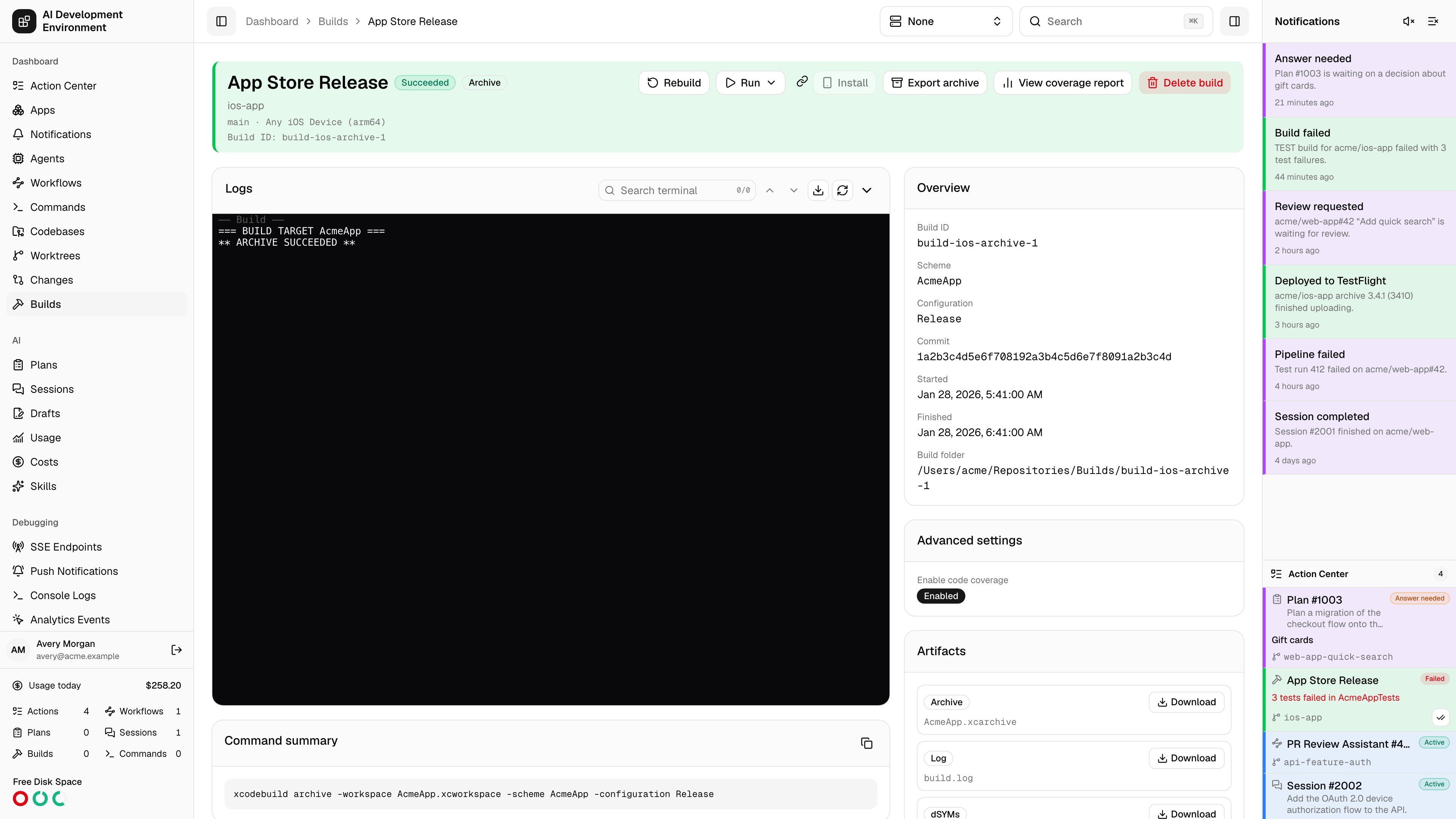
/dashboard/builds/{id} covers one immutable build from end to end: what was run, what it printed, what it produced, whether the tests passed, and how to get it onto a device.
Header actions
An Out of date badge appears when the worktree has moved on since this build was made. Select it for a Rebuild menu; the current surface refreshes and shows any queuing error. The header shows Custom or the captured configuration name, with a link when the saved configuration still exists.
Rebuild stays on this build. After the replacement is queued, an inline success notice offers an explicit link to the new build. Run uses the shared detailed device picker: checkbox multi-selection, per-device quick play, platform and OS details, live availability, Select All, Clear, and Run Selected.
The picker starts on the build agent and can switch to another eligible Mac. Cross-agent deployments show their target agent and transfer state in Runs and exports. While the app package moves through the relay, Build Details reports upload/download progress; checksum, compatibility, disk-space, extraction, signing, installation, and launch failures remain attached to that deployment with an actionable message.
Overview
The scheme, action, destination, commit, build ID, start and finish times, duration, and the build folder path on the agent. The Command summary shows the exactxcodebuild invocation, with Copy command summary to reproduce it by hand. Advanced settings captured at build time are listed too; older builds may report that advanced settings were not captured.
An Install button appears immediately after Run when the build contains an IPA. It uses the newest eligible IPA and keeps the same HTTPS, export-method, and metadata checks as artifact installation. On unsupported browser devices, select the disabled-looking button for “Open this page on an iPhone or iPad to install.” Copied installation links always open this build’s page.
Logs
Logs open at the newest page and follow new output while you remain at the bottom. Scroll upward to fetch preceding pages. Earlier chunks are inserted in chronological order while preserving your reading position; duplicate and late chunks are reconciled in place. Loading and retry feedback appears above the terminal. Return to the bottom or select Follow output to resume tailing. The native app loads log history separately from build-detail refreshes. Live streaming output with the same terminal controls used elsewhere in the app:- Follow output pins the view to the newest line.
- Search terminal with previous and next match navigation.
- Fit terminal, View raw output, and scroll to top or bottom.
- Expand logs / Collapse logs for a full-height view.
Script executions
The Scripts section lists the captured script name, phase, status, and any error for each hook. If no scripts were selected, it shows an empty state. The native Build Details screen also lists script execution outcomes.
A skipped pre-build hook can remain
PENDING because no execution result was produced. Post-build hooks still run after Xcode preflight failures, pre-build failures, and cancellation once the agent reaches the build’s cleanup phase.
GraphQL Build.scriptExecutions also exposes position, nameSnapshot, sourceSnapshot, timeoutSeconds, failureBehavior, exitCode, durationMs, causedBuildFailure, outputRelativePath, and error. A failed hook does not necessarily mean a failed build: Continue with a warning records the failure while allowing execution to proceed. See Build script execution and failures for ordering, timeout, and cancellation rules.
Artifacts
Everything the build captured — the archive, the runnable app, test products, thexctestrun, the result bundle, and the dSYMs — each with a Download. Choose a shared Local, Remote, or configured Proxy address before downloading. The server produces a signed link for that address, so a different hostname does not require your browser cookie. Download links expire after six hours; treat a shared signed link as access to the artifact. The native artifact link sheet offers copy, share, and download actions.
When the build kept its dSYMs, a dSYMs artifact holds them as dSYMs.zip with the number of bundles, and View dSYMs opens the dSYMs table filtered to this build. After a successful build the control plane imports that zip automatically, so crashes from this build can be symbolicated. Collect dSYMs in the advanced settings decides whether a build keeps them; archives do by default.
Test results
Parse test results reads the result bundle and produces a test report. If parsing fails, Retry test parsing runs it again. Once parsed you get totals — tests, passed, failed, skipped — and a browsable tree grouped by suite and file, with per-suite pass rates. Filter to All, Passed, Failed, or Skipped. Tests without a suite or without a file are grouped separately.Coverage
Generate coverage report builds the coverage report for this build; View coverage report opens it. See Build coverage report.Exporting an archive
Export archive writes the captured.xcarchive out locally as an IPA.
Choose a distribution method
Debugging, Release Testing, Enterprise, or App Store Connect.
Select the team and signing
Pick a development team from those installed on the build agent, then a signing certificate — chosen automatically or named explicitly. Parse project reads the scheme’s signable targets and matches installed provisioning profiles, giving you one profile selector per app and extension.Toggle between Show matching and Show all profiles, and add a bundle identifier by hand if parsing missed one. Expired profiles and profiles that may not match a bundle are flagged.
Set export options
Upload symbols, manage app version and build number, internal TestFlight only, strip Swift symbols, app thinning, iCloud container environment, and a distribution bundle identifier — as applicable to the chosen method.
Exports are written locally as an IPA. These settings never upload to App
Store Connect.
Installing over the air
Install serves the exported IPA for direct installation. Choose Local, Remote, or configured Proxy using the address picker; Copy install link includes that choice in the build page URL. The OTA manifest resolvesserverUrlKind against shared settings and signs the package URL at the same address. The page reports the bundle identifier and version being installed.
Requirements and limits:
Runs and exports
A record of every time this build has been run on a device or exported, so a single build’s distribution history stays in one place. Device deployments identify the target agent as well as the destination, which prevents identical simulator or device identifiers on different Macs from being conflated.Related pages
Builds
Build history and the reusable build script library.
Devices
Enrolled iPhones and iPads that builds can be installed on.